10
LC-22AD1E
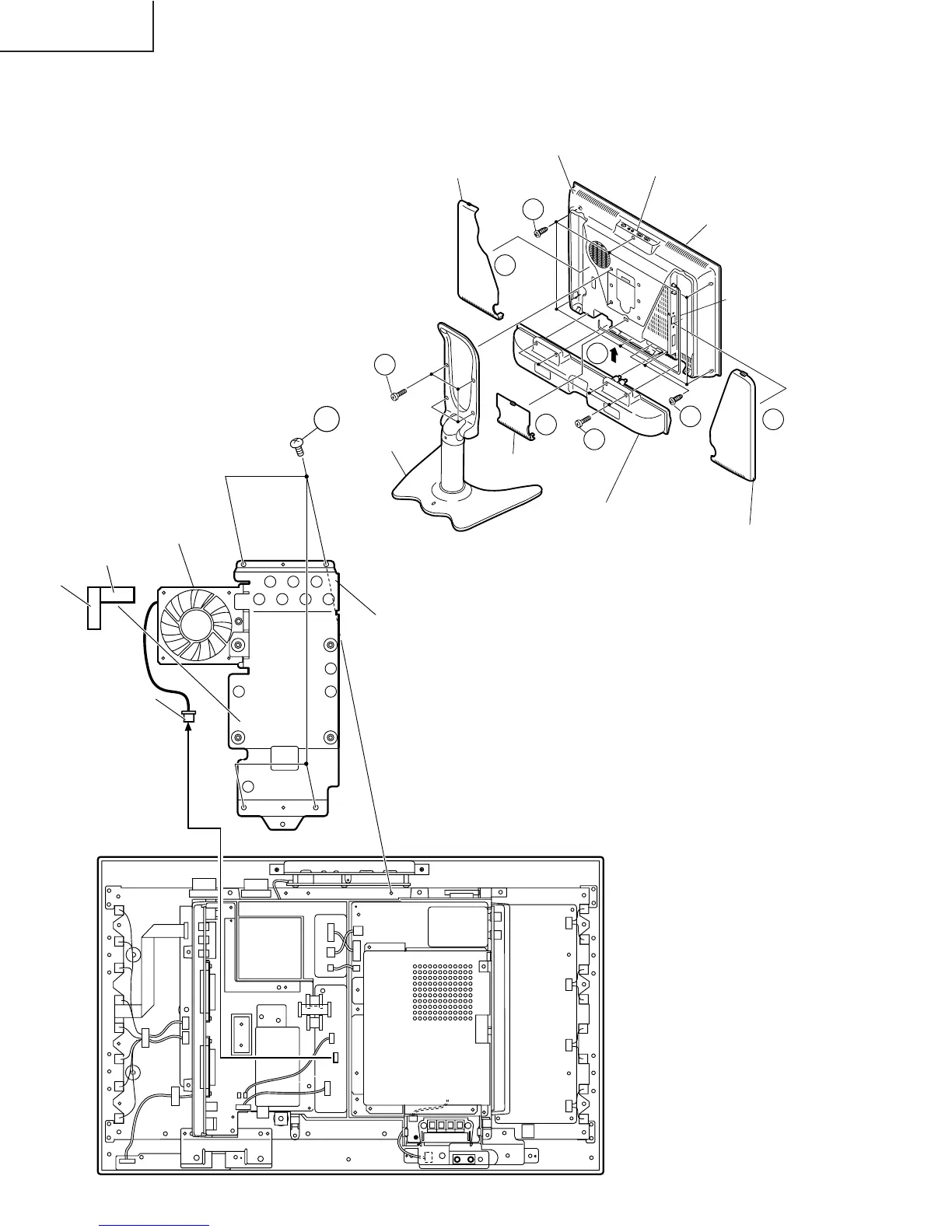
REMOVING OF MAJOR PARTS
1. Remove the 4 stand fixing screws to detach
the stand.
2. Remove the terminal covers (R), (L) and (C).
3. Remove the 2 terminal fixing screws.
4. Remove the 4 speaker fixing screws to detach
the speaker.
5. Remove the 6 cabinet B fixing screws.
6. Open in the direction of the arrow and detach
the cabinet B.
7. Remove the 4 stand reinforcement angle fixing
screws. Remove the connector (MF) to detach
the stand reinforcement angle.
1
3
6
2
2
2
5
4
Terminal Cover (R)
Stand
Cabnet B
Control Panel (Top Cover)
Cabnet A
Terminal Cover (L)
Terminal Cover (C)
Speaker
Remove the antenna cable
Stand Reinforcement Angle
7
P3705
Fan
Shield Tape
Tape
Connector(MF)






 To Next Page