LC-26SA1E/RU, LC-32SA1E/RU
5 – 15
5. PAL signal & tuner adjustment
6. PAL Signal & Tuner Adjustment (SMPTE RF SIGNAL-Alternative Method)
7. ADC adjustment (Component 15K)
Adjustment point Adjustment Conditions Adjustment procedure
1 Setting [Signal]
PAL
Full Field Color Bar
Composite or RF signal
[Terminal]
EXT3 VIDEO IN
TUNER
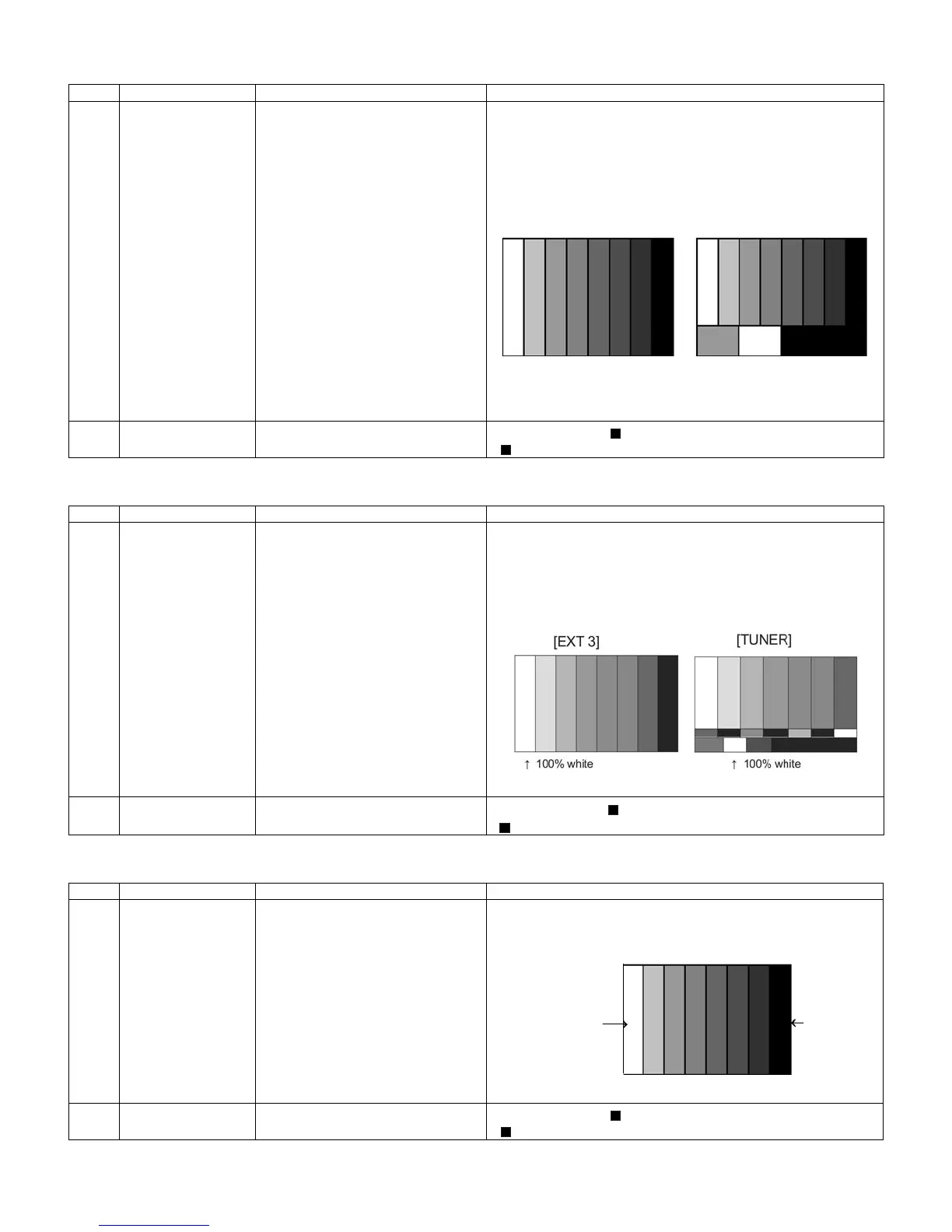
•Feed the PAL full field colour bar signal (75% colour saturation) to
EXT3 VIDEO IN.
•Feed the RF signal (PAL colour bar) to TUNER.
•Make sure the PAL colour bar pattern has the sync level of 7:3 with
the picture level.
2 Auto adjustment
performance
Adjustment process
Page3
Bring the cursor on [ PAL + TUNER ADJ] and press [OK]
[ PAL + TUNER ADJ OK] appears when finished.
Adjustment point Adjustment Conditions Adjustment procedure
1 Setting [Signal]
PAL
Full Field Color Bar
Composite or RF SMPTE signal
[Terminal]
EXT3 VIDEO IN
TUNER
•Feed the PAL full field color bar signal (75% color saturation) to EXT3
VIDEO IN
•Feed the RF signal SMPTE color bar (E-12) to TUNER.
•Make sure the SMPTE color bar pattern (E-12) has the sync level of
7:3 with the picture level.
2 Auto adjustment
performance
Adjustment process
Page6
Bring the cursor on [ PAL +TUNER ADJ] and press [OK].
[ PAL+ TUNER ADJ OK] appears when finished.
Adjustment point Adjustment Conditions Adjustment procedure
1 Setting [Signal]
COMP15K, 50Hz
100% Full Field Colour Bar
[Terminal]
EXT4 COMPONENT IN
•Feed the COMPONENT 15K 100% full field colour bar signal (100%
colour saturation) to EXT4 COMPONENT IN.
2 Auto adjustment
performance
Adjustment process
Page4
Bring the cursor on [ COMP15K ADJ] and press [OK]
[ COMP15K ADJ OK] appears when finished.
㸡100% white
㪲VIDEO IN SIGNAL]
㸡100% white
[RF Signal]
100% white
Black





 To Next Page