LC-40/46LE810E, LC-40/46LX810E
4 – 8
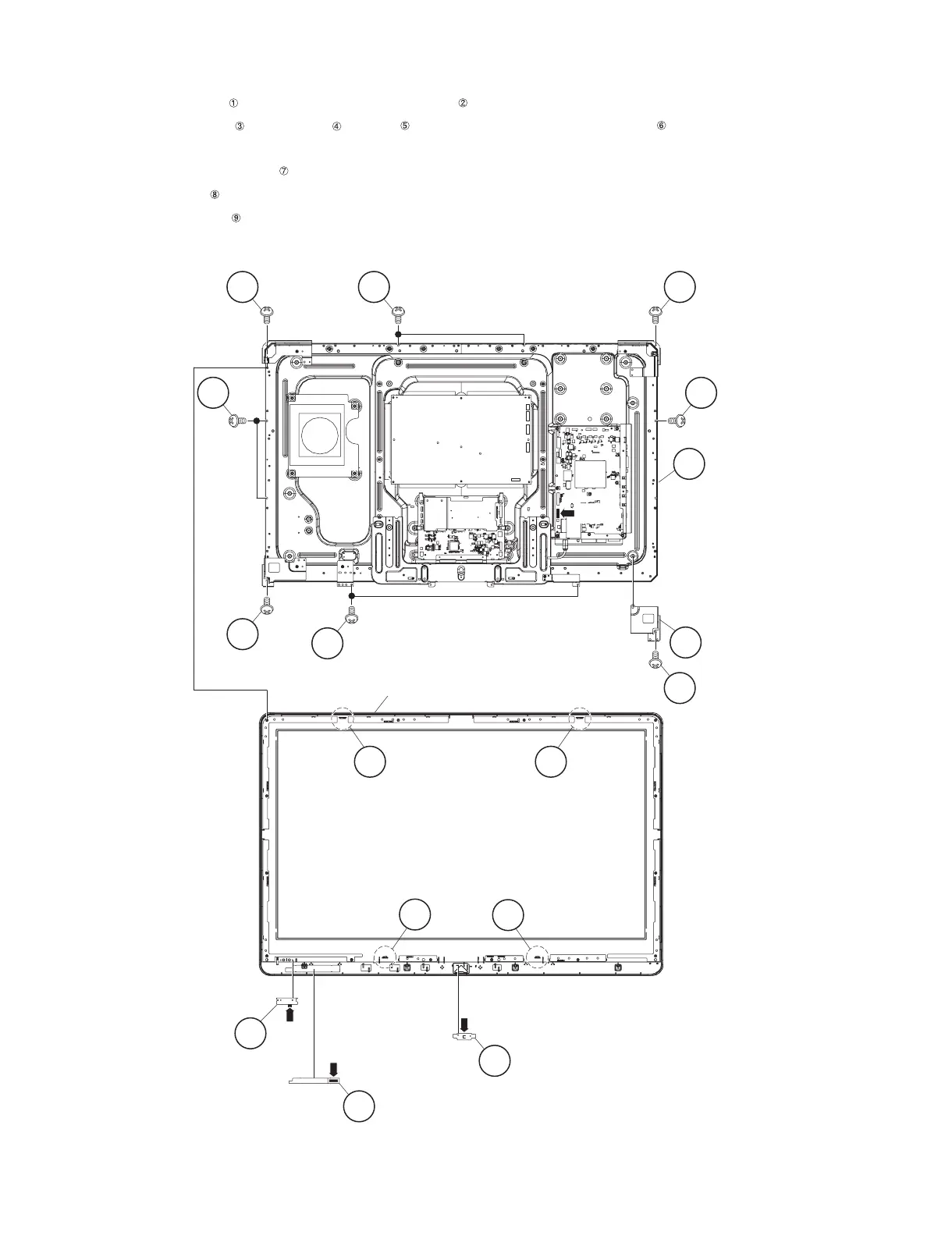
3. Removing of 46” LCD Panel Module Unit, TOUCH SENSOR Unit, ICON Unit, R/C, LED Unit, Front Cabinet
Ass’y.
1. Remove the 1 lock screw and detach the LCD Angle (Bottom-R) .
2. Remove the 5 lock screws , 5 lock screws , 4 Hooks and detach the 46” LCD Panel Module Unit .
3. Disconnect RA wire.
4. Detach the TOUCH SENSOR Unit . (RK)
5. Detach the ICON Unit . (RI)
6. Detach the R/C, LED Unit . (RA)
NOTE: The TOUCH SENSOR Unit removed once is not reusable.
8 ICON Unit
9
R/C, LED Unit
7 TOUCH SENSOR Unit
6
46" LCD Panel
Module Unit
4
4
4
33
1
5 5
5
5
2
LCD Angle
(Bottom-R)
3
3
Front Cabinet Ass'y
[RA]
[RI]
[RK]
[RA]



 To Next Page