LC-40/46/52/60LE820UN
4 – 9
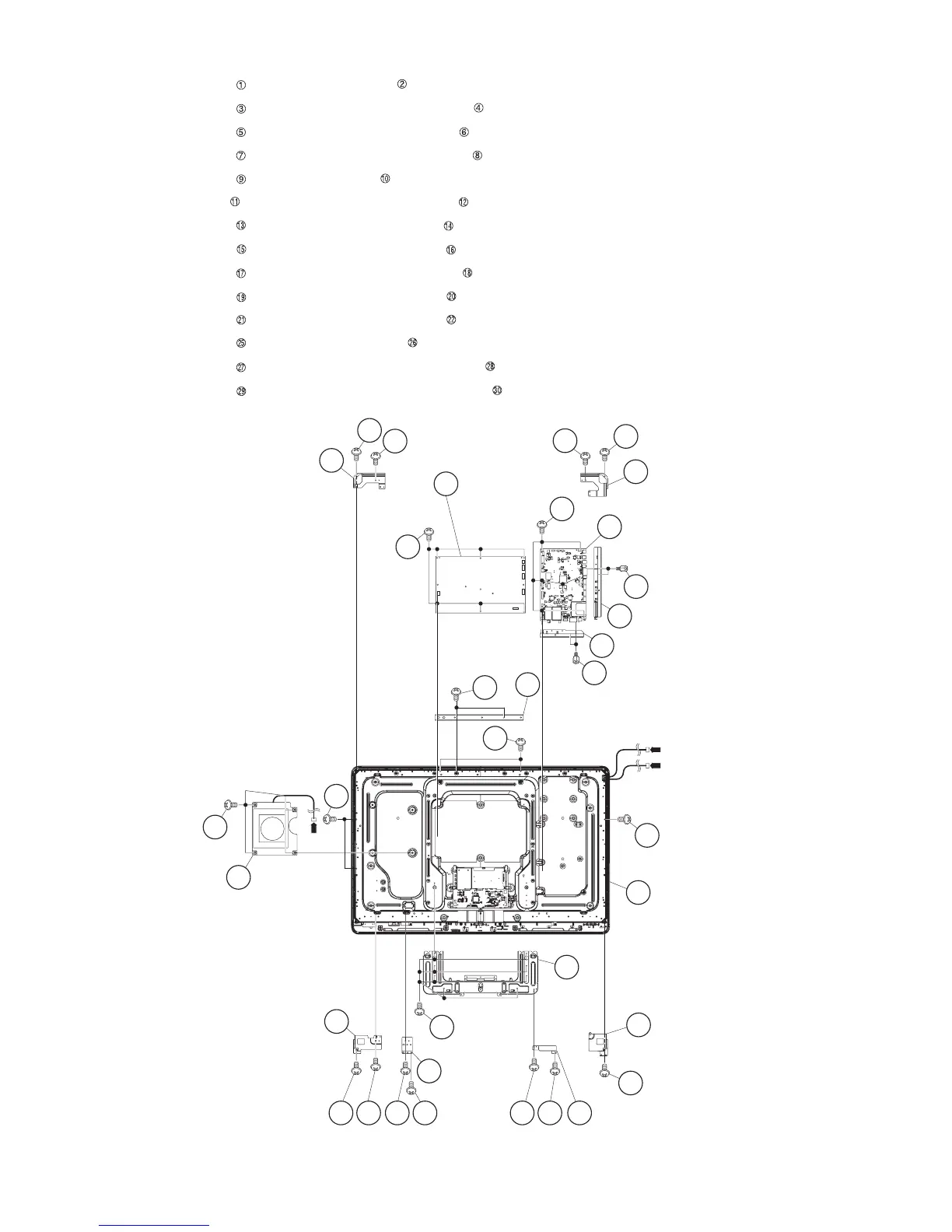
4. Removing of MAIN Unit, POWER/LED Drive Unit, Woofer, Stand Angle, 46” LCD Panel Module Unit.
1. Remove the 7 lock screws and detach the MAIN Unit .
2. Remove the 2 lock screws and detach the Terminal Angle (Bottom) .
3. Remove the 2 lock screws and detach the Terminal Angle (Side) .
4. Remove the 6 lock screws and detach the POWER/LED Drive Unit .
5. Remove the 4 lock screws and detach the Woofer .
6. Remove the 1 lock screw and detach the LCD Angle (Bottom-R) .
7. Remove the 2 lock screws and detach the LCD Angle (Top-L) .
8. Remove the 2 lock screws and detach the LCD Angle (Top-R) .
9. Remove the 2 lock screws and detach the LCD Angle (Bottom-L) .
10.Remove the 2 lock screws and detach the LCD Angle (B-C-A) .
11.Remove the 2 lock screws and detach the LCD Angle (B-C-B) .
12.Remove the 8 lock screws and detach the Stand Angle .
13.Remove the 2 lock screws and detach the BL Chassis Support Angle .
14.Remove the 5 lock screws and detach the 46” LCD Panel Module Unit .
46" LCD Panel
Module Unit
[L1]
[L2]
25
26
Stand
Angle
22 LCD Angle
(B-C-B)
12
11
LCD Angle
(Bottom-R)
19 19 21 21
20 LCD Angle
(B-C-A)
18
1717
LCD Angle
(Bottom-L)
9
10
Woofer
[SB]
5
3
29
30
4
TERMINAL Angle
(Bottom)
BL Chassis
Support Angle
6
TERMINAL Angle
(Side)
2 MAIN Unit
1
29
8
POWER/LED
Drive Unit
7
16 LCD Angle
(Top-R)
15
15
29
27
28
14LCD Angle
(Top-L)
13
13



 To Next Page