LC-46D82U/LC-52D82U
4 – 14
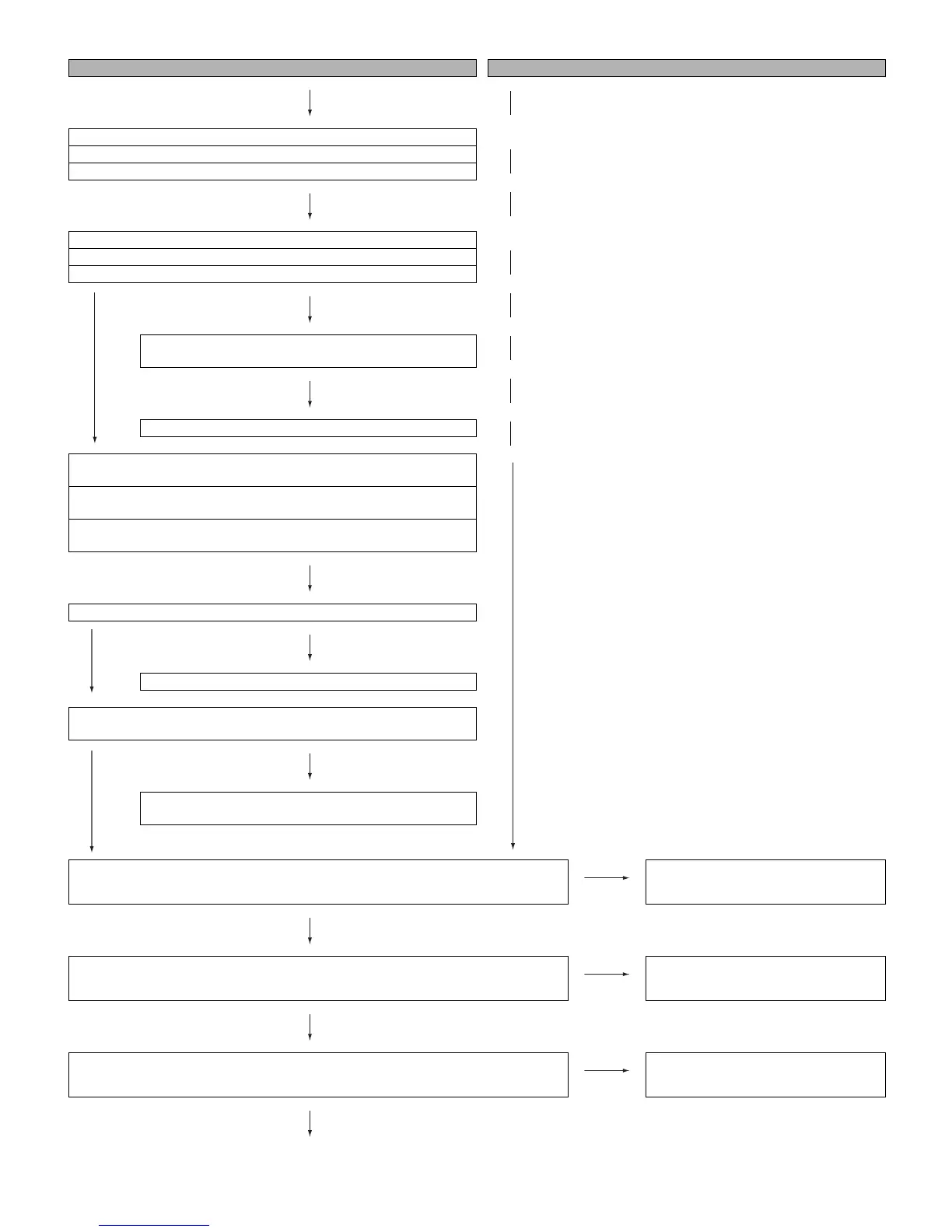
[with HDMI connected] No audio (2) No audio in all modes (3)
YES
[Audio signal] [INPUT-4] No audio (HDMI connected)
[Audio signal] [INPUT-5] No audio (HDMI connected)
[Audio signal] [INPUT-6] No audio (HDMI connected)
[INPUT-4 input] Is INPUT-4 selected on the input select menu screen?
[INPUT-5 input] Is INPUT-5 selected on the input select menu screen?
[INPUT-6 input] Is INPUT-6 selected on the input select menu screen?
YES
NO
Is the audio output selected for “VARIABLE” on the menu
screen?
YES
Set the audio output to “FIXED”
[INPUT-4] If no video appears, refer to “No external input video (HDMI)
[INPUT-4]”
[INPUT-5] If no video appears, refer to “No external input video (HDMI)
[INPUT-5]”
[INPUT-6] If no video appears, refer to “No external input video (HDMI)
[INPUT-6]”
YES
Is the SII9011_MUTE line as specified?
YES
NO
Check Q1301, IC1303 and their peripheral circuits.
Does the HDMI_SPDIF signal come from pins (78) of IC1510 to pin (2)
of IC1404 (CODEC)?
YES
NO
Check the line between IC1510 and IC1404 and their
peripheral circuit.
Is there the audio signal output at pins (38) (L) and (39) (R) of IC1404?
NO
Check IC1404 and its peripheral circuits.
YES
Is there the audio signal output at pins (11) (L) and (14) (R) of connector (SC1301) on the
MAIN unit?
NO
Check the line between IC1404 and
SC1301.
YES
Is there the audio signal input at pins (11) (L) and (14) (R) of connector (P2704) on the
TERMINAL unit?
NO
Check the SC1301 and P2704 connec-
tors.
YES



 To Next Page