Part Names
[] LE857U, LE757U,
LE755U, LE657U
and LE655U modeNs
_re
13
[] LE750U, LE650U,
07500U and
06500U modems
AAL
13
27
17--
28
29
-- 30
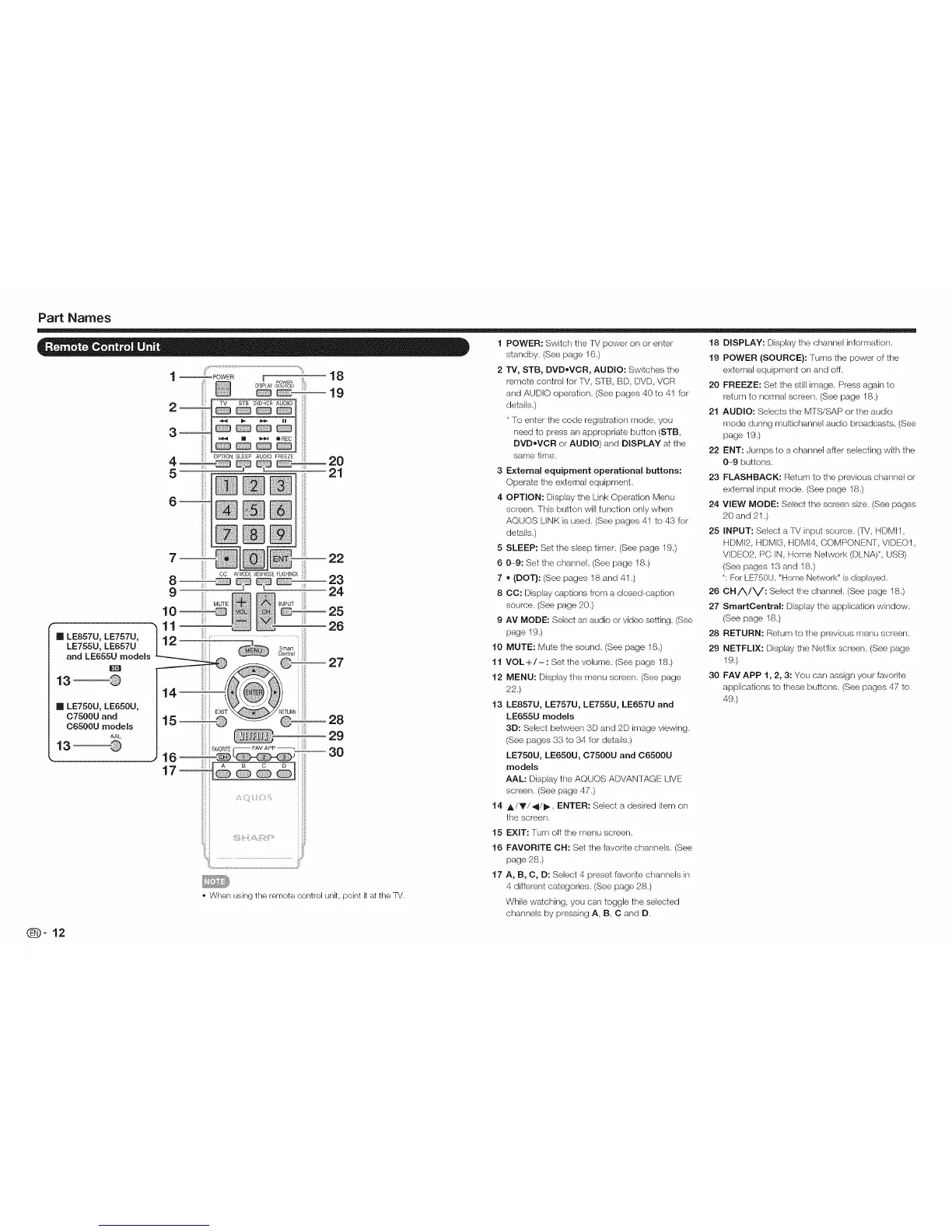
• When using the remote control unk, point k at the TV.
1 POWER: Switch the TM power on or enter
standby. (See page 16.)
2 TV, STB, DVD,bVOR, AUDIO: Switches the
remote controJ for TM, STB, BD, DVD, VCR
and AUDIO operation. (See pages 40 to 41 for
details.)
* To enter the code registration mode, you
need to press an appropriale button (STB,
DVDoVCR or AUDIO) and DISPLAY at the
same time.
3 External equipment operational buttons:
Operate the external equipment.
4 OPTION: Display the Link Operation Menu
screen. This button will function only when
AQUOS LINK is used. (See pages 41 to 43 for
details.)
5 SLEEP: Set the sleep timer. (See page 19.)
6 0-9: Set the channel. (See page 18.)
7 ,D(DOT}: (See pages 18 and 41 .)
8 CC: Display captions from a closed-caption
source. (See page 20.)
9 AV MODE: Select an audio or video setting. (See
page 19.)
MUTE: Mute the sound. (See page 18.)
VOL +/-: Set the volume. (See page 18.)
MENU: Display the menu screen. (See page
22.)
LE857U, LE757U, LE755U, LE657U and
LE655U modems
3D: Select between 3D and 2D image viewing.
(See pages 33 to 34 for details.)
LE750U, LE650U, 07500U and 06500U
models
AAL: Display the AQUOS ADVAN TAGE LIVE
screen. (See page 47.)
A/Y/4/_, ENTER: Select a desired item on
the screen.
EXIT: Turn off the menu screen.
FAVORITE CH: Set the favorite channels. (See
page 28.)
A, B, C, D: Select 4 preset favorite channels in
4 different categories. (See page 28.)
While watching, you can toggle the selected
channels by pressing A, B, C and D.
10
11
12
13
14
15
16
17
18 DISPLAY: Display the channel information.
19 POWER (SOURCE): Turns the power of the
external equipment on and off.
20 FREEZE: Set the still image. Press again to
return to normal screen. (See page 18.)
21 AUDIO: Selects the MTS/SAP or the audio
mode during multichannel audio broadcasts. (See
page 19.)
22 ENT: Jumps to a channel after selecting with the
0---9 buttons.
23 FLASHBACK: Return to the previous channel or
external input mode. (See page 18.)
24 VIEW MODE: Select the screen size. (See pages
20 and 21 .)
25 INPUT: Select a TV input source. (TV, HDMI1,
HDMI2, HDMI3, HDMI4, COMPONENT, VIDEO1,
VDEO2, PC IN, Home Network (DLNA)*, USB)
(See pages 13 and 18.)
*: For LE750U, "Home Network" is displayed.
26 CH/X./V: Select the channel. (See page 18.)
27 SmartCentral: Display the application window.
(See page 18.)
28 RETURN: Return to the previous menu screen.
29 NETFLIX: Display the Netflix screen. (See page
19.)
30 FAY APP 1, 2, 3: You can assign your favorite
applications to these buttons. (See pages 47 to
49.)
_-12




 To Next Page