LC-60/70LE650U/C6500U/LE657U,LC-60/70LE755U/LE757U/LE857U/C7500U
4 – 5
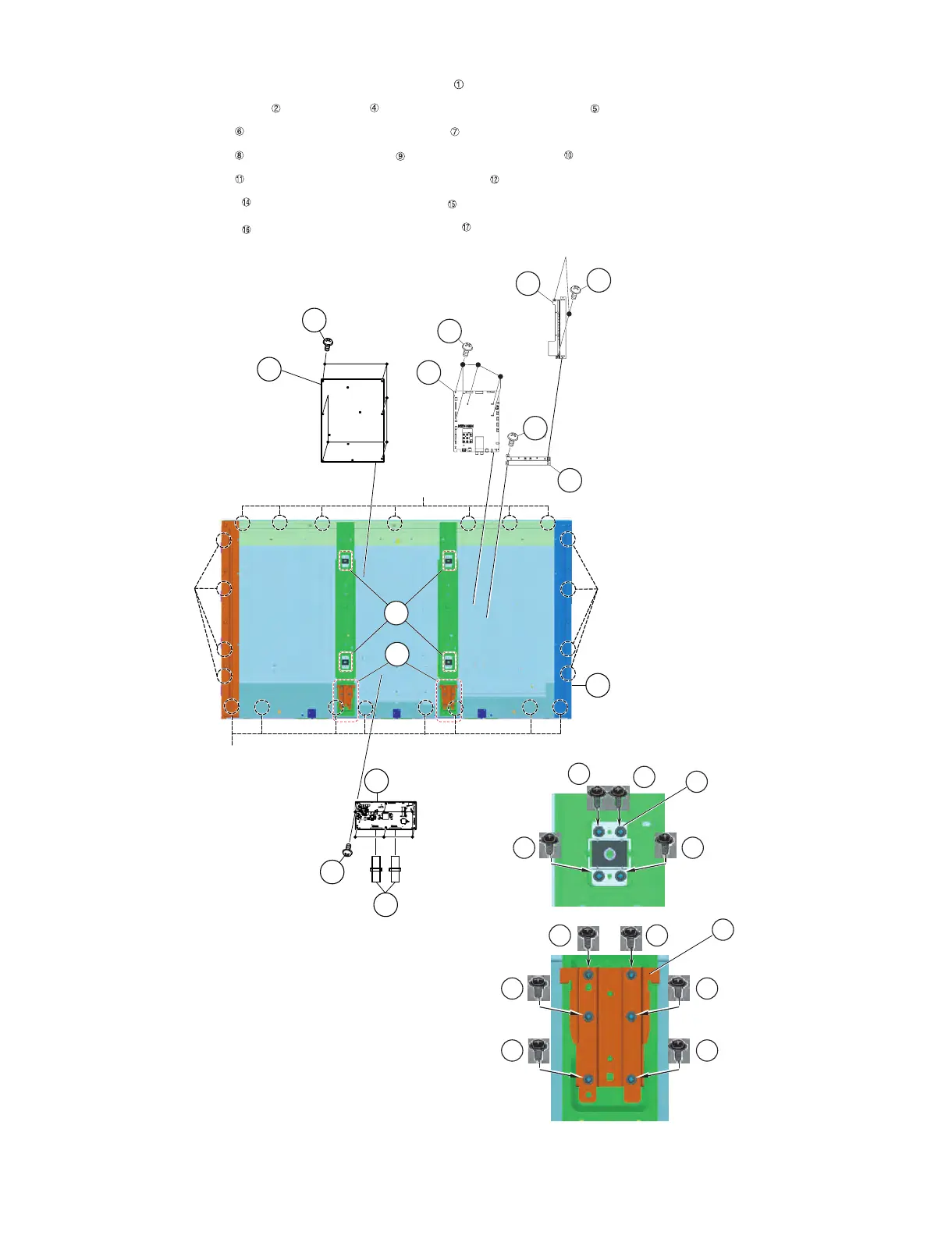
4. Removing of 60” LCD Panel Module Unit, LCD CONTROL Unit, MAIN Unit, POWER/LED DRIVER Unit.
1. Remove the 23 Hooks and detach the 60” LCD Panel Module Unit .
2. Remove the 2 Connecting Cords , 6 lock screws and detach the LCD CONTROL Unit .
3. Remove the 2 lock screws and detach the Terminal Angle Side .
4. Remove the 6 lock screws and detach the MAIN Unit and Terminal Angle Bottom .
5. Remove the 6 lock screws and detach the POWER/LED DRIVER Unit .
6. Remove the 12 lock screws and detach the 2 Stand Fix Angle .
7. Remove the 16 lock screws and detach the 4 VESA Angle Ass’y .
䎔䎕
䎔䎔
䎘
䎗
䎕
䎯䎦䎧䎃䎦䎲䎱䎷䎵䎲䎯
䎃䎸䏑䏌䏗
䎦䏒䏑䏑䏈䏗䏌䏑䏊䎃䎦䏒䏕䏇
䎳䎲䎺䎨䎵䎒
䎯䎨䎧䎃䎧䎵䎬䎹䎨䎵
䎃䎸䏑䏌䏗
䎙䎓䎅䎯䎦䎧䎃䎳䏄䏑䏈䏏䎃䎰䏒䏇䏘䏏䏈䎃䎸䏑䏌䏗
䎹䎨䎶䎤䎃䎤䏑䏊䏏䏈䎃䎤䏖䏖䎊䏜
䎔
䎫䏒䏒䏎
䎫䏒䏒䏎
䎫䏒䏒䏎
䎫䏒䏒䏎
䎶䏗䏄䏑䏇䎃䎩䏌䏛䎃䎤䏑䏊䏏䏈
9
MAIN
Unit
7Terminal Angle Side
10
16
16
16 16
14
14 14
14
14
14
17
15
Terminal Angle
Bottom
8
6
8
17
15



 To Next Page
 Loading...