21
Web-site: www.sharp.co.uk/support Help Line: 08705 274277 (office hours)
Basic Operation
– Recording –
Recording : continued
Notes:
● Changing the volume level whilst recording does not af-
fect the recording.
● You cannot adjust the bass level whilst recording.
1 Press the REC button.
● Record pause mode is entered.
● The REC button does not light.
2 Begin playback on the stereo system con-
nected to this portable MD.
● To enable the record level to be set.
3 Move the right shuttle switch to
55
55
5
or
44
44
4
to adjust the recording level.
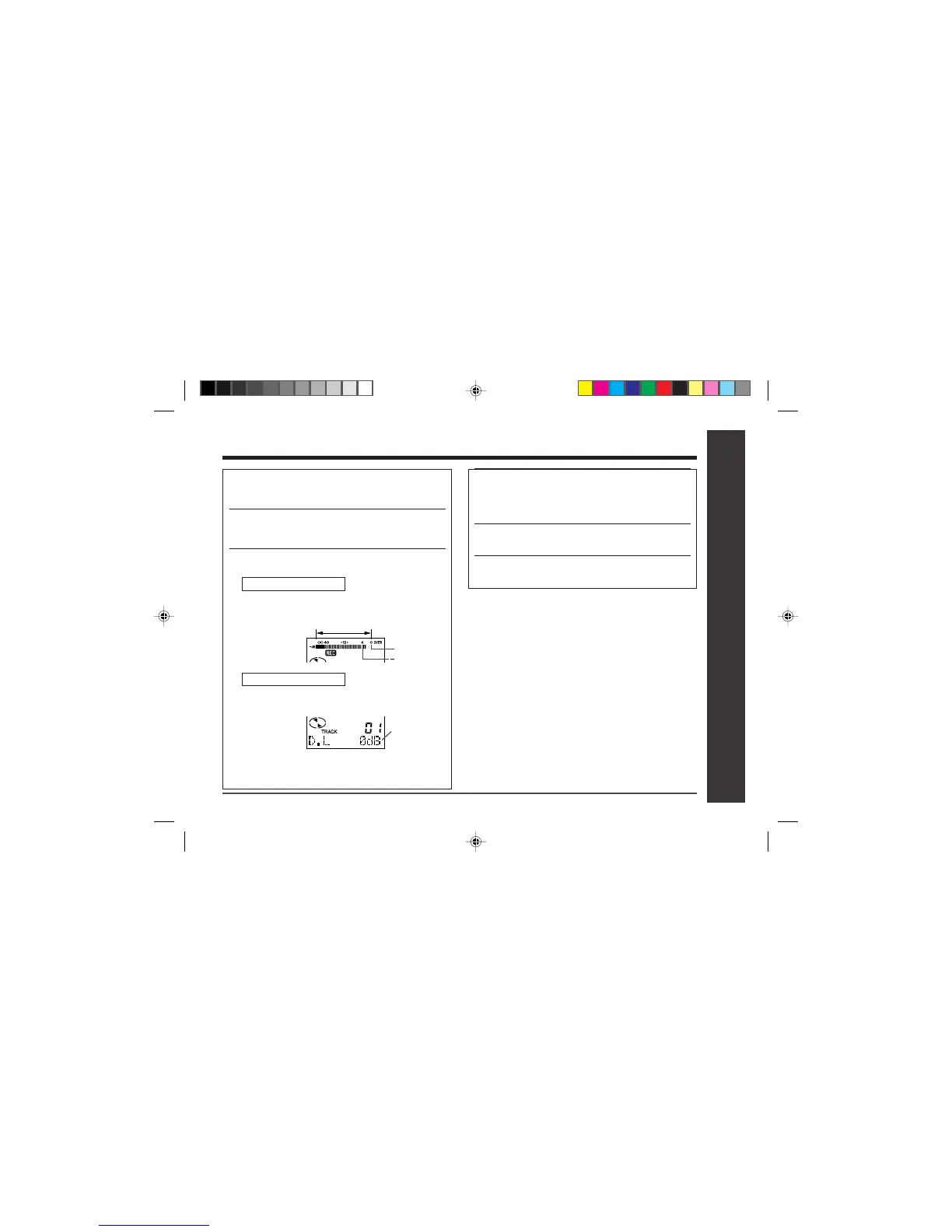
Analogue recording
● Adjust the recording level so that the maximum
sound volume from the source makes the read-
ing swing somewhere between –4 dB and 0 dB.
0dB
4dB
Digital recording
● You can adjust the level in 1 dB increments within
the range of +12 - –12dB.
● Once you adjust the digital recording level, the
setting remains even after the recording stops.
(For cancellation instructions, see page 38.)
4 Press the PAUSE button on the stereo sys-
tem to enter the playback pause mode at
the point you wish to start recording.
●
Here you can select the track to be recorded.
5 Press the
0606
0606
06 button to start the MiniDisc
unit recording.
6 Begin playback on the stereo system, the
output will be recorded.
Level meter indicator
+12 - –12dB


 To Next Page