45
Web-site: www.sharp.co.uk/support Help Line: 08705 274277 (office hours)
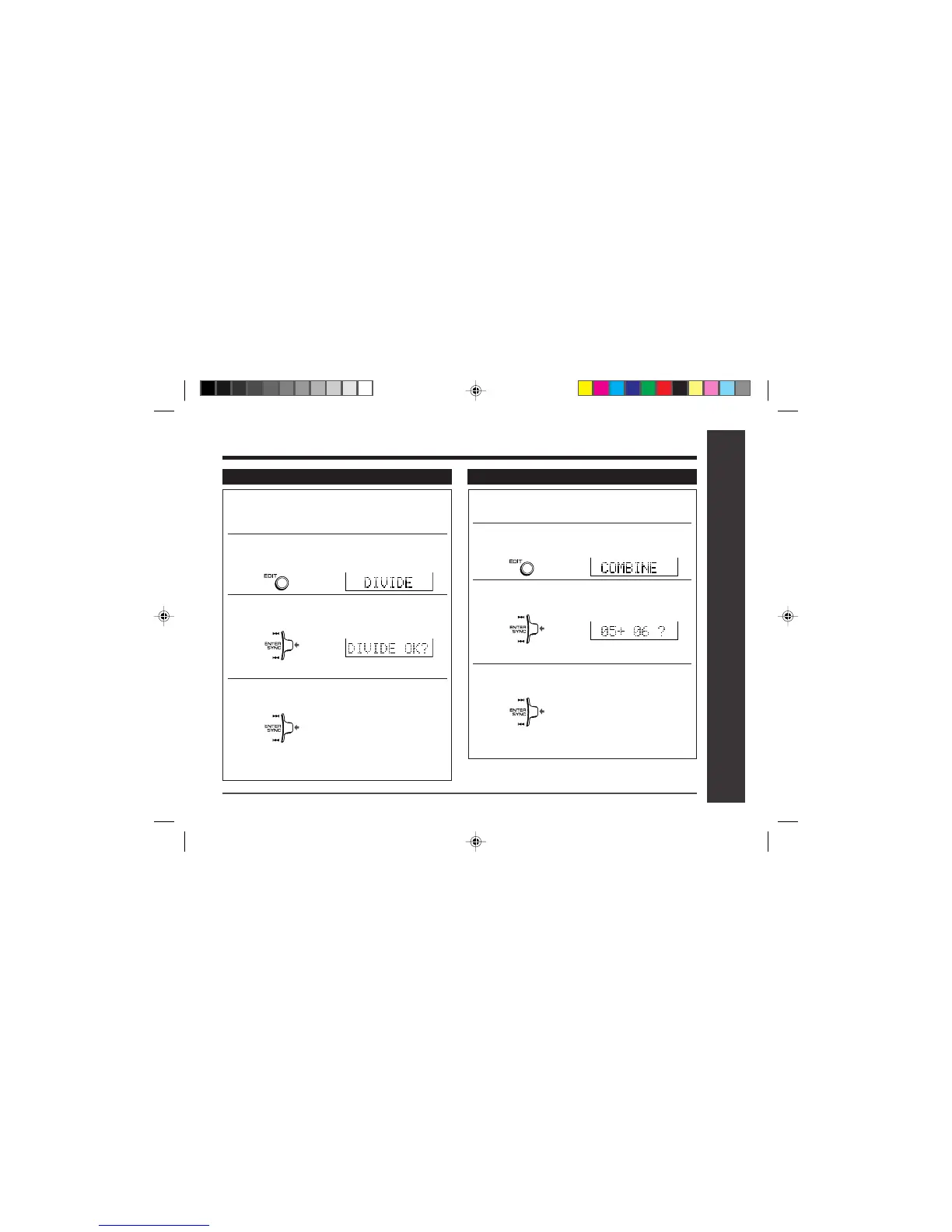
To divide a track
1Start playing the track to be divided into
two. Press the
0606
0606
06 button at the point where
you want to divide the track.
2
Press the EDIT button repeatedly to select
“DIVIDE”.
3Press the right shuttle switch toward
“ENTER/SYNC”.
●
T
o cancel the operation, press the • ■ / :OFF button.
4Press the right shuttle switch toward
“ENTER/SYNC” again.
●
T
he track will be divided into two tracks, and the
unit will pause at the beginning of the second of the
two new tracks.
Editing a recorded MiniDisc : continued
Advanced Features
– Editing a Recorded MiniDisc –
To combine tracks
1Start playing the last of the two tracks to
be combined, and press the
06 06
06 06
06 button.
2
Press the EDIT button repeatedly to select
“COMBINE”.
3Press the right shuttle switch toward
“ENTER/SYNC”.
●
T
o cancel the operation, press the • ■ / :OFF button.
4Press the right shuttle switch toward
“ENTER/SYNC” again.
●
T
he two tracks will be combined, and the unit will
be paused at the beginning of the combined track.


 To Next Page