27
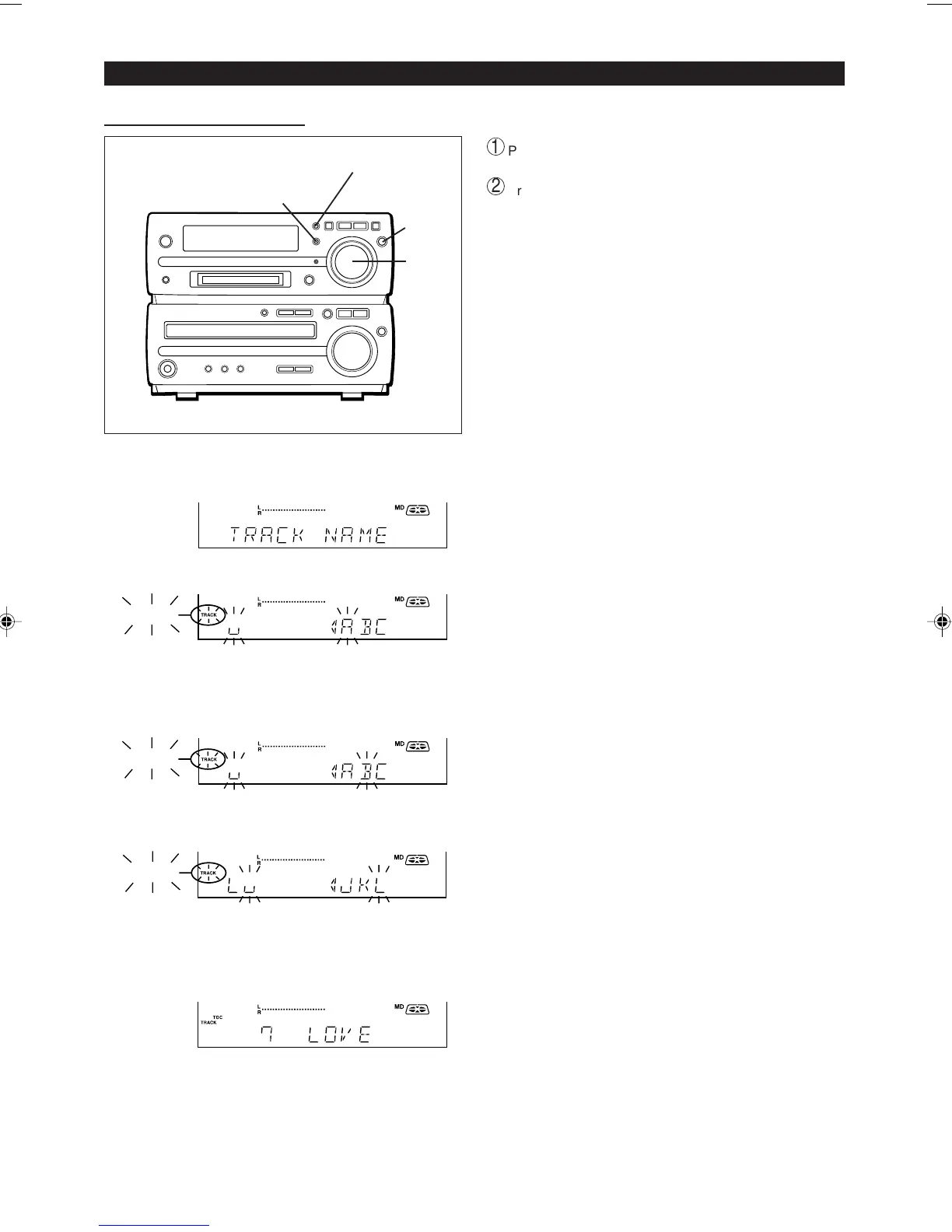
1 During playback or in the pause mode, press the
NAME/TOC EDIT button.
2 Within 10 seconds, press the MEMORY/ENTER button.
TRACK
● The unit will enter the character input mode.
● The track you are listening to will be played repeatedly.
3 Select the character you want using the jog dial.
TRACK
4 Press the MEMORY/ENTER button to enter the char-
acter.
TRACK
● Repeat steps 3 to 4 above to enter the characters in the
name.
5 After entering all of the characters in the name, press
the NAME/TOC EDIT button.
● The track name will be recorded.
● The unit will return to normal playback.
■ To create a track name
To erase a track name:
After performing steps 1 to 2.
1
Press the TIMER/DELETE button for 2 seconds or more.
● "NAME CLEAR" will flash.
2
Press the MEMORY/ENTER button.
Notes:
● Up to 40 characters can be entered.
● This function cannot be used in the random play mode and
APMS play mode.
● If you create a track name while recording the track, make
sure you finish entering the name before you finish record-
ing the track.
If the end of the recording is reached before you have en-
tered the complete name, only the characters entered be-
fore the recording ended will be recorded. To rename it,
see page 28.
(Continued)
1,5
TIMER/DELETE
2,4
3


 To Next Page