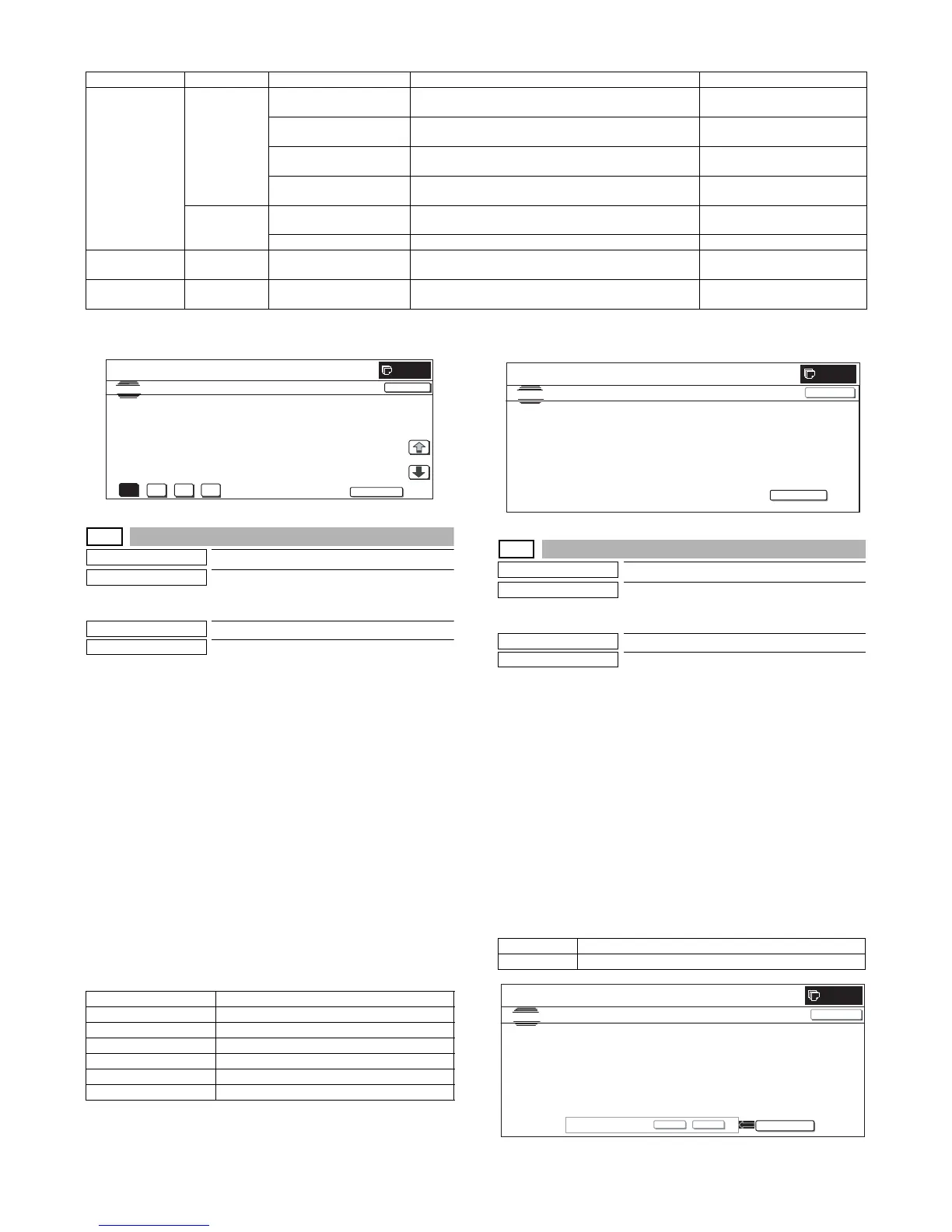
MX3500N SIMULATION 7 – 70
<Display item and content of each item>
* When the display item is not executed yet, “–––” is displayed. In case of an error, “ERR” is displayed.
* An error display is not made for the reference value and the correction value, and the previous value is displayed.
44-56
Purpose
Setting
Function (Purpose)
(This function is not used. Do not operate.)
Used to perform the forcible execution of 1
pixel half tone correction.
Section
Process
Item
Operation
Operation/Procedure
1) When the machine enters Simulation 44-56, the following
screen is displayed.
When [EXECUTE] button is pressed, the forcible execution of
1 pixel process control is started. (When [EXECUTE] button is
pressed during execution, the operation is interrupted.)
* In case of a sensor adjustment error, press [EXECUTE] but-
ton to resume the operation.
2) The display shifts to the normal completion screen or the error
screen automatically.
When [RESULT] button is pressed, the result screen is dis-
played.
* Select a color with [K] [C] [M] [Y] buttons. The data of the
selected color are displayed.
Only one color button can be selected. The selected button
is highlighted. (In the initial screen, black ([K]) is selected.)
* When [EXECUTE] button is pressed, the 1 pixel process
control correction value setting is performed again.
<Result display and content description>
44-57
Purpose
Data clear
Function (Purpose)
(This function is not used. Do not operate.)
Used to clear the correction value of 1 pixel
half tone correction.
Section
Process
Item
Data clear
Operation/Procedure
1) Press [EXECUTE] button.
[EXECUTE] button is highlighted, and [YES] and [NO] buttons
becomes active display.
2) Press [YES] button.
* The half tone correction value is cleared. [YES] button is
highlighted.
* When [NO] button or [EXECUTE] button is pressed, [EXE-
CUTE] button returns to the normal display, and [YES] and
[NO] buttons gray out.
* After completion of clearing the half tone correction value,
[EXECUTE] button returns to the normal display, and [YES]
and [NO] buttons gray out.
* The cleared data are saved to EEPROM and RAM.
<Half tone correction value clear item>
Category Page number Display item Content Display range
Approximation
result
1/2 [EX-LOW] EXTRA lowest density area approximation formula
coefficient
A: –10.000 to +10.000
B: –255.000 to +255.000
[LOW] Low density approximation formula coefficient A: –10.000 to +10.000
B, C:-255.000 to +255.000
[CONNECT] Approximation formula coefficient when connecting low
density and middle density
A: –10.000 to +10.000
B: –255.000 to +255.000
[MID] Middle density approximation formula coefficient A: –10.000 to +10.000
B, C: –255.000 to +255.000
2/2 [HIGH] High density approximation formula coefficient A: –10.000 to +10.000
B: –255.000 to +255.000
[CONNECT SENSOR] Sensor output at connecting point of each density area #1 to #4: 0 to 255
Reference
register value
1/1 [SENSOR_TARGET] Reference value registration value of each color and each
point of 1 pixel half tone correction
#1 to #15
Correction value 1/1 [S_VALUE] Correction value of each color and each point of 1 pixel
half tone correction
#1 to #15
Display Content
COMPLETE Normal completion
INTERRUPTION Forcible interruption
CL_SEN_ADJ_ERR Color sensor adjustment error
BK_SEN_ADJ_ERR Black sensor adjustment error
[YMCK] High density process control [YMCK] error
CONNECTION_ERR Connection error
K
M
Y
C
SIMULATION
NO.44
㧙
54
TEST
1PIXELHALFTONERESULTDISPLAY
CLOSE
[EX-LOW] A: 01.000 , B: 100.000
[LOW] A: -10.000 , B: -200.000 , C: 200.000
[CONNECT] A: 10.000 , B: -150.000
[MID] A: 05.000 , B: 200.000 , C: 150.000
1/2
NEXT
0
Half tone correction value clear item
1 to 15 Process control half tone correction value



 To Next Page