MX3500N SIMULATION 7 – 73
46-8
Purpose
Adjustment
Function (Purpose)
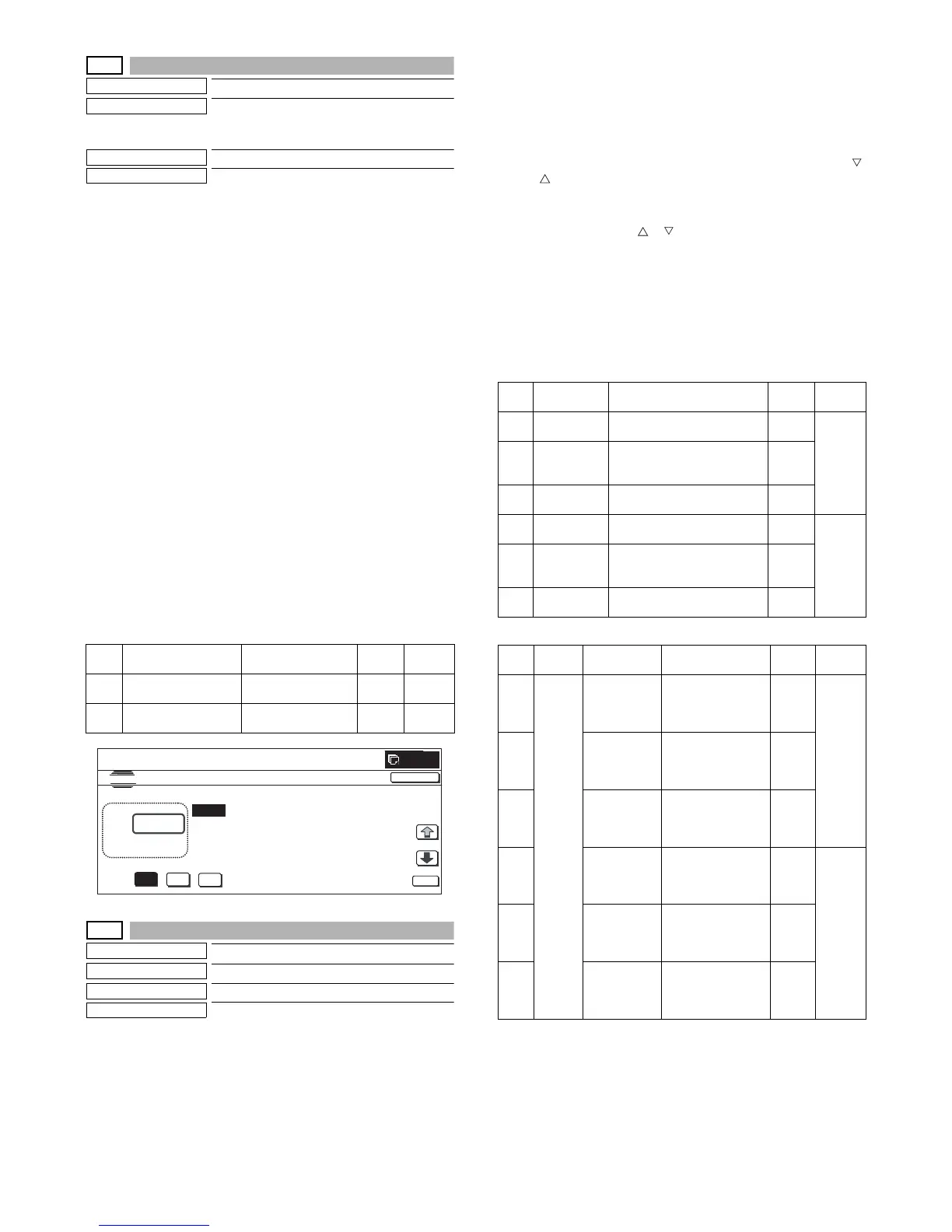
Used to make the scanner color balance
RGB adjustment (for color push scanner
mode).
Section
Scanner
Item
Adjustment
Operation/Procedure
1) Select a desired color with [B] [G] [R] buttons. (In this example,
[B] is selected.) The data of the selected color are displayed.
* Only one color button can be selected. The selected button
is highlighted. (Blue is selected in the initial screen.)
2) Select the set item with [↑] and [↓] buttons.
The highlighted set value is switched and the value is dis-
played in the setting area.
* If there is any item over [↑], an active display is made and
item is shifted.
If there is no item over [↑], the display grays out and the
operation is invalid.
If there is any item under [↓], an active display is made and
item is shifted.
If there is no item over [↓], the display grays out and the
operation is invalid.
3) Enter the set value with 10-key.
* Press [C] key to clear the entered values.
4) When [OK], [↑], [↓] button, [COLOR], or [BLACK] key is
pressed, the current entered value is saved to EEPROM and
RAM.
* When [CLOSE] button is pressed, the display is shifted to the
copy basic screen of simulation.
* Copying can be performed also by pressing [COLOR]/[BLACK]
key.
<Set range and default value of each setup>
46-9
Purpose
Adjustment
Function (Purpose)
Used to adjust the exposure.
Section
RSPF/DSPF
Item
Adjustment
Operation/Procedure
1) Select the set item with [↑] and [↓] buttons.
The highlighted set value is switched and the value is dis-
played in the setting area.
* If there is any item over [↑], an active display is made and
item is shifted.
If there is no item over [↑], the display grays out and the
operation is invalid.
If there is any item under [↓], an active display is made and
item is shifted.
If there is no item over [↓], the display grays out and the
operation is invalid.
2) Enter the set value with 10-key.
* Press [C] key to clear the entered values.
* The set values can be collectively changed by pressing [ ]
[ ] buttons.
When the set value is not the upper limit value (lower limit
value), the data of each item is increased (decreased) by 1.
3) When [OK], [↑], [↓], [ ], [ ] button, [COLOR], or [BLACK] key
is pressed, the current entered value is saved to EEPROM and
RAM.
* When [CLOSE] button is pressed, the display is shifted to
the copy basic screen of simulation.
* Copying can be performed also by pressing [COLOR]/
[BLACK] key.
<Set range and default value of each setup>
[MX-3500N/4500N]
[MX-3501N/4501N]
Item Display Content
Set
range
Default
value
A LOW DENSITY
POINT
Low density side
correction set value
1 to 99 50
B HIGH DENSITY
POINT
High density side
correction set value
1 to 99 50
:
A㧦 70
B㧦 50
㧧 LOW DENSITY POINT
㧧 HIGH DENSITY POINT
SIMULATION
NO.46
㧙
08
SCANNER COLOR BALANCE ADJUSTMENT㧔COLOR SCANNER MODE㧕
70
㨇 1 㨪 99 㨉
OK
TEST
CLOSE
0
B
G
R
Item Display Content
Set
range
Default
value
A COPY: LOW RSPF copy mode exposure
adjustment (low density side)
1 to 99 42
B SCAN: LOW RSPF scanner mode
exposure adjustment (low
density side)
1 to 99
C FAX: LOW RSPF FAX mode exposure
adjustment (low density side)
1 to 99
D COPY: HIGH RSPF copy mode exposure
adjustment (high density side)
1 to 99 53
E SCAN: HIGH RSPF scanner mode
exposure adjustment (high
density side)
1 to 99
F FAX: HIGH RSPF FAX mode exposure
adjustment (high density side)
1 to 99
Item Button Display Content
Set
range
Default
value
AOC COPY
SIDEA: LOW
DSPF copy mode
exposure
adjustment (low
density side)
1 to 99 42
B SCAN
SIDEA: LOW
DSPF scanner
mode exposure
adjustment (low
density side)
1 to 99
C FAX SIDEA:
LOW
DSPF FAX mode
exposure
adjustment (low
density side)
1 to 99
DCOPY
SIDEA: HIGH
DSPF copy mode
exposure
adjustment (high
density side)
1 to 99 53
E SCAN
SIDEA: HIGH
DSPF scanner
mode exposure
adjustment (high
density side)
1 to 99
F FAX SIDEA:
HIGH
DSPF FAX mode
exposure
adjustment (high
density side)
1 to 99



 To Next Page