MX3500N SIMULATION 7 – 77
[Cancel during execution of the operation]
• To cancel and resume the operation, press [EXECUTE].
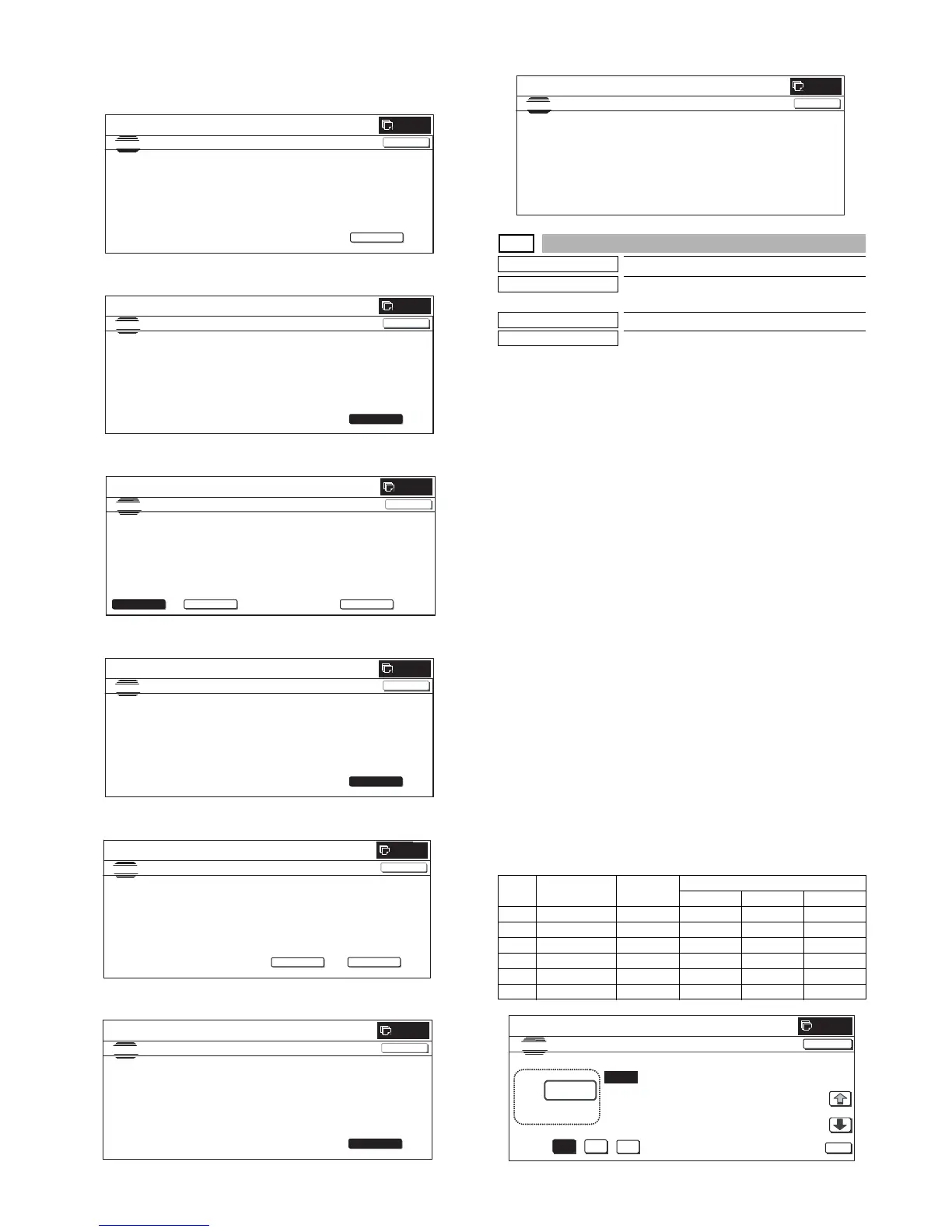
(Initial screen)
(48-patch print)
(Output patch read (FACTORY))
(16-patch self print)
(Standby for registration process)
(Registration of half tone process control reference value)
(Completion of all the processes)
46-25
Purpose
Adjustment
Function (Purpose)
Used to execute the fine adjustment of sin-
gle color mode color balance.
Section
Image process (ICU)
Item
Adjustment
Operation/Procedure
1) Select a color to be set. (In this example, [C] (Cyan) is
selected.)
* When a color button ([C](Cyan), [M](Magenta), [Y](Yellow))
is selected, the selected button is highlighted and the adjust-
ment value of the selected button is displayed.
* Only one color can be selected. The selected button is high-
lighted.
In the initial state, [C] is selected.
2) Select the set item with [↑] and [↓] buttons.
The highlighted set value is switched and the value is dis-
played in the setting area.
* If there is any item over [↑], an active display is made and
item is shifted.
If there is no item over [↑], the display grays out and the
operation is invalid.
If there is any item under [↓], an active display is made and
item is shifted.
If there is no item over [↓], the display grays out and the
operation is invalid.
3) Enter the set value with 10-key.
* Press [C] key to clear the entered values.
4) When [OK], [↑], [↓] button, [COLOR], or [BLACK] key is
pressed, the current entered value is saved to EEPROM and
RAM.
* When [CLOSE] button is pressed, the display is shifted to the
copy basic screen of simulation.
* Copying can be performed also by pressing [COLOR]/[BLACK]
key.
<Set range and default value of each setup>
SIMULATION
NO.46-24
TEST
ENGINE HA LFTO NE AU T O AD JUSTM E NT
EXECUTE
0
CLOSE
PRESS [EXEC UTE] TO PR INT THE TE ST PATCH
.
(PLEASE USE SPECIFIED TYPE OF A3 OR 11”
17” SIZE PAPER
FOR THIS ADJUSTME NT
SIMULATION
NO. 46-24
TEST
ENGINE HA LFTONE AUTO ADJUSTME N T
0
CLOSE
TEST PATCH PRINTING IN PROGRESS...
EXECUTE
0
SIMULATION
NO. 46-24
TEST
ENGINE H A LFTONE AUT O ADJUSTME NT
PLEASE SELECT THE MODE (FACTORY) OR (SERVICE) AND PLACE
THE PRINTED TEST PATCH ON DOCUMENT GLASS THEN PRESS [EXECUTE].
㪁
DARK AREA AT LEFT SIDE ON DOCUMENT GLASS.
,
SERVICE
FACTORY
EXECUTE
CLOSE
SIMULATION
NO. 46-24
TEST
ENGINE HALFTONE AUTO ADJUSTMENT
0
CLOSE
ADJUSTED PATCH PRINTING IN PROGRE SS.
EXECUTE
SIMULATION NO . 46-24
TEST
ENGINE HALFTONE AUTO ADJUSTMENT
OK
0
CONFIRM THE ADJUSTED PATCH AND PRESS [OK] TO REGISTER THIS PATCH DATA
,PRESS [REPEAT] TO CONTINUE THIS PROCEDURE.
REPEAT
CLOSE
SIMULATION
NO. 46-24
TEST
ENGINE HA LFT ON E AUT O A D JUSTM E N T
OK
0
CLOSE
PLEASE WAIT.
NOW R EGISTERING THE NEW TARGET OF HALFTONE PROCON.
Item Description Range
Default value
CMY
A RED 0 to 255 0 255 255
B GREEN 0 to 255 255 0 255
C BLUE 0 to 255 255 255 0
D YELLOW 0 to 255 0 0 255
E MAGENTA 0 to 255 0 255 0
FCYAN 0 to 255 255 0 0
SIMULATION
NO. 46-24
TEST
ENGINE HALFTONE A UT O ADJ USTME N T
0
CLOSE
COMPLETED T HIS PROCEDURE.
PLEASE QUIT THIS MODE.



 To Next Page