MX3500N SIMULATION 7 – 109
* When [CLOSE] button is pressed, the display is shifted to the
copy basic screen of simulation.
* Copying can be performed also by pressing [COLOR]/[BLACK]
key.
<Set range and default value of each setup>
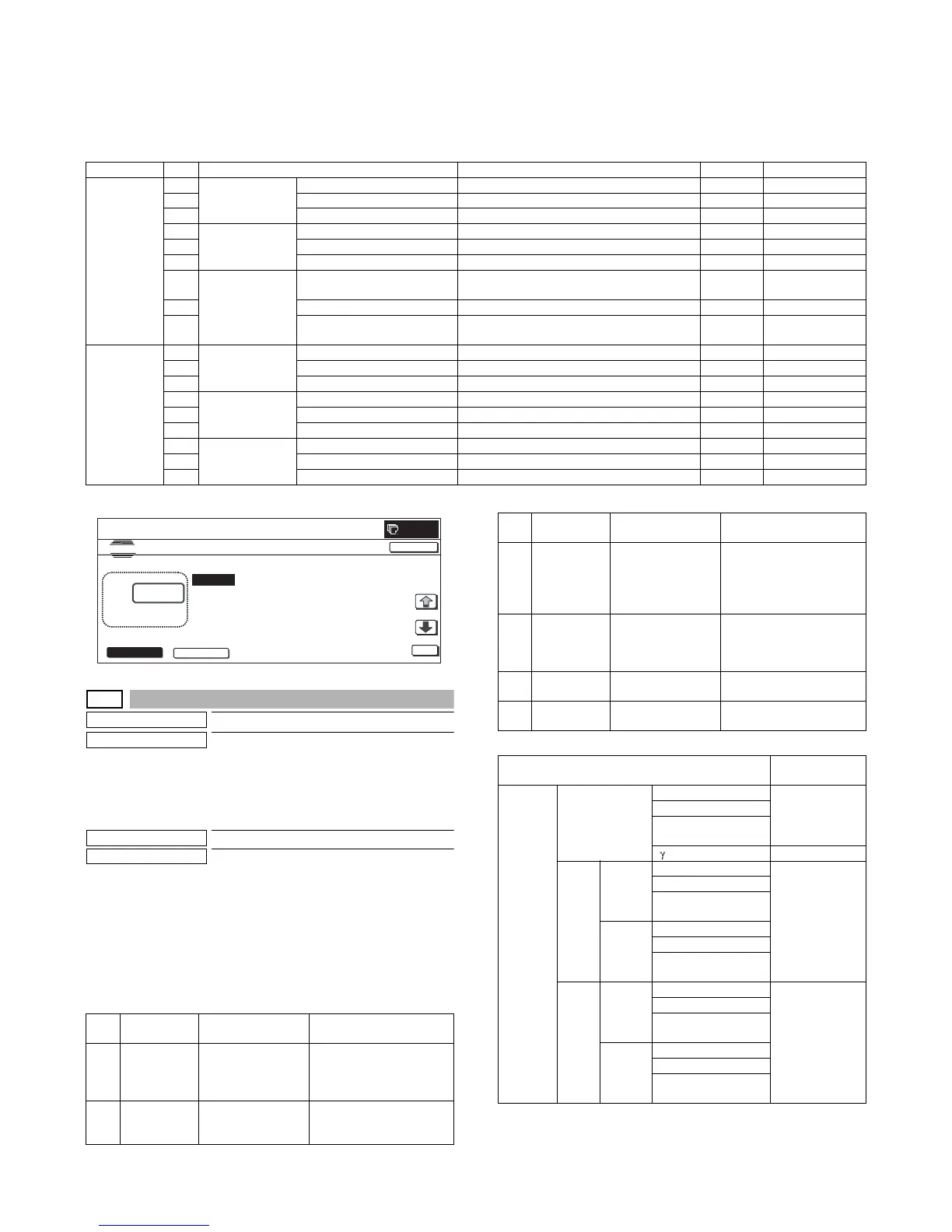
* A to I: The greater the adjustment value is, the greater the image loss is. 1step=0.1mm
50-28
Purpose
Adjustment
Function (Purpose)
Used to execute the service adjustment,
the OC adjustment, the BK main scan mag-
nification ration correction, the RSPF/DSPF
adjustment, and the print position adjust-
ment (Auto void adjustment (Service instal-
lation adjustment)).
Section
—
Item
Image quality
Operation/Procedure
1) When the machine enters Simulation 50-28, the following
screen is displayed.
2) Press the button of an item to be adjusted, and the display is
shifted to the adjustment screen.
* The operating procedures and the display shift for each adjust-
ment and the display, refer to the next page.
<List of adjustment items>
<List of adjustment items and adjustment menus>
Item Display item Description Set range Default value
FAX send A Image loss
setting OC
LEAD_EDGE (OC) OC lead edge image loss setting 0 to 100 30 (3mm)
B FRONT_REAR (OC) OC side image loss setting 0 to 100 20 (2mm)
C TRAIL_EDGE (OC) OC rear edge image loss setting 0 to 100 20 (2mm)
D Image loss
setting RSPF
(DSPF) SIDE1
LEAD_EDGE (SPF_SIDE1) Front surface lead edge image loss setting 0 to 100 20 (2mm)
E FRONT_REAR (SPF_SIDE1) Front surface side image loss setting 0 to 100 20 (2mm)
F TRAIL_EDGE (SPF_SIDE1) Front surface rear edge image loss setting 0 to 100 30 (3mm)
G Image loss
setting RSPF
(DSPF) SIDE2
LEAD_EDGE (SPF_SIDE2) Back surface lead edge image loss setting 0 to 100 RSPF: 20 (2mm)
DSPF: 30 (3mm)
H FRONT_REAR (SPF_SIDE2) Back surface side image loss setting 0 to 100 20 (2mm)
I TRAIL_EDGE (SPF_SIDE2) Back surface rear edge image loss setting 0 to 100 RSPF: 30 (3mm)
DSPF: 20 (2mm)
SCANNER
mode (FAX,
other than
COPY)
A Image loss
setting OC
LEAD_EDGE(OC) OC lead edge image loss setting 0 to 100 0 (0mm)
B FRONT_REAR(OC) OC side image loss setting 0 to 100 0 (0mm)
C TRAIL_EDGE(OC) OC rear edge image loss setting 0 to 100 0 (0mm)
D Image loss
setting RSPF
(DSPF) SIDE1
LEAD_EDGE(SPF_SIDE1) Front surface lead edge image loss setting 0 to 100 0 (0mm)
E FRONT_REAR(SPF_SIDE1) Front surface side image loss setting 0 to 100 0 (0mm)
F TRAIL_EDGE(SPF_SIDE1) Front surface rear edge image loss setting 0 to 100 0 (0mm)
G Image loss
setting RSPF
(DSPF) SIDE2
LEAD_EDGE(SPF_SIDE2) Back surface lead edge image loss setting 0 to 100 0 (0mm)
H FRONT_REAR(SPF_SIDE2) Back surface side image loss setting 0 to 100 0 (0mm)
I TRAIL_EDGE(SPF_SIDE2) Back surface rear edge image loss setting 0 to 100 0 (0mm)
NO.
Menu
display item
Content Description
1 OC ADJ OC adjustment OC document lead edge,
off-center, and sub scan
magnification ratio
adjustment
2 BK-MAG
ADJ
BK main scan
magnification ratio
correction
BK main scan
magnification ratio
adjustment
CLOSE
0
TEST
FAX SCANNER
A㧦 30
㧧 LEAD_EDGE(OC)
B㧦 20 㧧 FRONT_REAR(OC)
C㧦 20 㧧 TRAIL_EDGE(OC)
D㧦 30 㧧 LEAD_EDGE(SPF_SIDE1)
3 SPF ADJ RSPF/DSPF
adjustment
RSPF/DSPF (front/back)
document lead edge, off-
center, sub scan
magnification ratio
adjustment
4 SETUP/
PRINT ADJ
Print position
adjustment
Print lead edge adjustment,
all-cassette print off-center
(individual cassette, ADU)
adjustment
5 RESULT Result display Display of the adjustment
result
6 DATA Data display Display of data used for the
adjustment
Adjustment item
Adjustment
menu
Scanner OC Document lead edge OC ADJ
Document off-center
Sub scan
magnification ratio
adjustment –
RSPF SIDE1
(front)
Document lead edge SPF ADJ
(RSPF)
Document off-center
Sub scan
magnification ratio
SIDE2
(back)
Document lead edge
Document off-center
Sub scan
magnification ratio
DSPF SIDE1
(front)
Document lead edge SPF ADJ
(DSPF)
Document off-center
Sub scan
magnification ratio
SIDE2
(back)
Document lead edge
Document off-center
Sub scan
magnification ratio
NO.
Menu
display item
Content Description



 To Next Page