MX3500N DRIVE SECTION P – 1
MX3500N
Service Manual
[P] DRIVE SECTION
1. Disassembly and assembly
A. Main drive section
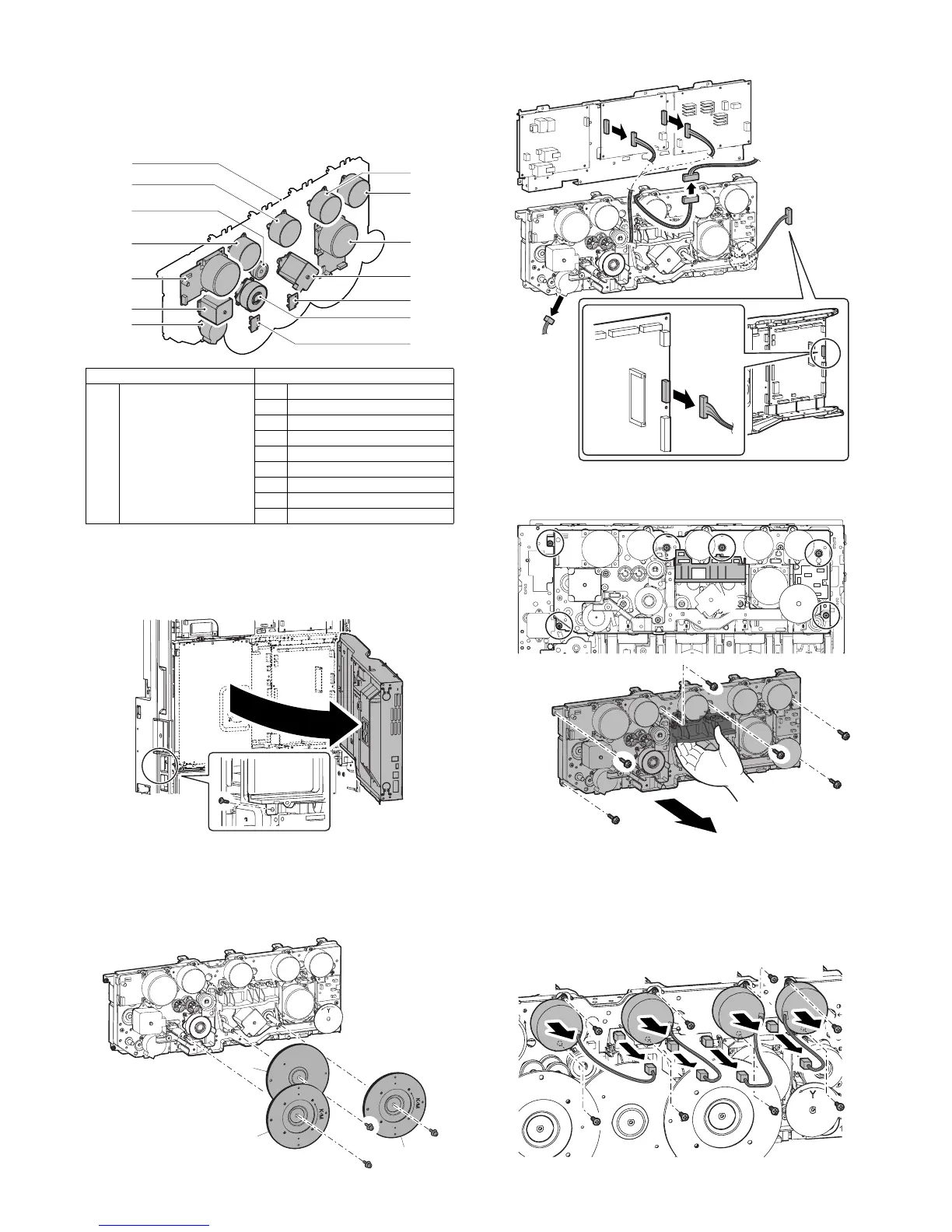
(1) Main drive unit
1) Remove the rear cabinet. (Refer to Rear Cabinet in External
Outfit Section.)
2) Remove the screws, and open the control box.
3) Remove the flywheel.
* Installing sequence: (1) C → (2) KM → (3) KM (Each color is
marked.)
* After installation, check to confirm that it is not in contact
with the harness, etc.
4) Remove the connectors.
5) Remove the screws, and remove the main drive unit.
* Hold section A and remove.
a. Toner motor
1) Remove the rear cabinet. (Refer to Rear Cabinet in External
Outfit Section.)
2) Open the control box.
3) Remove the connector and the screws, then remove the toner
motor.
Unit Parts
(1) Main drive unit a Toner motor
b Developer drive motor (K)
c Developing drive motor (CL)
d Drum motor (K)
e Drum motor (CL)
f Resist motor
g Phase detection PWB
h Separation clutch
iBelt motor
(1)-a
(1)-a
(1)-c
(1)-e
(1)-g
(1)-d
(1)-g
(1)-b
(1)-a
(1)-f
(1)-h
(1)-a
(1)-i
(1)
C
KM
KM
A
BK
C
M
Y



 To Next Page