EasyManua.ls Logo

Sharp MX-4501N - Page 426

Sharp MX-4501N
448 pages
Print Icon
To Next Page IconTo Next Page
To Previous Page IconTo Previous Page
Loading...
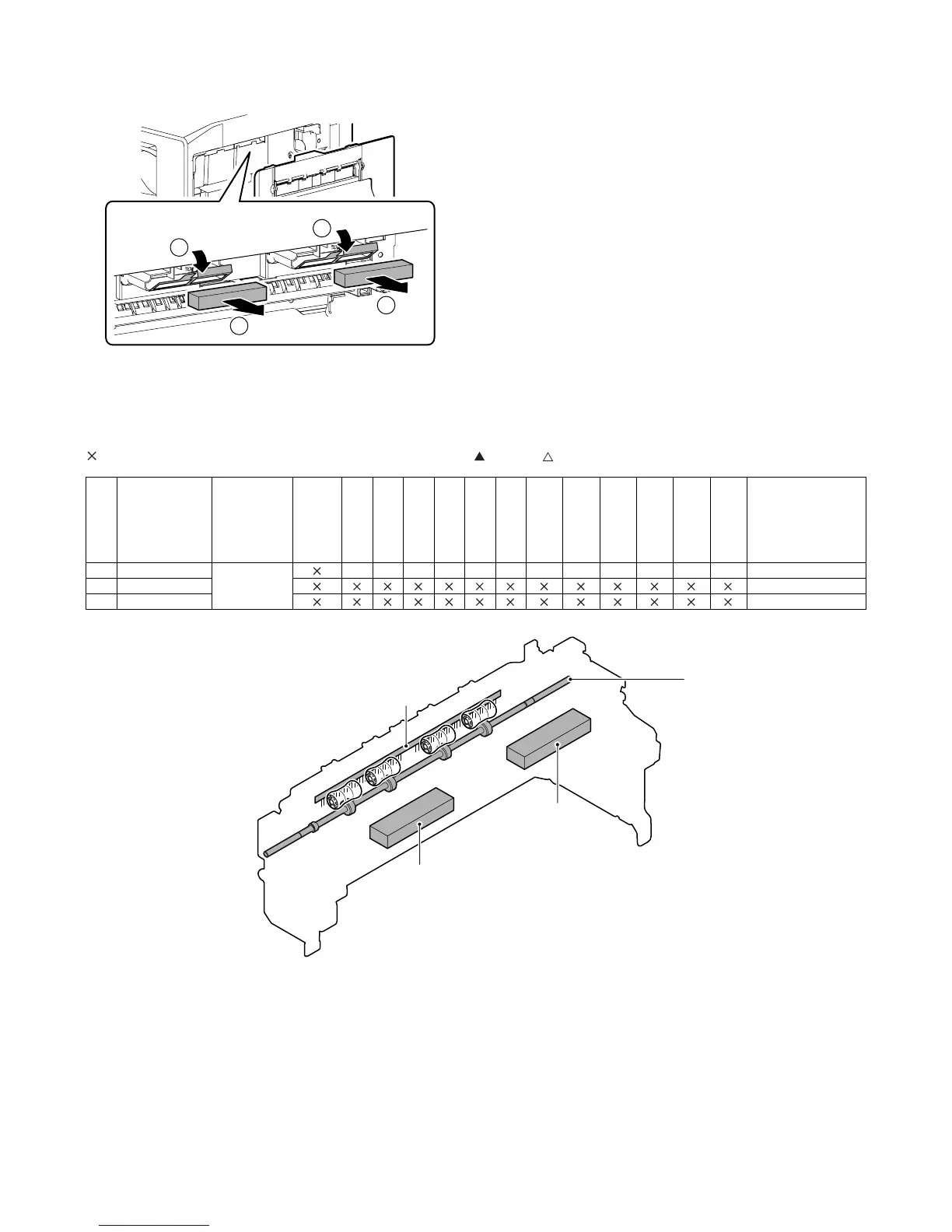
MX3500N PAPER EXIT SECTION O – 5
m. Paper exit filter
1) Open the right door.
2) Open the filter holding sheet, and remove the paper exit filter.
4. Maintenance
A. Paper exit section
: Check (Clean, replace, or adjust according to necessity.) {: Clean : Replace : Adjust : Lubricate : Shift the position.
1
1
2
2
No. Part name
Monochrome
supply/
Mechanical
parts
When
calling
150
K
300
K
450
K
600
K
750
K
900
K
1050
K
1200
K
1350
K
1500
K
1650
K
1800
K
Remark/Refer to the
Parts Guide.
Block/Item No.
(Only the
replacement parts
are described.)
1 Transport rollers Mechanical
parts
{{{{{{ { { { { { {
2 Discharge brush
3 Paper exit filter
2
3
3
1

Table of Contents

Other manuals for Sharp MX-4501N

Related product manuals