MX3500N PAPER EXIT SECTION O – 4
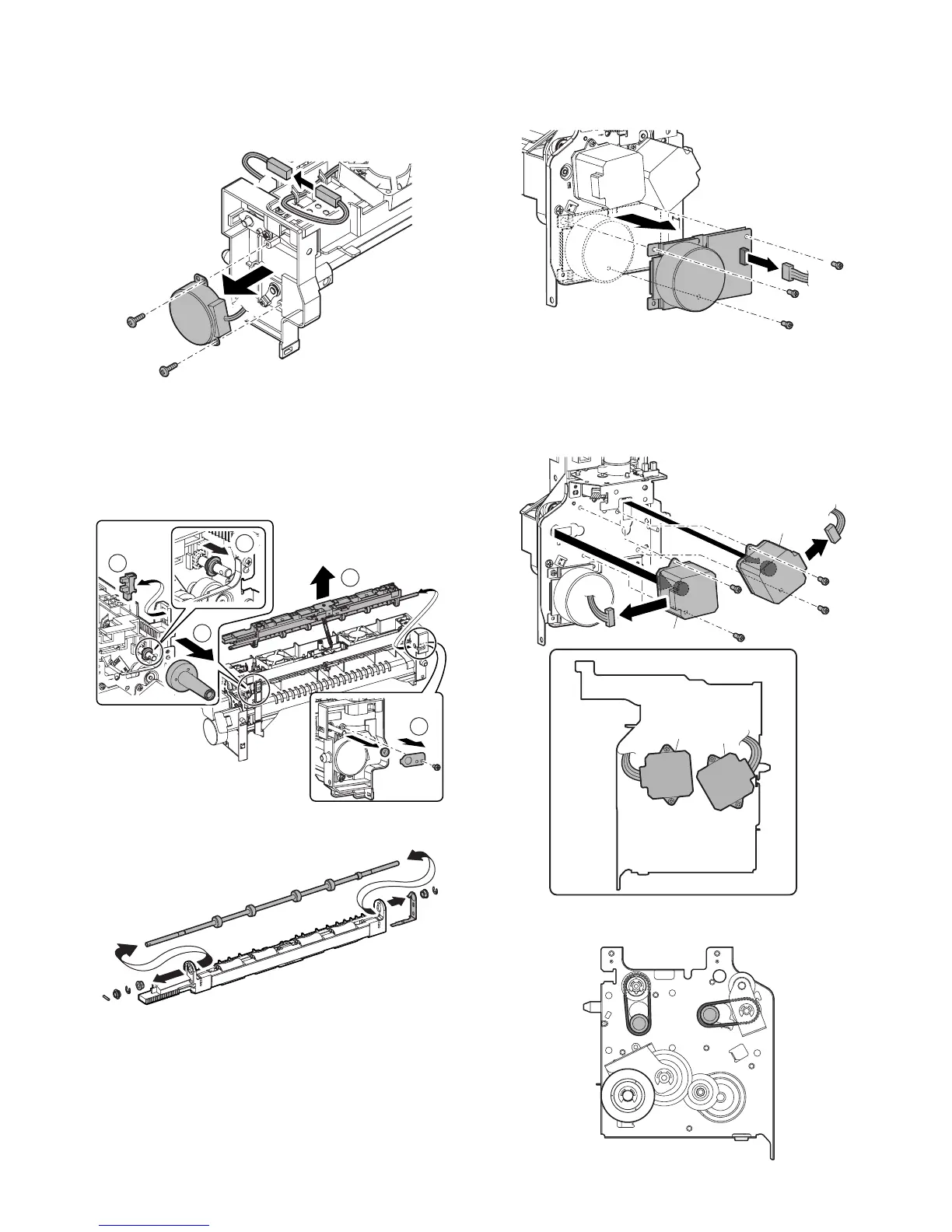
h. Fusing web cleaning motor
1) Remove the paper exit unit.
2) Remove the exhaust fan duct.
3) Disconnect the connector, and remove the screws, and then
remove the fusing web cleaning motor.
i. Paper exit roller 1 (Drive)
1) Remove the paper exit unit.
2) Remove the exhaust fan duct.
3) Remove the slide motor unit.
4) Remove the parts. Remove the paper exit full detection sen-
sor. Slide the bearing, and remove the shifter unit.
5) Remove the parts, and remove the paper exit roller 1 (drive).
j. Fusing drive motor
1) Remove the paper exit unit.
2) Disconnect the connector, and remove the screws, and then
remove the fusing drive motor.
k. Paper exit drive motor
l. ADU motor upper
1) Remove the paper exit unit.
2) Disconnect the connector, and remove the screws, and
remove the paper exit drive motor (A), and the ADU motor
upper (B).
* Be careful to the motor installing direction.
* When installing, attach the belt as shown below.
1
2
4
5
3
A
A
B
B



 To Next Page