MX3500N PAPER EXIT SECTION O – 3
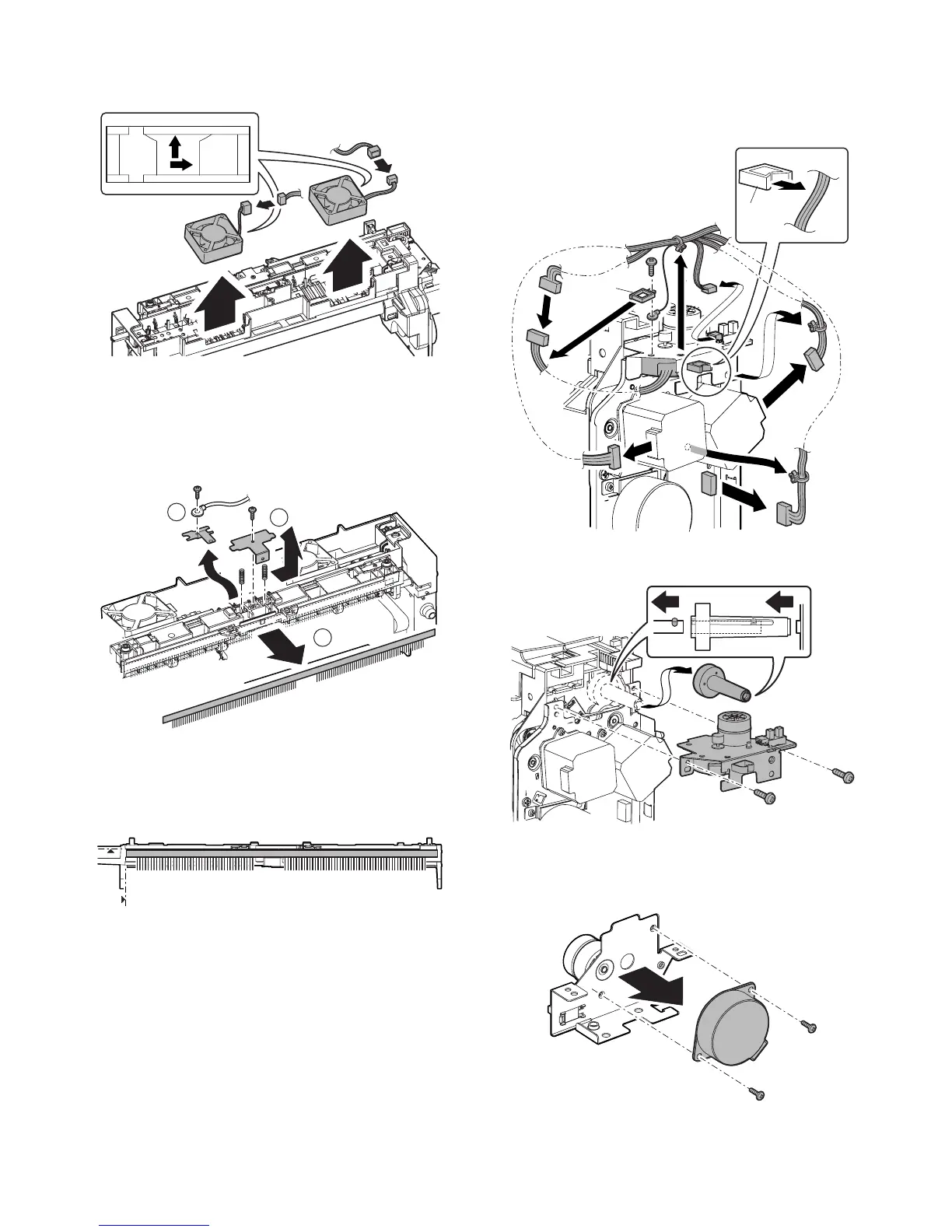
3) Disconnect the connector, and remove the paper exit cooling
fan motor.
* When installing, be sure to note the fan direction.
f. Discharge brush
1) Remove the paper exit unit.
2) Remove the exhaust fan duct.
3) Remove the screw, and remove the earth wire, the shifter
earth plate. Remove the screw, and remove the earth wire, the
discharge earth plate. Remove the discharge brush.
* When installing, place the shifter earth plate is over the dis-
charge earth plate.
* Discharge brush attachment reference
When attaching the discharge brush, attach it along the
shifter PG.
g. Shifter motor
1) Remove the paper exit unit.
2) Remove the harness from the saddle (A) and the saddle (B).
Remove the screw, and remove the earth terminal. Disconnect
the connectors and remove the snap band.
3) Remove the shifter motor unit. Remove the gear.
* When installing, place the paper exit roller SP pin in the gear
slit.
Engage the bar ring of the shifter motor unit with the gear.
4) Remove the screws, and remove the shifter motor.
1
3
2
A
B



 To Next Page