MX3500N PWB SECTION Q – 2
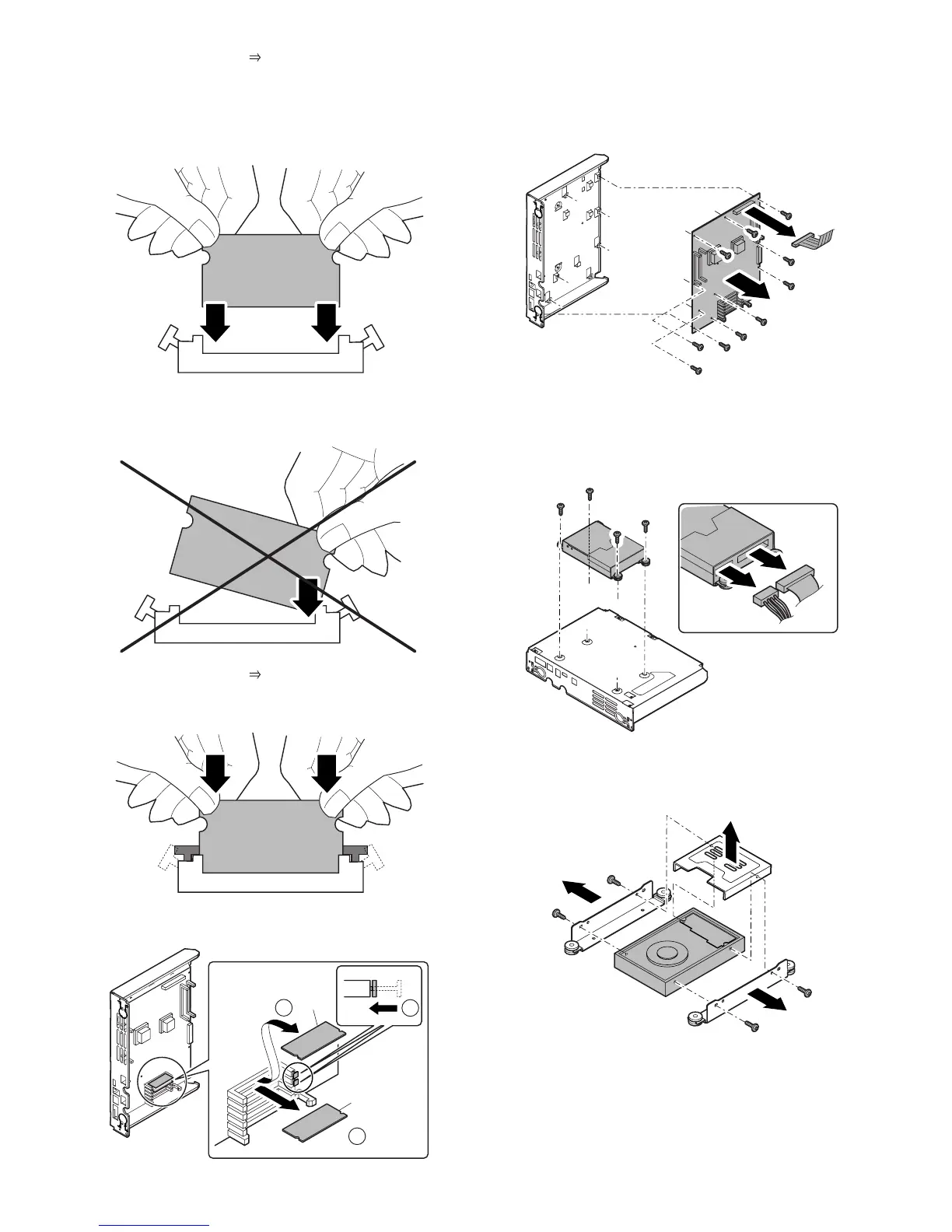
a) Press the section ( ) of the memory PWB with both
hands.
* When handling the memory PWB, do not touch the
pins.
* Insert temporally and straightly until it is in contact with
the contact.
* When inserting, be careful not to insert the memory
PWB obliquely to the connector. Do not press the
memory PWB pins with one hand.
b) Press the section ( ) of the memory PWB with both
hands simultaneously until the right and the left buttons
are locked.
3) Release the lock, and remove the BOOT ROM PWB (A) and
the PROGRAM ROM PWB (B).
c. MFP cnt PWB
1) Remove the right rear cabinet.
2) Remove the BOOT ROM PWB and the PROGRAM ROM
PWB.
3) Remove the screws and then remove the MFP cnt PWB.
d. HDD
1) Remove the right rear cabinet.
2) Remove the screws and pull out the MFP cnt PWB unit.
3) Remove the connector and screws then remove the HDD unit.
4) Remove the screws, and remove the angle from HDD.
* Since the HDD is weak in shock, avoid hitting the corner,
dropping, or other shocks.
A
B
1
2
2



 To Next Page