MX3500N PWB SECTION Q – 3
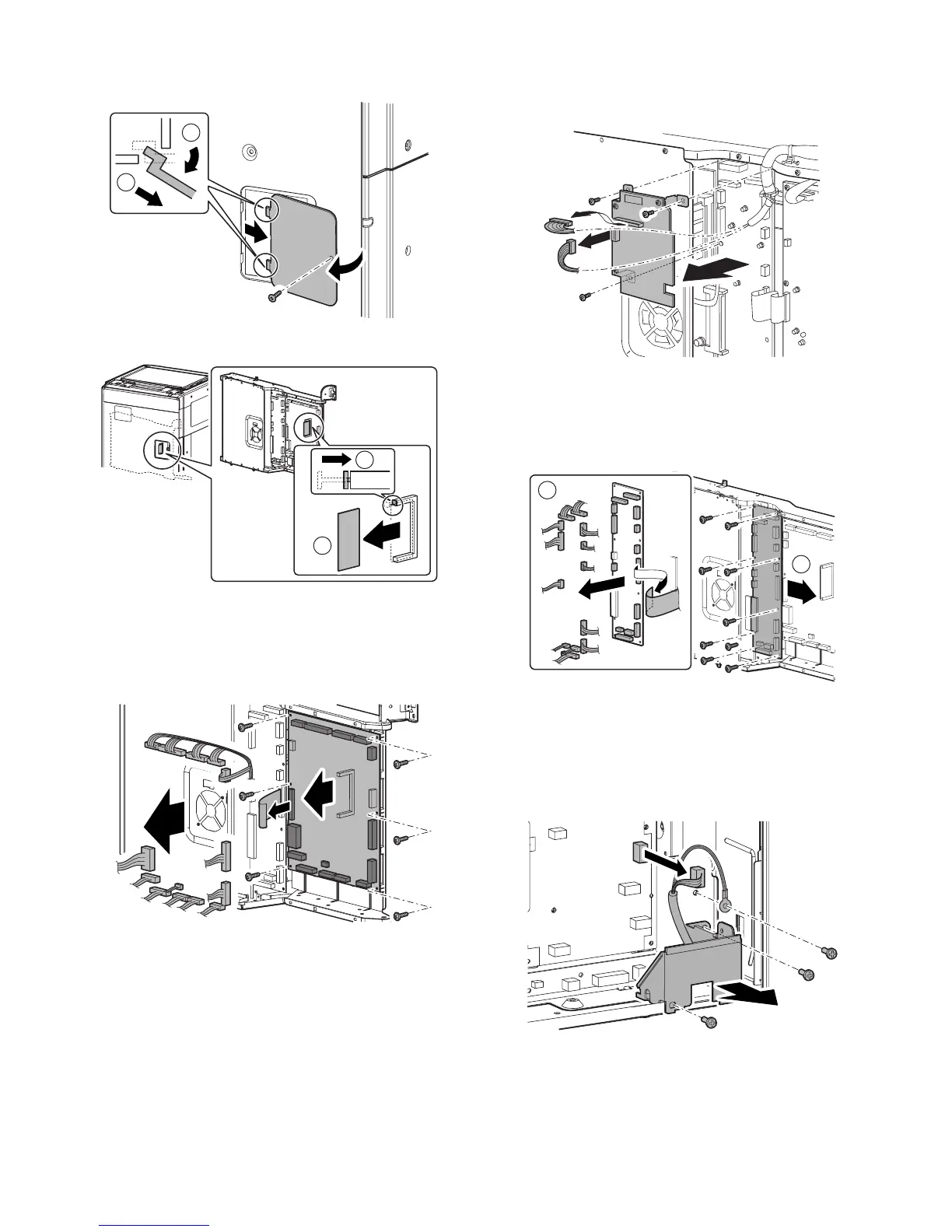
e. PCU Flash ROM PWB
1) Remove the screws, and remove the rear cabinet cover.
2) Remove the PCU Flash ROM PWB.
f. PCU PWB
1) Remove the rear cabinet.
2) Remove the PCU Flash ROM PWB.
3) Remove the connector and the screws, then remove the PCU
PWB.
g. SCAN IN PWB
1) Remove the rear cabinet.
2) Remove the connector and the screws, then remove the
SCAN IN PWB.
h. Mother PWB
1) Remove the rear cabinet.
2) Remove the SCAN IN PWB.
3) Remove the connector and the screws, then remove the
mother PWB.
(2) Power supply unit
a. AC Power PWB
1) Remove the rear cabinet.
2) Disconnect the connector. Remove the screw, and remove the
grounding wire. Remove the screw, and remove the AC cord
install plate.
1
2
1
2
1
2



 To Next Page