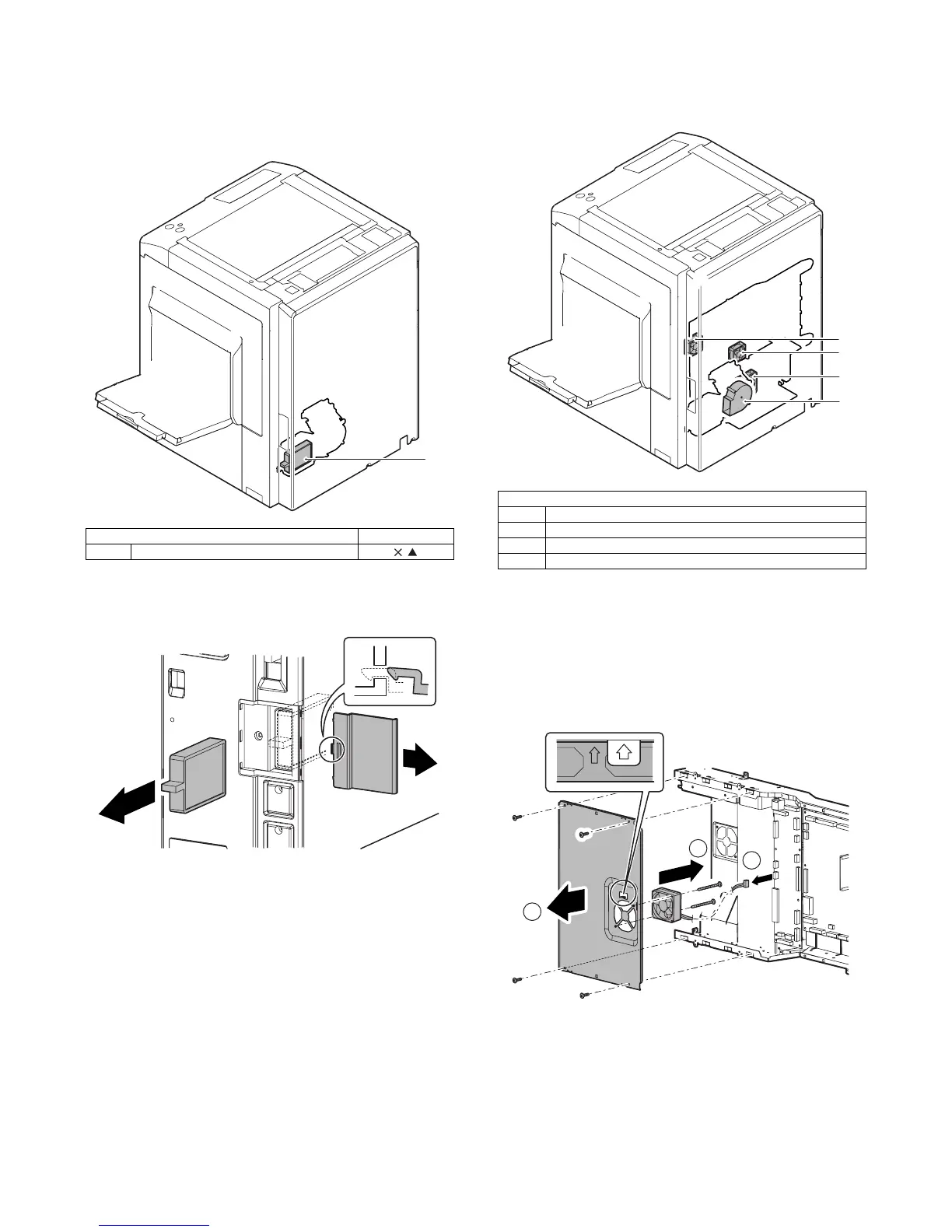
MX3500N FAN AND FILTER SECTION R – 1
MX3500N
Service Manual
[R] FAN AND FILTER SECTION
1. Disassembly and assembly
A. Filters
(1) Ozone Filter
1) Remove the ozone filter cover, then remove the ozone filter
PA.
B. Fans
(1) Controller cooling fan motor
1) Remove the rear cabinet. (Refer to Rear Cabinet in External
Outfit Section.)
2) Remove the connector. Remove the screws, and remove the
MFP PWB shield upper. Remove the screws, and remove the
controller cooling fan motor.
* When installing, fit the arrow mark on the MFP PWB shield
and the arrow mark of the controller cooling fan motor.
Parts Maintenance
(1) Ozone filter PA
(1)
Parts
(1) Controller cooling fan motor
(2) HDD cooling fan motor
(3) Ozone fan motor
(4) Power supply cooling fan motor



 To Next Page