MX3500N PWB SECTION Q – 6
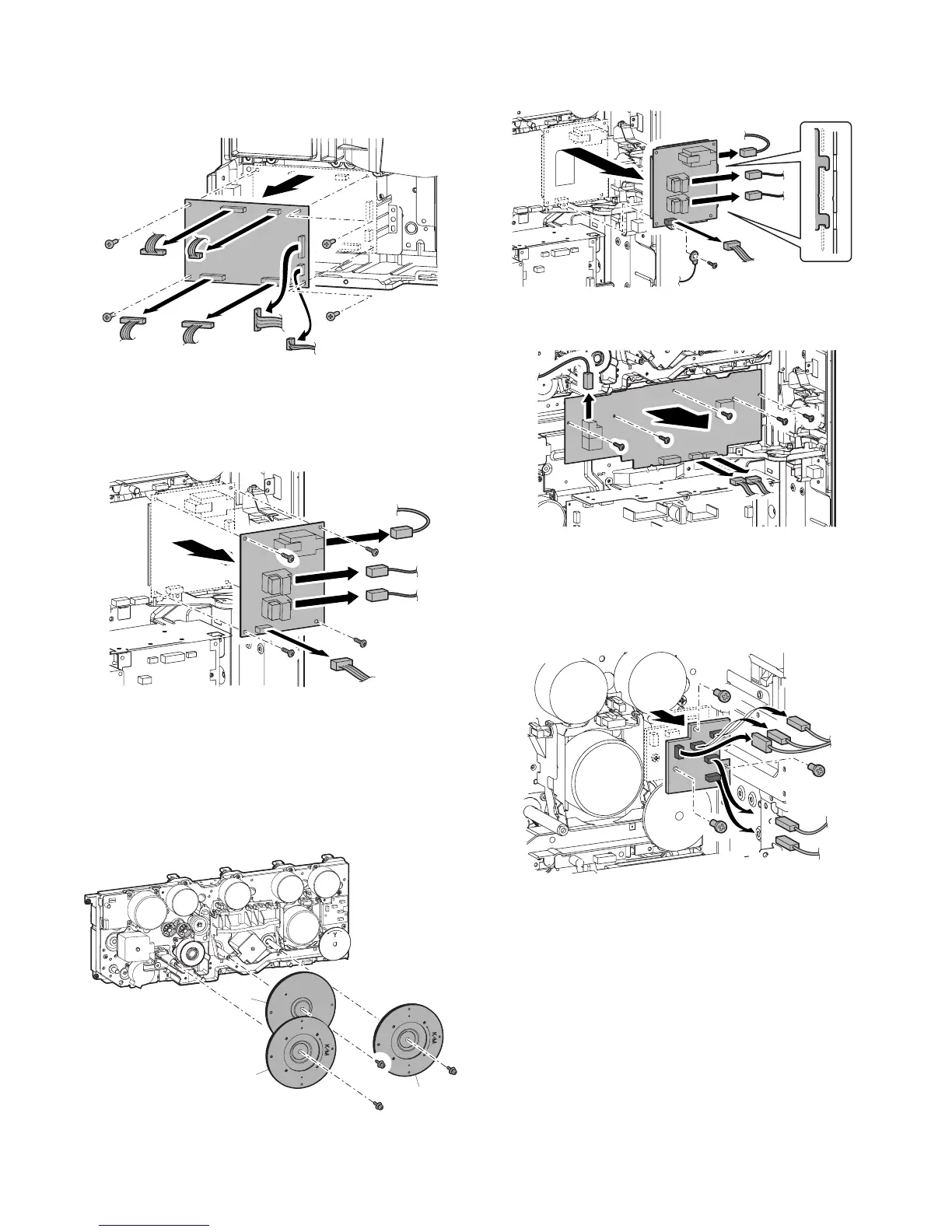
g. Driver Main PWB
1) Remove the rear cabinet.
2) Remove the screws and the connector, and remove the driver
main PWB.
h. Primary transfer PWB
1) Remove the rear cabinet.
2) Open the control box.
3) Remove the screws and the connector, and remove the pri-
mary transfer PWB.
i. MC PWB
1) Remove the rear cabinet.
2) Open the control box.
3) Remove the screws, then remove the fly wheel.
* Installing sequence: (1) C → (2) KM → (3) KM (Each color is
marked.)
* After installation, check to confirm that it is not in contact
with the harness, etc.
4) Remove the screw, and remove the grounding wire. Remove
the screws and the connector, then remove the primary trans-
fer PWB unit.
5) Remove the screws and the connector, then remove the MC
PWB.
j. HVR PWB
1) Remove the rear cabinet.
2) Open the control box.
3) Remove the connector and the screws, and remove the HVR
PWB.
C
KM
KM



 To Next Page