MX-M200D SIMULATIONS 7-4
02 01 Single Paper Feeder(SPF)/Reversing single pass feeder(RSPF)aging
Used to check the operations of the SPF/RSPF unit and its control circuit.
Enter the magnification ratio and press[OK] key or [START] key to drive the SPF/RSPF unit at the speed
corresponding to the setting.
* When [INTERRUPT] key is press, the simulation is terminated and the machine returns to the sub code
input window.
* When [CA] key is pressed, the simulation is terminated and the machine exits the simulation mode.
02 SPF/RSPF sensor status display
Used to display the sensor status in the SPF/RSPF section. An active sensor is highlighted.
[CA] key: Exits the simulation mode.
[INTERRUPT] key: Returns to the sub code input window.
Only when the SPF/
RSPF is installed.
03 SPF/RSPF motor operation check
Used to check the operation of the SPF/RSPF motor and its control circuit. When this simulation is
executed, the initial menu shown below is displayed. Select the magnification ratio to drive the motor.
[CA] key: The SPF/RSPF motor is stopped, and the machine exits the simulation mode.
[INTERRUPT] key: The SPF/RSPF motor is stopped, and the machine returns to the sub code input window.
Only when the SPF/
RSPF is installed.
Main
code
Sub
code
Contents Remark
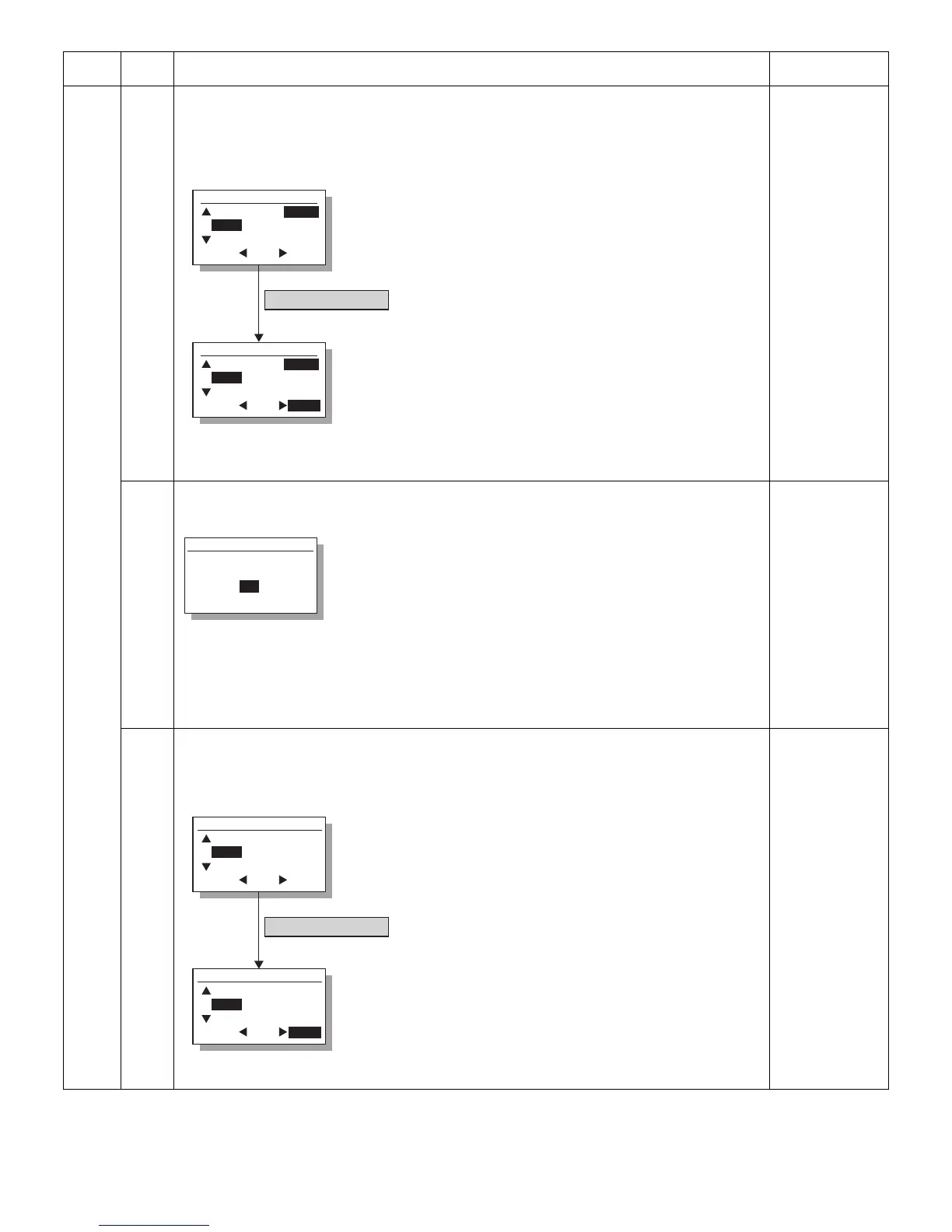
Sim2-1 SPF AGING
115%
100%
86%
1SIDE
2SIDE
[OK] key or [START] Key
(Magnification ratio selection window)
ZOOM 100% EXEC
Sim2-1 SPF AGING
115%
100%
86%
1SIDE
2SIDE
(Execution
window)
ZOOM 100% EXEC
Select the scan magnification ratio (drive speed).
This also accords with the magnification ratio and
the speed in copying similarly to the OC.
The setting range is 50% - 200%.
"EXEC" is highlighted during execution.
Sim2-2 SENSOR CHECK
SPFP
OCCV
POUT
SPFC
L1
L2
W0
W1
W2
W3
Displayed name : Sensor name
SPFP :SPF document transportation sensor
OCCV :SPF unit (OC cover) open/close sensor
POUT :SPF paper exit sensor
SPFC :SPF paper feed cover open/close sensor
L1 :SPF paper length sensor 1
L2 :SPF paper length sensor 2
W0 :SPF document set sensor
W1 :SPF paper width sensor (small)
W2 :SPF paper width sensor (middle)
W3 :SPF paper width sensor (large)
Sim2-3 OUTPUT CHECK
Sim2-3 OUTPUT CHECK
115%
100%
86%
[OK] key or [START] Key
(Initial window = Magnification ratio selection window)
ZOOM 100% EXEC
115%
100%
86%
ZOOM 100% EXEC
(Execution
window)
Select the scan magnification ratio (drive speed).
This also accords with the magnification ratio and
the speed in copying.
The setting range is 50% - 200%.
"EXEC" is highlighted during execution.



 To Next Page