70
SENDING THE SAME FAX TO MULTIPLE
DESTINATIONS (Broadcast Transmission)
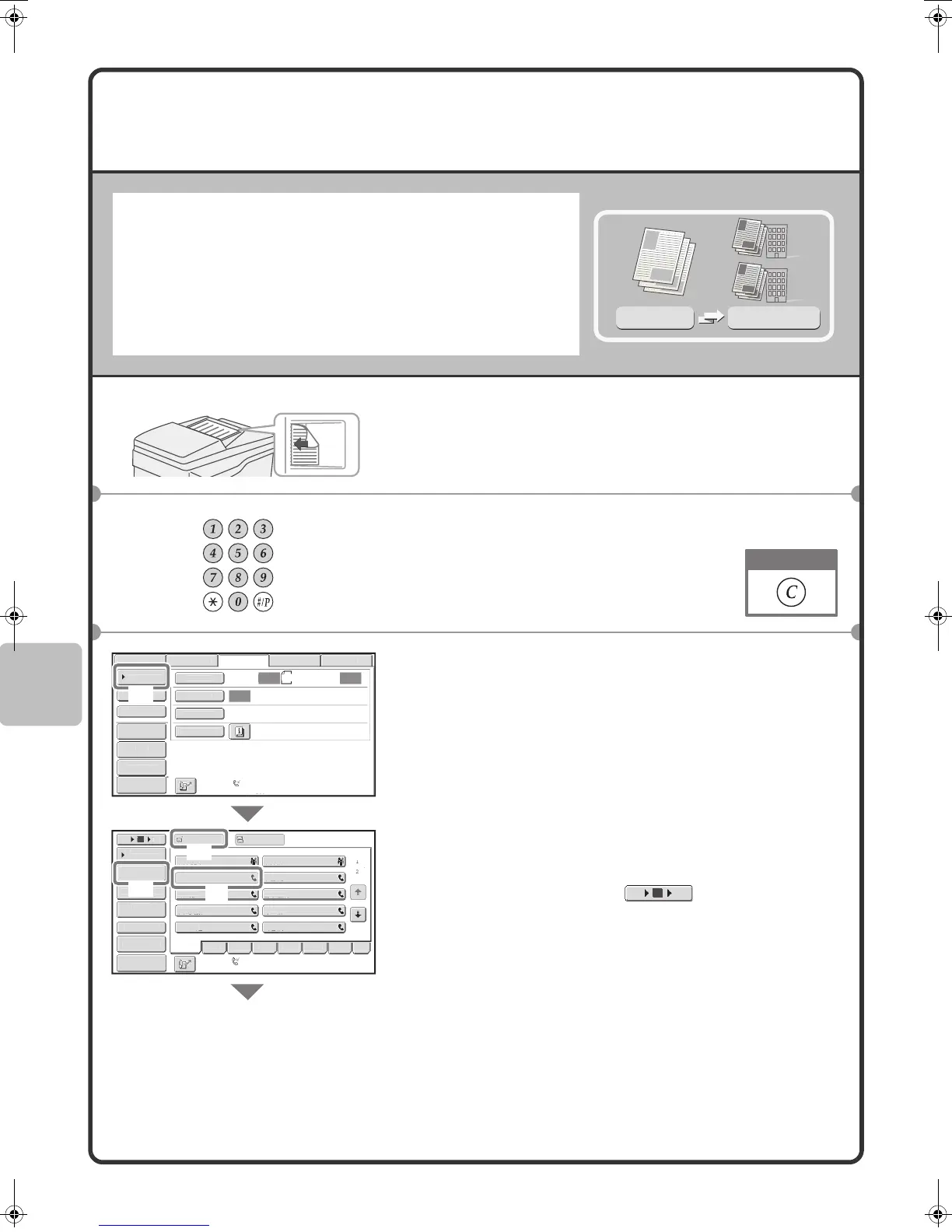
The same document/image can be sent to multiple fax mode, scan
mode, and Internet fax mode destinations in a single operation. If you
frequently send documents/images to the same group of destinations,
it is recommended that you store those destinations as a group in a
one-touch key.
The following procedure explains how to enter a fax number with the
numeric keys and then select a destination that is stored in a
one-touch key.
1 Place the originals.
When using the document glass, place the original with the
side to be scanned face down.
2 Enter the fax number of the first destination.
3 Select settings in the touch panel.
(1) Touch the [Address Book] key.
(2) Touch the one-touch key in which the desired
destination is stored.
To change the number of one-touch keys displayed in
the screen, touch the key. Select 5, 10, or
15 keys.
(3) Touch the [To] key.
(4) Touch the [Address Review] key.
Original
Broadcast
Transmission
The side to be scanned must be face up!
Correct a mistake
Auto
Auto
Auto
SB Mem. Sca
ax
ca
n
r
uto Rece
t
on
ax Memory:100
Internet Fax
can
can
en
:
File
uick File
A
r
R
vi
r
T
A
r
r
B
pec
al Mode
Resolut
o
xposure
Origina
Fre
AB
D EF
H
JK
MNOP
R
T
VWXY
e
c.
10
5
5
To
Cc
II II
EE EE
CCC CCC
FF FF
o
a
A
r
r
ress Entr
Sort Addres
A
r
ddress Review
ondition
Sett
n
Auto Reception
Fax Memory:100%
(1)
(4)
(3)
(2)
Preview
Preview
10 155
mxm503_ex_qck.book 70 ページ 2009年3月6日 金曜日 午前11時40分



 To Next Page