2.3.8.9
SET,RESET
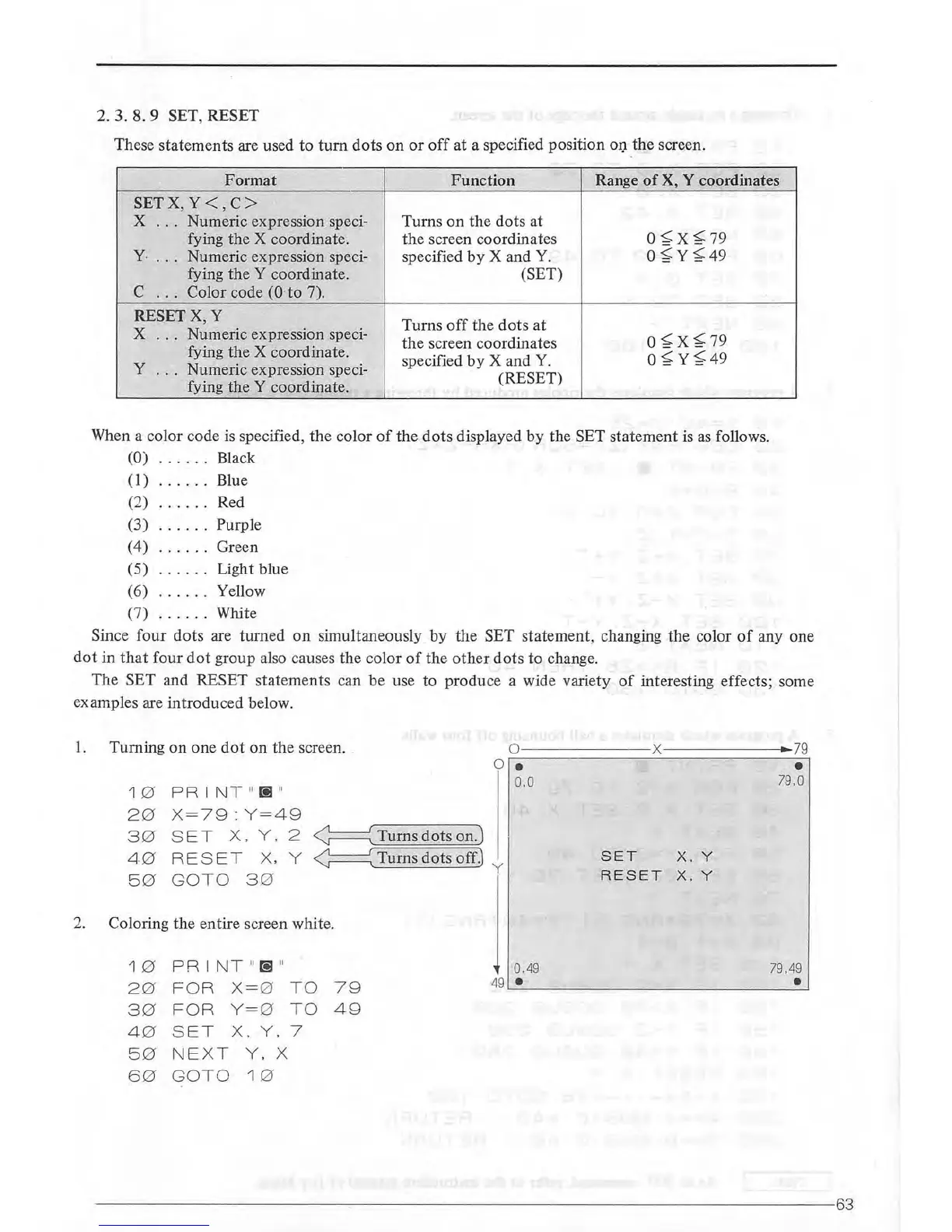
These statements are used to
turn
dots
on
or
off
at a specified position
OIJ
the screen.
Format
Function
Range
of
X, Y coordinates
SETX,
Y<
,
C>
X
...
Numeric expression speci- Turns
on
the
dots at
fying the X coordinate. the screen coordinates
0
~X
~79
y.
. ..
Numeric expression speci- specified
by
X and
Y.
0 ~y
~49
fying
theY
coordinate. (SET)
c
...
Color code (0
to
7).
RESET X, Y
Turns
off
the
dots
at
X
.
..
Numeric expression speci-
the screen coordinates
0
~X~
79
fying
the
X coordinate.
specified
by
X and
Y.
0
~
Y~49
y
.
..
Numeric expression speci-
(RESET)
fying the Y coordinate.
When a color code is specified,
the
color
of
the
dots
displayed
by
the SET statement is
as
follows.
(0)
....
. . Black
(1)
....
. . Blue
(2)
(3)
(4)
(5)
(
6)
(7)
......
• 0
••
0
•••
. .
...
. . .
..
. . . .
• 0 •
••
Red
Purple
Green
Light blue
Yellow
White
Since
four
dots
are turned
on
simultaneously
by
the SET statement, changing the color
of
any one
dot
in
that
four
dot
group also causes the
calor
of
the
other
dots
to
change.
The
SET and RESET statements can be use to produce a wide variety
of
interesting effects; some
examples are introduced below.
1.
Turning
on
one
dot
on
the screen . .
1 0
PRINT
"
(!]
"
20
X=
79:Y
=
49
30
S
ET
X.
Y.
2
40
RESET
x,
y
5 0
GOTO 3 0
2.
Coloring the entire screen white.
10
PR
I NT "S "
20
FOR
X= 0
TO
79
30
FOR Y=0
TO
49
4 0
S
ET
X.
Y. 7
50
NEXT
Y.
X
60
GOTO
1 0
o---
----
x
0 •
0.0
0.49
49
•
SET
X. Y
RESET
X.
Y
79
•
79,0
79.49
•
----------------------~------------
--------
-------------------------63



 To Next Page