2.7.6 Graphic mode statements .
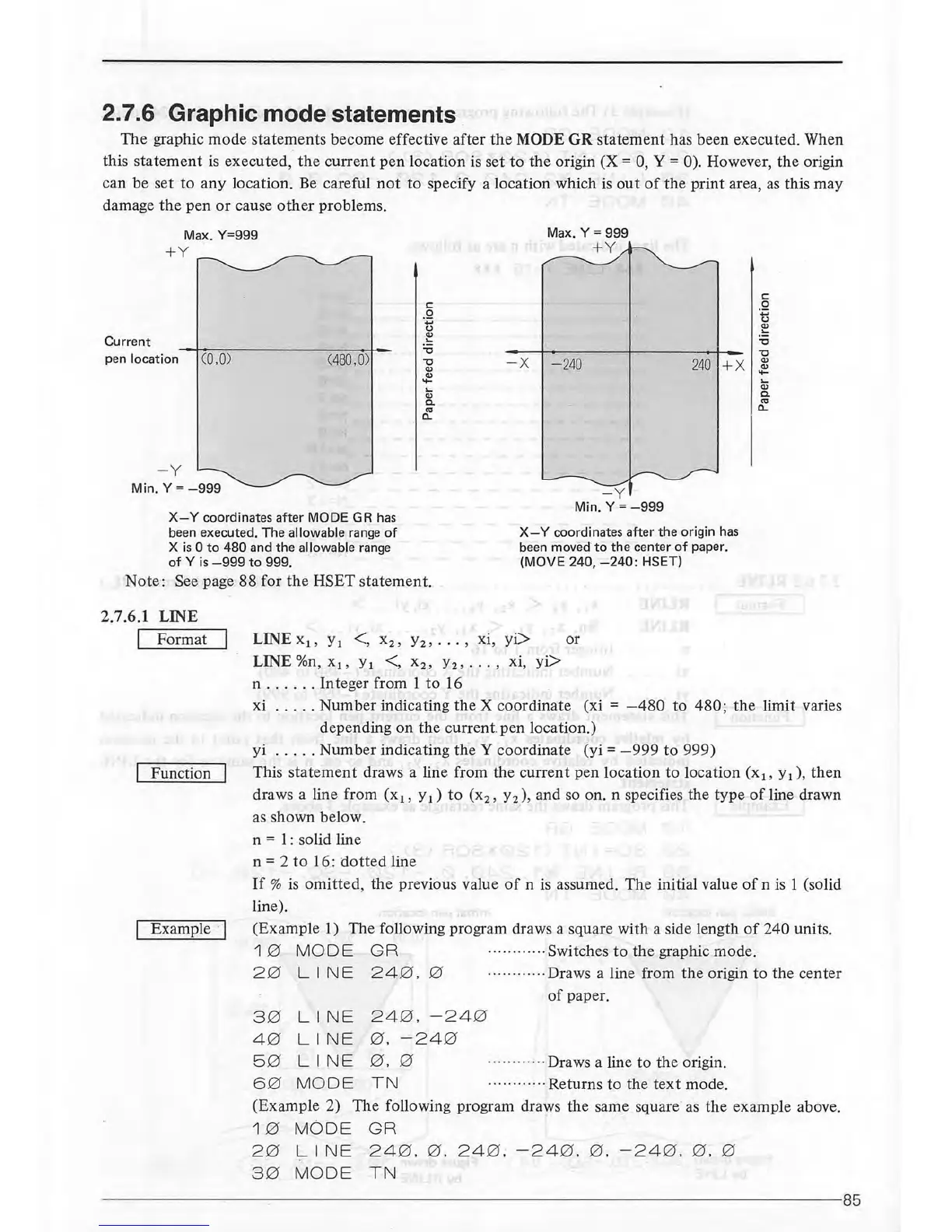
The graphic mode statements become effective after
the
MODE GR statement has been executed. When
this
statement
is
executed,
the
current
pen location is set
to
the origin
(X=
0, Y = 0). However, the origin
can be set to any location.
Be
careful
not
to specify a location which
is
out
of
the print area,
as
this may
damage
the
pen
or
cause
other
problems.
Max.
Y=999
+Y
c:
0
·.;::;
u
Cl)
Current
.....
Max. Y = 999
+Y
c:
0
...
u
Cl)
.....
"C
pen
location (0.0)
(48
0.
0)
"C
"C
"C
- X
- 240
24
0
+X
Cl)
Cl)
Cl)
Cl)
....
....
.....
.....
Cl)
Cl)
a.
a.
CO
CO
a..
a..
- Y
Min. Y =
-999
X-Y
coordinates after MODE
GR
has
been
executed. The allowable
range
of
X
is
0
to
480 and the allowable
range
of
Y
is
-999
to
999.
X-
Y coordinates after the origin
has
been
moved
to
the center
of
paper.
(MOVE 240,
-240:
HSET)
Note: See page
88
for the HSET statement.
2.7.6.1 LINE
I Format
Function
LINE x
1
,
y
1
<, x
2
,
y
2
,
...
, xi,
yi>
LINE
%n
, x
1
,
y
1
<, x
2
,
y
2
, . . . ,
xi,
yi>
n
..
.
...
Integer from 1
to
16
or
xi
.. ..
. Number indicating the X coordinate (xi =
-480
to
480
; the limit varies
depending on the
current
pen location.)
yi
...
. . Number indicating
theY
coordinate (yi =
-999
to
999)
This
statement
draws a line from the current pen location
to
location (x
1
,
y
1
) ,
then
draws a line from (x
1
,
y
1
)
to
(x
2
,
y
2
) ,
and so on. n specifies the type
of
line drawn
as
shown below.
n
= 1 : solid line
n
= 2
to
16:
dotted
line
If
%
is
omitted
, the previous value
of
n
is
assumed. The initial value
of
n
is
1 (solid
line).
Example
·I (Example 1) The following program draws a square with a side length
of
240 units.
1 0 MODE G R · .... ·
..
·
..
·Switches
to
the
graphic mode.
2 0
LINE
24
0.
0 ............ Draws a line from
the
origin to the center
of
paper.
3 0
LINE
24
0 .
-24
0
4 0
LINE
0 .
-24
0
5 0
LINE
0.
0
· .... ·
..
..
..
Draws a line to
th
e origin.
6 0
MODE
TN
....
..
......
Returns
to the
text
mode.
(Example 2) The following program draws the same square
as
the example above.
1 0 MODE GR
2 0
LINE
24
0 .
0.
24
0;
-24
0 .
0.
-24
0 . 0 . 0
3 0
MODE TN
--
------------
--~--------
----------------------------
------------------85



 To Next Page