EasyManua.ls Logo

Sharp MZ-800 - Page 162

Sharp MZ-800
221 pages
Print Icon
To Next Page IconTo Next Page
To Previous Page IconTo Previous Page
Loading...
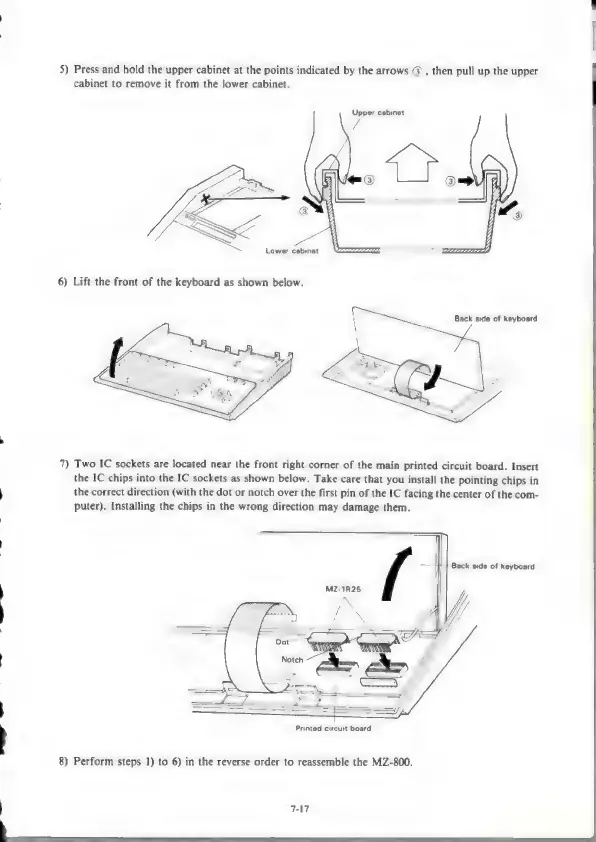
5)
Press
and
hold
the
upper
cabinet
at
the
points
indicated
by
the
arrows
@),
then
pull
up
the
upper
cabinet
to
remove
it
from
the
lower
cabinet.
Upper
cabinet
&
Lower
cabinet
ze
6)
Lift
the
front
of
the
keyboard
as
shown
below.
Back
side
of
keyboard
7)
Two
IC
sockets
are
located
near
the
front
right
corner
of
the
main
printed
circuit
board.
Insert
the
IC
chips
into
the
IC
sockets
as
shown
below.
Take
care
that
you
install
the
pointing
chips
in
the
correct
direction
(with
the
dot
or
notch
over
the
first
pin
of
the
IC
facing
the
center
of
the
com-
puter).
Installing
the
chips
in
the
wrong
direction
may
damage
them.
Back
side
of
keyboard
MZ-1R25
Printed
circuit
board
8)
Perform
steps
1)
to
6)
in
the
reverse
order
to
reassemble
the
MZ-800.
7-17
crs
a

Other manuals for Sharp MZ-800

Related product manuals