EasyManua.ls Logo

Sharp MZ-800 - Page 193

Sharp MZ-800
221 pages
Print Icon
To Next Page IconTo Next Page
To Previous Page IconTo Previous Page
Loading...
roe?
gf
A
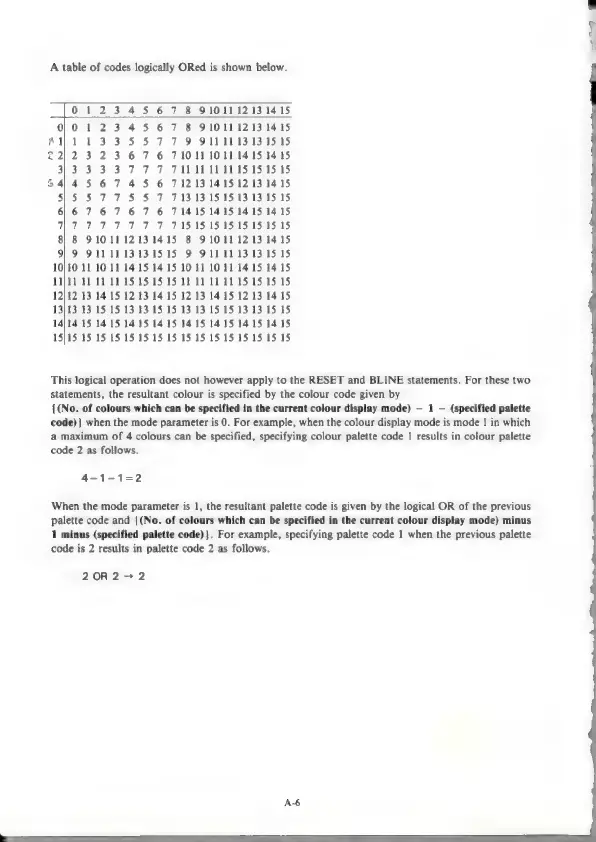
table
of
codes
logically
ORed
is
shown
below.
0123
45
67
8
91011
12131415
0}0
123
4
5
6
7
8
9101112131415
PA)
a.
b
83 HS
PR
Oma
sI31595
22)
2
3 2 3
6
7
6
710111011
1415
1415
a3
3
SS
77
F
PABA
SSS
ss
6414
5
67
4
5
6
712131415
12 13
1415
55°35
7°72
SS
7
713
13:15:15:13
13
15
15
6/6
76
7
6
7
6
714151415
14
15
1415
ET
POE TOT
PF
RASASNS
TS:15:151515
8)
8
9101112131415
8
91011
12131415
9)
9
9111113131515
9
9111113
131515
10}10
11
10
11
14.15
14.15
10
11
10
11
14
15
1415
1N}11
11
11
11
15
15
15
15
11
11
11
11
15
15
15 15
12/12
13
14
15
12
13
14.
15
12
13
14.15
12 13
1415
13]13
13
15
15
13
13
15
15
13
13
15
15 13 13
15
15
14/14
15
14.15 14.15
14
15
14.15
1415
1415
14.15
15}15
15 15 15 15 15 15 15 15 15 15 15 15 15 15
15
This
logical
operation
does
not
however
apply
to
the
RESET
and
BLINE
statements.
For
these
two
statements,
the
resultant
colour
is
specified
by
the
colour
code
given
by
{(No.
of
colours
which
can
be
specified
in
the
current
colour
display
mode)
1
(specified
palette
code)}
when
the
mode
parameter
is
0.
For
example,
when
the
colour
display
mode
is
mode
1
in
which
a
maximum
of
4
colours
can
be
specified,
specifying
colour
palette
code
1
results
in
colour
palette
code
2
as
follows.
4-1-1=2
When
the
mode
parameter
is
1,
the
resultant
palette
code
is
given
by
the
logical
OR
of
the
previous
palette
code
and
{(No.
of
colours
which
can
be
specified
in
the
current
colour
display
mode)
minus
1
minus
(specified
palette
code)}.
For
example,
specifying
palette
code
1
when
the
previous
palette
code
is
2
results
in
palette
code
2
as
follows.
20R2>2
A6

Other manuals for Sharp MZ-800

Related product manuals