26
E
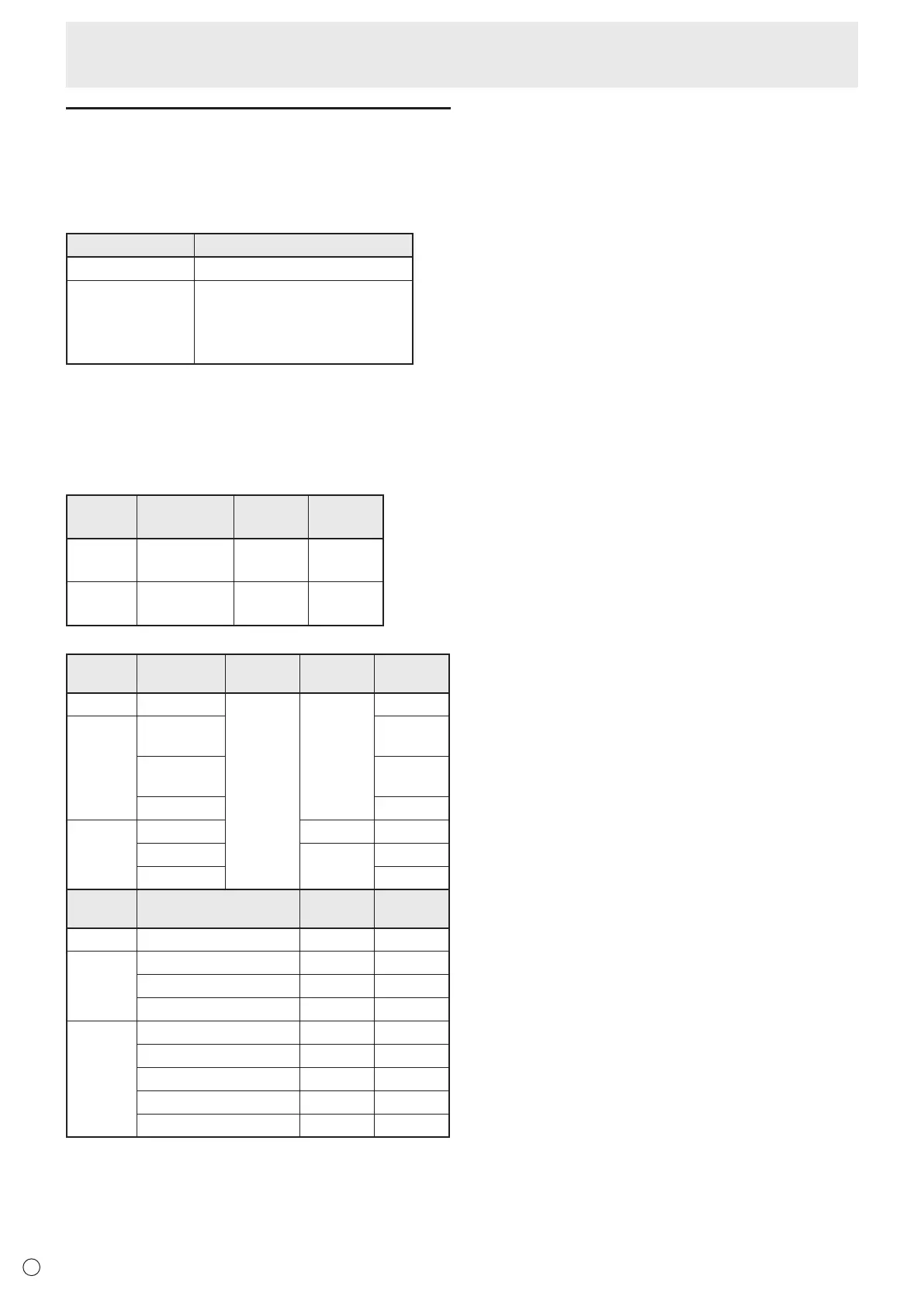
Supported formats
The types of les that can be played in USB ash drive or SD
memory card are as follows:
The operation of formats not indicated in the table is not guaranteed.
Image les
Extension Display capability
*.jpg (*.jpeg)
*1
Size <= 10000 x 10000 (pixel)
*.png
4096x3072 (pixel) 4bit,
2730x2500 (pixel) 8bit
2048x1536 (pixel) 16bit,
1500x1200 (pixel) 32bit
*1 JPEG les
• JPEG les in progressive format are not supported.
• Supported color formats are YUV4:4:4 and YUV4:2:2.
• Only YUV (YCbCr) color formats are supported. Files in
RGB or CMYK format cannot be played.
Audio les
Extension Sample rate
Maximum
bit rate
Audio
coding
*.mp3 32/44.1/48 384
MPEG-1, 2,
2.5 L3
*.wma 32/44.1/48/96 192/768
WMA,
WMA Pro
Video les
Extension Video coding
Max.
resolution
Frame rate
Maximum
bit rate
*.wmv
*
1,
*
2
WMV9
1920x1080
6-30
12
*.mp4
H.264 BP, MP,
HP
25
MPEG4 SP,
ASP
8
XVID 8
*.ts
MPEG2 24/25/30 30
H.264
6-30
25
VC1 25
Extension Audio coding
Sample
rate
Maximum
bit rate
*.wmv
*
1,
*
2
WMA 32/44.1/48 192
*.mp4
MP3 32/44.1/48
384
ADPCM 192
768
AAC 48
1024
*.ts
AC3 48
448
AAC 48
1024
MP3 32/44.1/48 384
DD+ 48 192
HE-AAC 44.1 128
*1 WMV7 and WMV8 video coding are not supported and thus
video will not appear. If it is possible to play only audio, only
audio will be output.
*2
If the playable bit rate is exceeded, video may not play
smoothly. In this event, convert the bit rate to about 10 Mbps.
Playing the Files in a media
• Some les may not play even if the format is supported.
• A maximum of 32 alphanumeric characters can be used for
folder name and le name. A le name or folder name may
not display correctly if a space, hyphen (-), or underbar (_)
is used.
• When le names or folder names are long, some
characters may not appear in the list screen.
• Do not use a le that is over 2 GB.
• During playback and when a list is displayed, the remote
control and some buttons may not respond when operated.
This is caused by the heavy image processing load and is
not due to a product failure or problem.
• Operation is not assured when a non-supported format is
used. The following types of problems may occur:
- Abnormal play speed
- Operations cannot be performed during playback
- Playback stops. The player application restarts.
- Playback stops. The monitor freezes.
• When a video le cannot be played, “Unsupported le”
appears. With some les, “Video resolution not supported”
or “Audio format not supported” may appear.



 To Next Page