A40441,ISRAEL R-340H/R-350H O/M
6
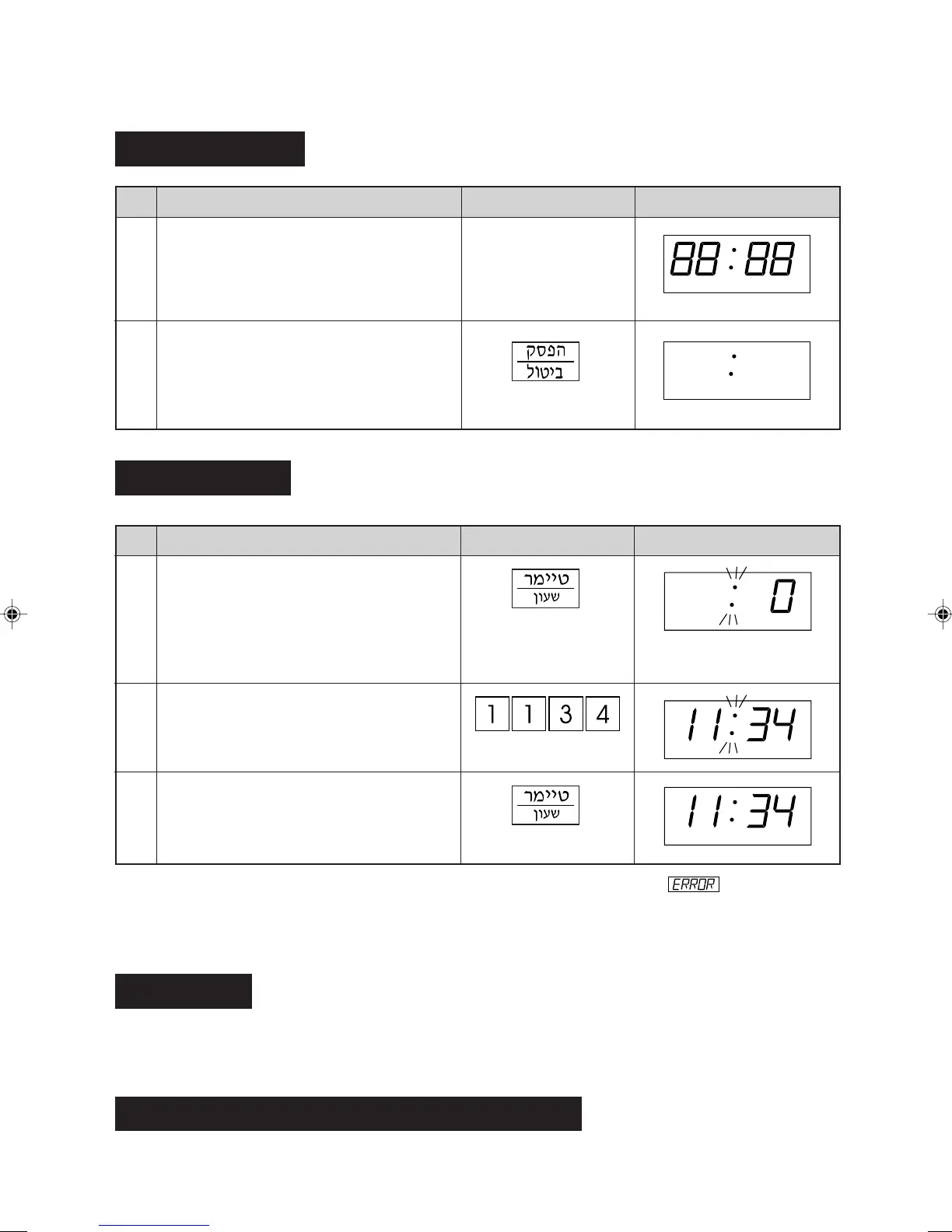
Step
Procedure Pad Order Display
1
Flashing eights
Clock Setting
Step
Procedure Pad Order Display
Press the TIMER/CLOCK pad.
* To enter the present time of day 11:34 (AM or PM).
BEFORE OPERATING
Enter the correct time of day by pressing
the numbers in sequence.
2
3
Getting Started
Only the dots will remain.
2
This is a 12 hour clock. If you attempt to enter an incorrect clock time (eg. 13:45), will appear in the
display. Press the STOP/CLEAR pad and re-enter the time of day (eg. 1:45).
If you wish to know the time of day during the cooking or timer mode, press the TIMER/CLOCK pad. As long
as your finger is pressing the TIMER/CLOCK pad, the time of day will be displayed.
Press the STOP/CLEAR pad once to:
1. Stop the oven temporarily during cooking.
2. Clear if you make a mistake during programming.
Press the STOP/CLEAR pad twice.
Stop/Clear
To Cancel a Programme During Cooking
Press the TIMER/CLOCK pad again.
The dots (:) will flash on and
off.
Press the STOP/CLEAR pad so that the
oven beeps.
Plug the oven into a power point.
Ensure the oven door is closed.
1
R-340H/R-341H,EN O/M,P05-09 03.11.10, 3:34 PM6



 To Next Page
 Loading...