RCD1200M
8 – 2
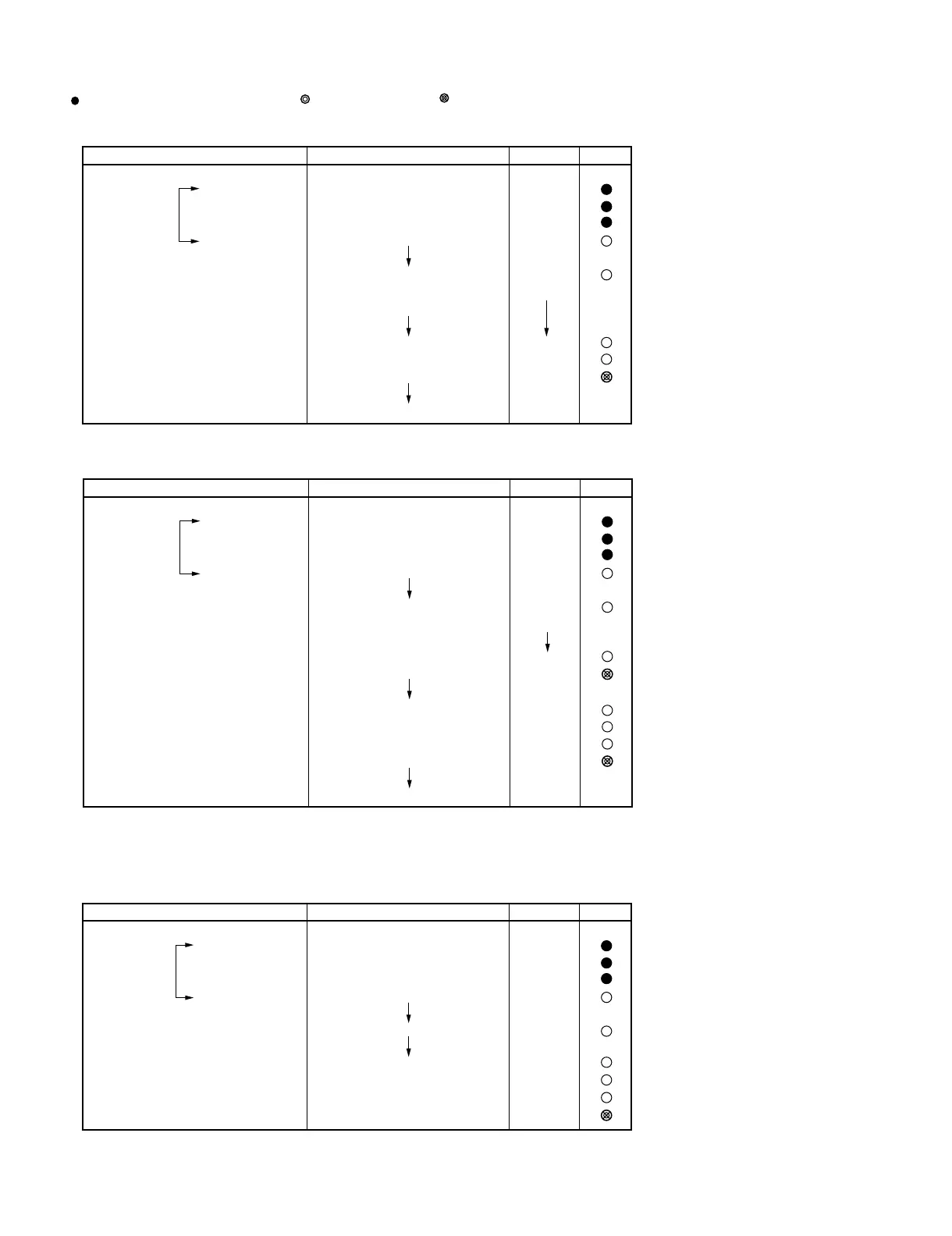
For example: Procedure to check the total cooking number of times (example, 957700 times) and using time (example, 1260 hours) of MG 1
and set 0 hours after MG1 is replaced.
: no sound {: 0.1 second sound : 2.0 second sound : (0.06 sec. ON, 0.06 sec. OFF) x 2 beeps
✩: [(0.04 sec. ON, 0.04 sec. OFF) x 3] x 4 beeps : (0.1 sec. ON, 0.1 sec. OFF) x 10 beeps
For example: Procedure to check the total cooking number of times (example, 957700 times) and clear it and check using time (example,
1260 hours) of MG 1 and set the using time (example, 1000 hours) of MG1.
2. Error history (SF-4)
You can check the most recent 10 error histories.
For example: Procedure to check the error histories that have been memorized in memory 1, memory 2 and memory 9.
#1 If there is no error “0" will be displayed.
#2 If you touch SELECT POWER, all history are cleared.
Operation Display Indicator Sound
(within 20 sec.)
SELECT POWER
SET MEMORY
START
STOP/CLEAR
2
(after 1 sec.)
1
SELECT TIME
START
STOP/CLEAR
CHECK
CHECK
.
.
.
.
SF-
SF2
9577
(total counter for serviced [x 100])
1260
0
SF-2
0
Operation Display Indicator Sound
(within 20 sec.)
SELECT POWER
SET MEMORY
START
STOP/CLEAR
2
(after 1 sec.)
SELECT TIME
START
1
SELECT TIME
1,0,0,0
START
STOP/CLEAR
CHECK
CHECK
.
.
.
.
SF-
SF2
9577
(total counter for serviced [x 100])
0
SF-2
1260
0
1000
SF-2
0
x4
Operation Display Indicator Sound
(within 20 sec.)
SELECT POWER
SET MEMORY
START
STOP/CLEAR
4
1 (latest error No.)
2
(1 time previous error)
9
(8 times previous error)
SELECT POWER
.
.
.
.
SF-
SF-4
EE 1
EE 6
EE24
0
#2
#1



 To Next Page