EasyManua.ls Logo

Sharp RT-1157H - Mains Voltage Selection; Cabinet Removal

Sharp RT-1157H
20 pages
Print Icon
To Next Page IconTo Next Page
To Previous Page IconTo Previous Page
Loading...
MAINS
VOLTAGE
SELECTION
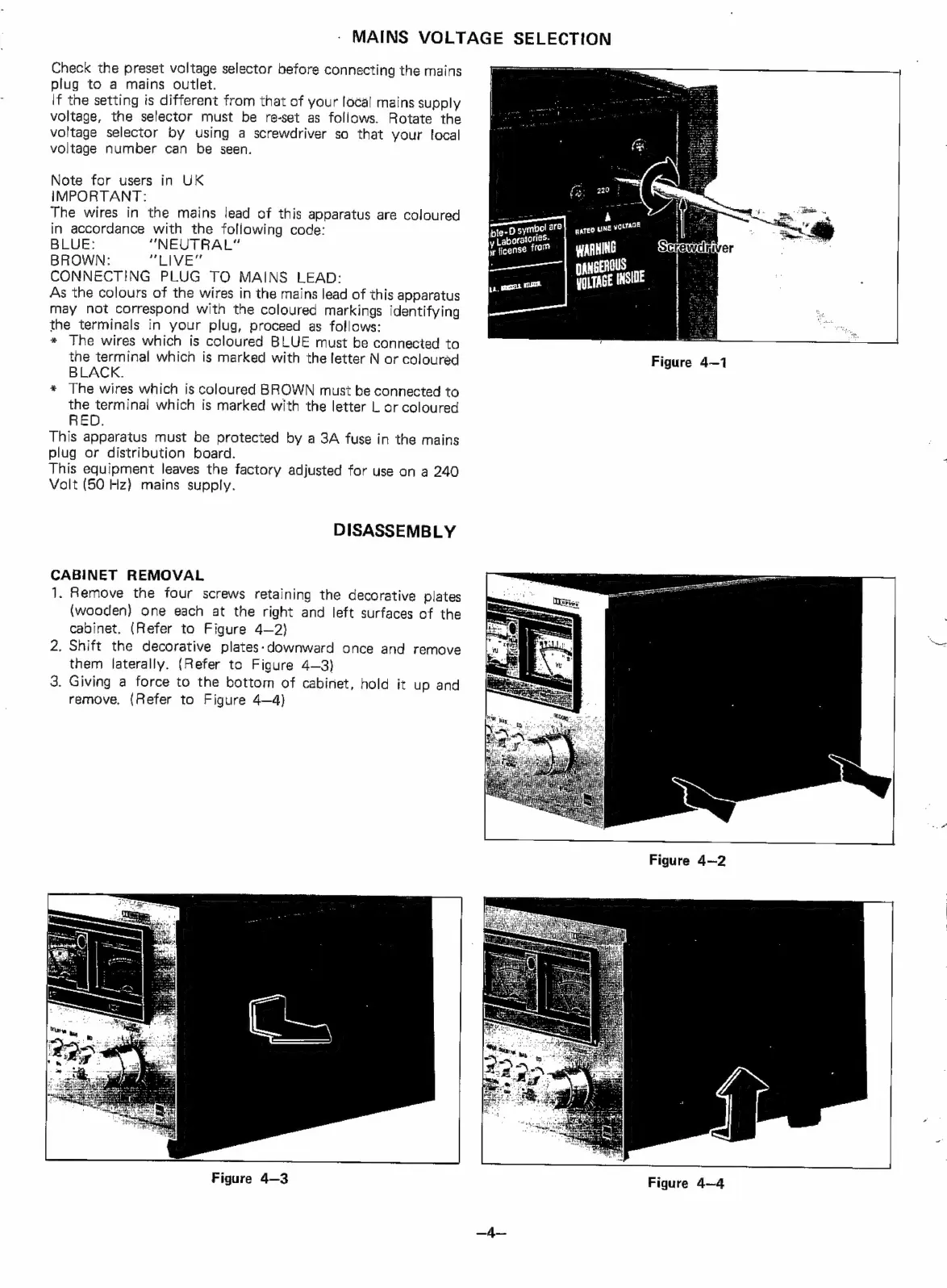
Check
the
preset
voltage
selector
before
connecting
the
mains
plug
to
a
mains
outlet.
\f
the
setting
is
different
from
that
of
your
local
mains
supply
voltage,
the
selector
must
be
re-set
as
follows.
Rotate
the
voltage
selector
by
using
a
screwdriver
so
that
your
local
voltage
Number
can
be
seen.
Note
for
users
in
UK
IMPORTANT:
The
wires
in
the
mains
lead
of
this
apparatus
are
coloured
in
accordance
with
the
following
code:
BLUE:
“NEUTRAL”
BROWN:
soa
WR
8
ca
CONNECTING
PLUG
TO
MAINS
LEAD:
As
the
colours
of
the
wires
in
the
mains
lead
of
this
apparatus
may
not
correspond
with
the
coloured
markings
identifying
the
terminals
in
your
plug,
proceed
as
follows:
*
The
wires
which
is
coloured
BLUE
must
be
connected
to
the
terminal
which
is
marked
with
the
letter
N
or
coloured
BLACK.
*
The
wires
which
is
coloured
BROWN
must
be
connected
to
the
terminal
which
is
marked
with
the
letter
L
or
coloured
RED.
This
apparatus
must
be
protected
by
a
3A
fuse
in
the
mains
plug
or
distribution
board.
This
equipment
leaves
the
factory
adjusted
for
use
on
a
240
Valt
(50 Hz}
mains
supply.
DISASSEMBLY
CABINET
REMOVAL
1.
Remove
the
four
screws
retaining
the
decorative
plates
(wooden)
one
each
at
the
right
and
left
surfaces
of
the
cabinet.
(Refer
to
Figure
4—2}
2.
Shift
the
decorative
plates-downward
once
and
remove
them
laterally.
(Refer
to
Figure
4—3)
3.
Giving
a
force
to
the
bottom
of
cabinet,
hold
it
up
and
remove,
(Refer
to
Figure
4—4)
Figure
4—3
-D
symbol
are
bles
orate
rigs.
ir
ficense
from
ee
pa,
messes.
=A
paTed
UNE
voLtTade
WARHING
gEROUS
IITAGE
INSIDE
Figure
4—1
Figure
4-2
Figure
4—4

Related product manuals