EasyManua.ls Logo

Sharp SC-7700CDH - Adjustment; CD Section Preparation; VCO Free-Run Frequency Adjustment; Tracking Error Balance Adjustment

Sharp SC-7700CDH
66 pages
Print Icon
To Next Page IconTo Next Page
To Previous Page IconTo Previous Page
Loading...
SC-
7700CDH
©
:
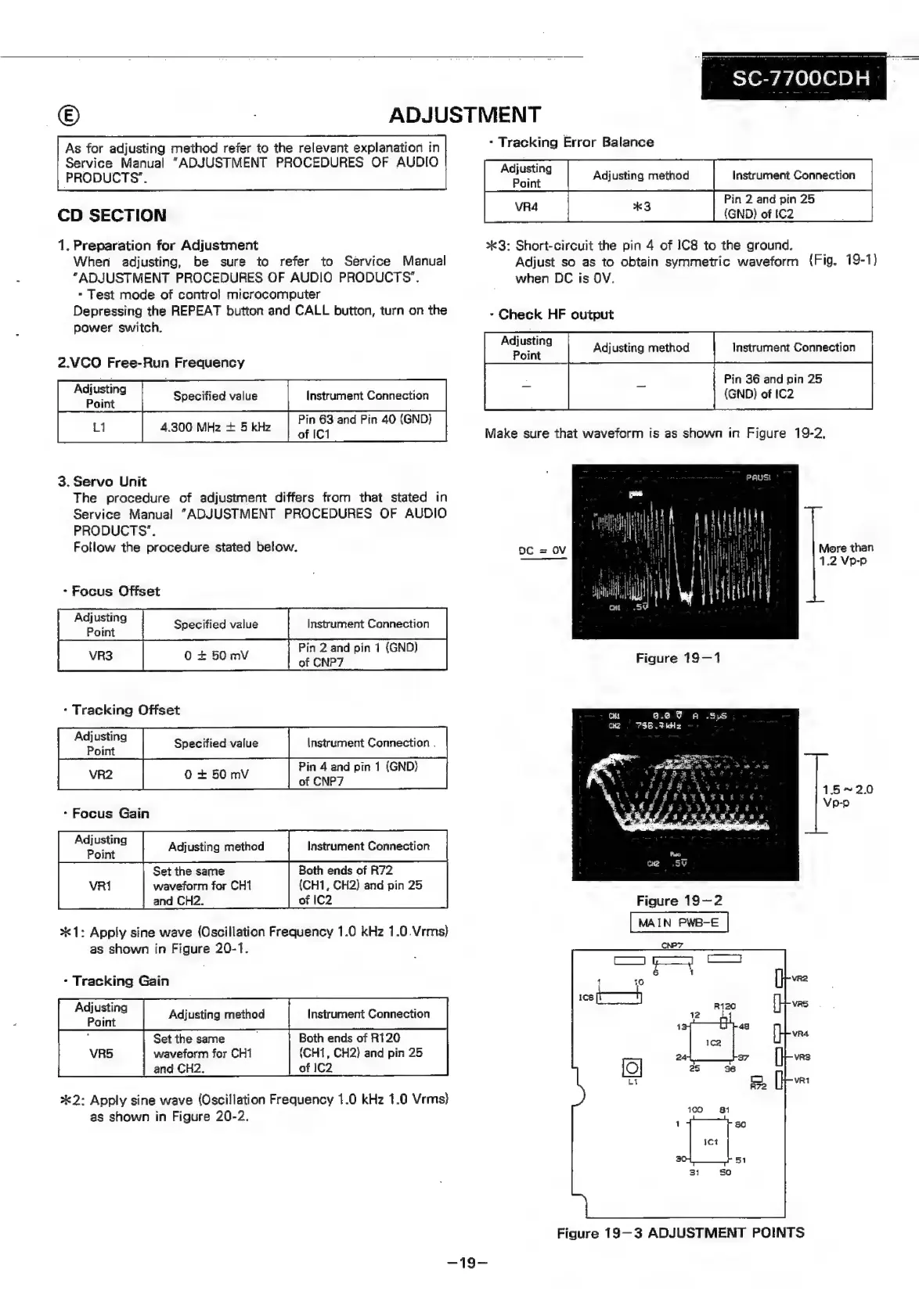
ADJUSTMENT
As
for
adjusting
method
refer
to
the
relevant
explanation
in
Service
Manual
“ADJUSTMENT
PROCEDURES
OF
AUDIO
PRODUCTS”.
CD
SECTION
1.
Preparation
for
Adjustment
When
adjusting,
be
sure
to
refer
to
Service
Manual
"ADJUSTMENT
PROCEDURES
OF
AUDIO
PRODUCTS’.
-
Test
mode
of
control
microcomputer
Depressing
the
REPEAT
button
and
CALL
button,
turn
on
the
power
switch.
2.VCO
Free-Run
Frequency
3.
Servo
Unit
The
procedure
of
adjustment
differs
from
that
stated
in
Service
Manual
“ADJUSTMENT
PROCEDURES
OF
AUDIO
PRODUCTS’.
Follow
the
procedure
stated
below.
-
Focus
Offset
-
Tracking
Offset
Adjusting
Specified
value
Instrument
Connection
.
Point
Pin
4
and
pin
1
(GND)
++
-
Focus
Gain
fe
ete
Adjusting
method
Instrument
Connection
Set
the
same
Both
ends
of
R72
VRi
waveform
for
CH1
(CH1,
CH2)
and
pin
25
and
CH2.
of
|C2
*1:
Apply
sine
wave
(Oscillation
Frequency
1.0
kHz
1.0.Vrms)
as
shown
in
Figure
20-1.
-
Tracking
Gain
Set the
same
Both
ends
of
R120
waveform
for
CH1
(CH1,
CH2)
and
pin
25
and
CH2.,
of
IC2
*2:
Apply
sine
wave
(Oscillation
Frequency
1.0
kHz
1.0
Vrms}
as
shown
in
Figure
20-2.
-
Tracking
Error
Balance
Pin
2
and
pin
25
cea
*3:
Short-circuit
the
pin
4
of
IC8
to
the
ground.
Adjust
so
as
to
obtain
symmetric
waveform
(Fig.
19-1)
when
DC
is
OV.
-
Check
HF
output
Pin
36
and
pin
25
{GND)
of
IC2
Make
sure
that
waveform
is
as
shown
in
Figure
19-2,
More
than
1.2
Vp-p
Figure
19—1
6.8
9
A
.SpsS
Oke
736
.FkHz
152.0
Vp-p
Figure
19-2
MAIN
PWB-E
Figure
19—3
ADJUSTMENT
POINTS

Related product manuals