EasyManua.ls Logo

Sharp SM-207H - Page 13

Sharp SM-207H
27 pages
Print Icon
To Next Page IconTo Next Page
To Previous Page IconTo Previous Page
Loading...
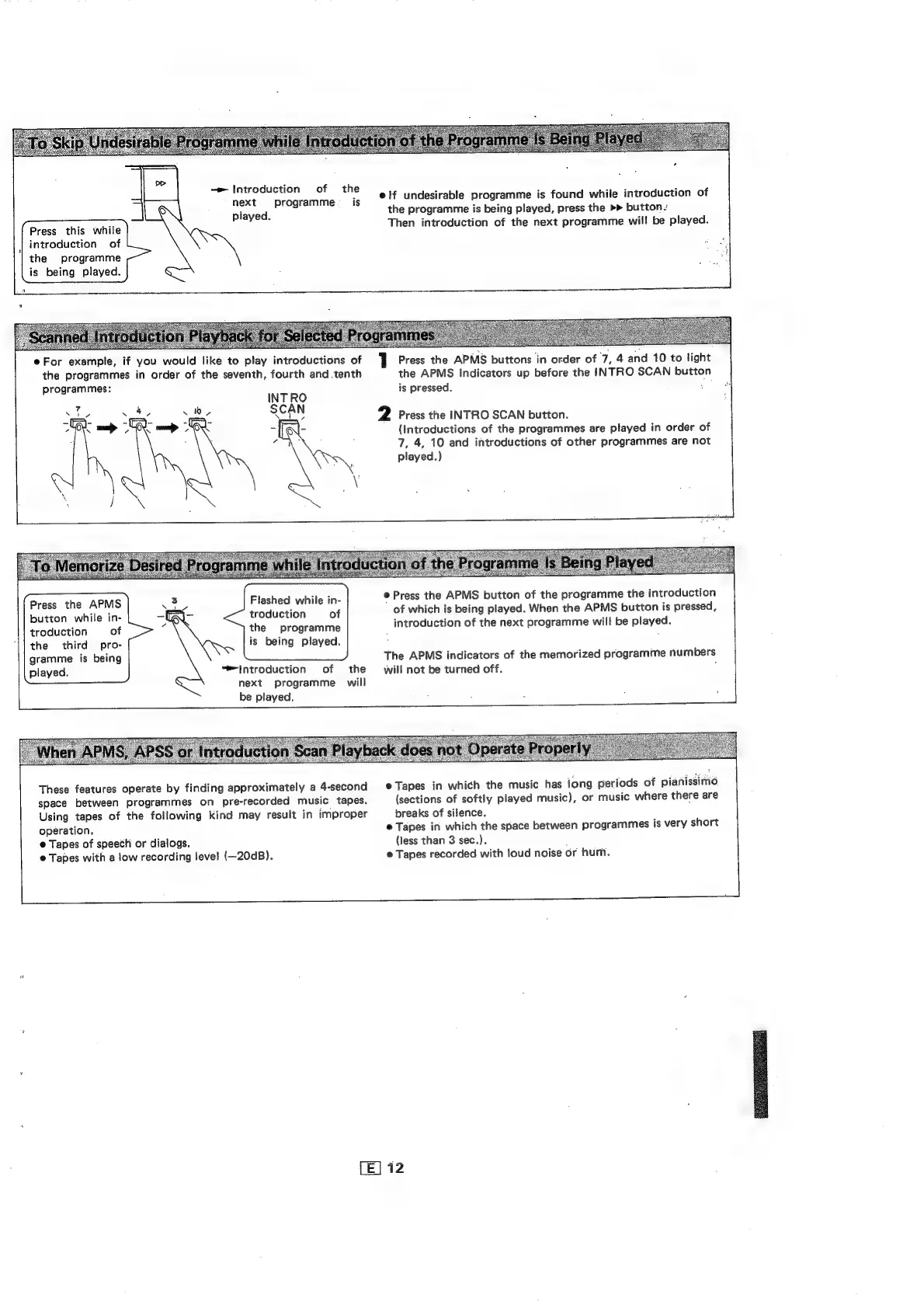
Introduction
of
the
next
programme
_
is
elf
undesirable
programme
is
found
while
introduction
of
the
programme
is
being
played,
press
the
>>
button.
layed.
.
ae
Then
introduction
of
the
next
programme
will
be
played.
Press
this
while
introduction
of
the
programme
is
being
played.
EOS
Sr
y
Eee
ts
@
:
Seek
EF%
eFor
example,
if
you
would
like
to
play
introductions
of
1
Press
the
APMS
buttons
in
order
of
7
4
and
10
to
light
the
programmes
in
order
of
the
seventh,
fourth
and
tenth
the
APMS
Indicators
up
before
the
INTRO
SCAN
button
programmes:
is
pressed.
a
INTRO
e
2
Press
the
INTRO
SCAN
button.
(Introductions
of
the
programmes
are
played
in
order
of
7,
4,
10
and
introductions
of
other
programmes
are
not
played.)
©
Press
the
APMS
button
of
the
programme
the
introduction
of
which
is
being
played.
When
the
APMS
button
is
pressed,
introduction
of
the
next
programme
will
be
played.
Flashed
while
in-
troduction
of
the
programme
is
being
played.
Press
the
APMS
button
while
in-
troduction
of
the
third
pro-
gramme
is
being
played.
The
APMS
indicators
of
the
memorized
programme
numbers
‘Introduction
of
the
will
not
be
turned
off.
;
next
programme
will
be
played.
These
features
operate
by
finding
approximately
a
4-second
©
Tapes
in
which
the
music
has
long
periods
of
pianissimo
space
between
programmes
on
pre-recorded
music
tapes.
(sections
of
softly
played
music),
or
music
where
there
are
Using
tapes
of
the
following
kind
may
result
in
improper
breaks
of
silence.
operation,
@
Tapes
in
which
the
space
between
programmes
is
very
short
@
Tapes
of
speech
or
dialogs.
(less
than
3
sec.).
;
©
Tapes
with
a
low
recording
level
(—20dB).
©
Tapes
recorded
with
loud
noise
or
hum.
"

Related product manuals