EasyManua.ls Logo

Sharp SM-207H - Page 12

Sharp SM-207H
27 pages
Print Icon
To Next Page IconTo Next Page
To Previous Page IconTo Previous Page
Loading...
@
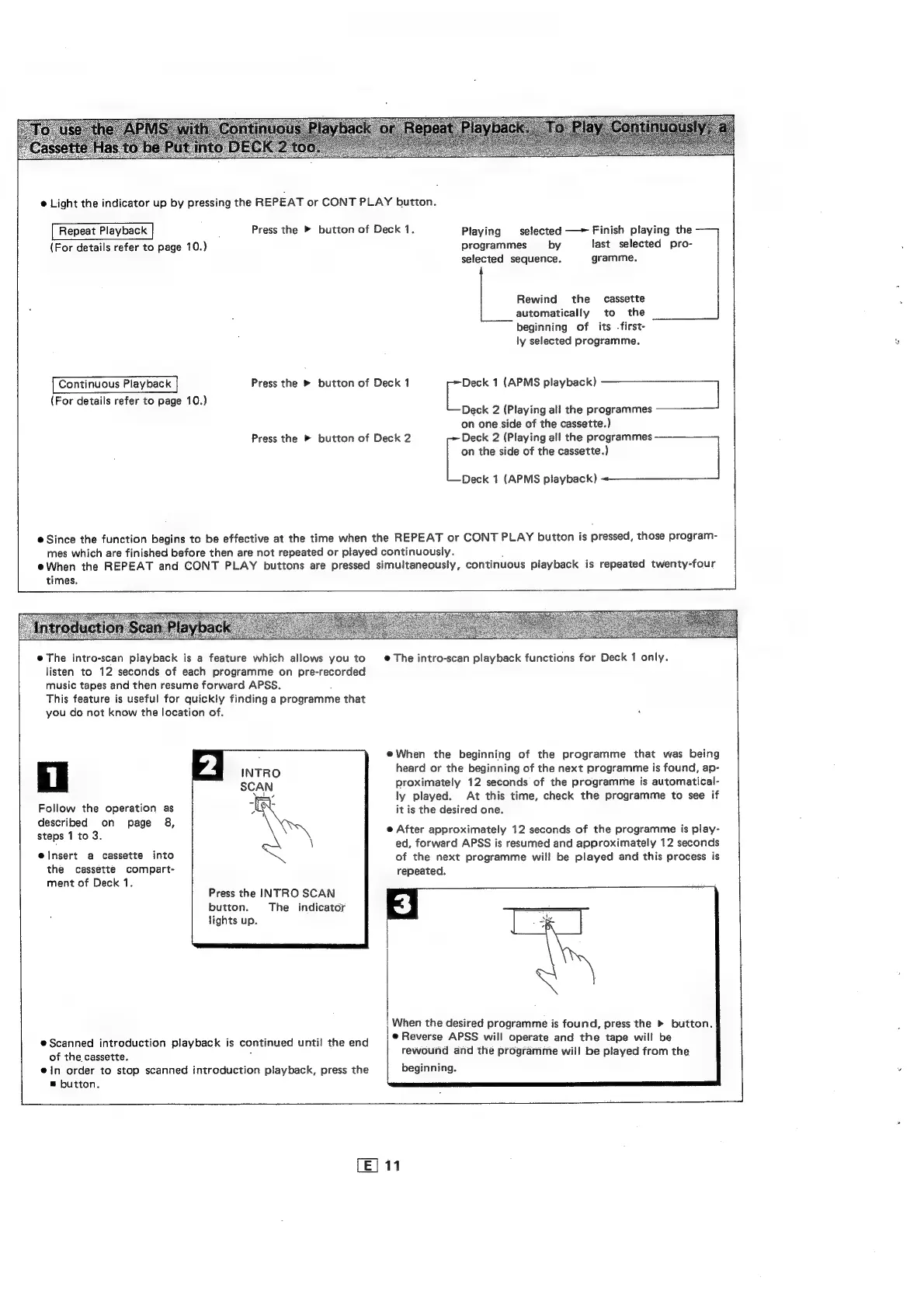
Light
the
indicator
up
by
pressing
the
REPEAT
or
CONT
PLAY
button.
Repeat
Playback
;
Press
the
»
button
of
Deck
1.
Playing
selected
Finish
playing
the
(For
details
refer
to
page
10.)
(For
details
refer
to
page
10.)
Continuous
Playback
Press
the
»
button
of
Deck
1
on
1
(APMS
playback)
fete
ta
ogrammes
Press
the
»
button
of
Deck
2
Deck
2
(Playing
all
the
programmes
@
Since
the
function
begins
to
be
effective
at
the
time
when
the
REPEAT
or
CONT
PLAY
button
is
pressed,
those
program-
mes
which
are
finished
before
then
are
not
repeated
or
played
continuously.
;
eWhen
the
REPEAT
and
CONT
PLAY
buttons
are
pressed
simultaneously,
continuous
playback
is
repeated
twenty-four
programmes
by
last
selected
pro-
selected
sequence.
gramme.
Rewind
the
cassette
automatically
to
the
beginning
of
its
-first-
ly
selected
programme.
Deck
2
(Playing
all
the
pr:
on
one
side
of
the
cassette.)
on
the
side
of
the
cassette.)
Deck
1
(APMS
playback)
The
intro-scan
playback
is
a
feature
which
allows
you
to
listen
to
12
seconds
of
each
programme
on
pre-recorded
music
tapes
and
then
resume
forward
APSS.
:
This
feature
is
useful
for
quickly
finding
a
programme
that
you
do
not
know
the
location
of.
Follow
the
operation
as
described
on
page
8,
steps
1
to
3.
elnsert
a
cassette
into
the
cassette
compart-
ment
of
Deck
1.
Press
the
INTRO
SCAN
button.
The
indicator
lights
up.
e
Scanned
introduction
playback
is
continued
until
the
end
of
the
cassette.
ein
order
to
stop
scanned
introduction
playback,
press
the
|
®
button.
@
The
intro-scan
playback
functions
for
Deck
1
only.
@When
the
beginning
of
the
programme
that
was
being
heard
or
the
beginning
of
the
next
programme
is
found,
ap-
proximately
12
seconds
of
the
programme
is
automatical-
ly
played.
At
this
time,
check
the
programme
to
see
if
it
is
the
desired
one.
e@
After
approximately
12
seconds
of
the
programme
is
play-
ed,
forward
APSS
is
resumed
and
approximately
12
seconds
of
the
next
programme
will
be
played
and
this
process
is
repeated.
S
;
When
the
desired
programme
is
found,
press
the
button.
|@
Reverse
APSS
will
operate
and
the
tape
will
be
rewound
and
the
programme
will
be
played
from
the
beginning.

Related product manuals