EasyManua.ls Logo

Sharp SM-207H - Page 11

Sharp SM-207H
27 pages
Print Icon
To Next Page IconTo Next Page
To Previous Page IconTo Previous Page
Loading...
le
Press
the
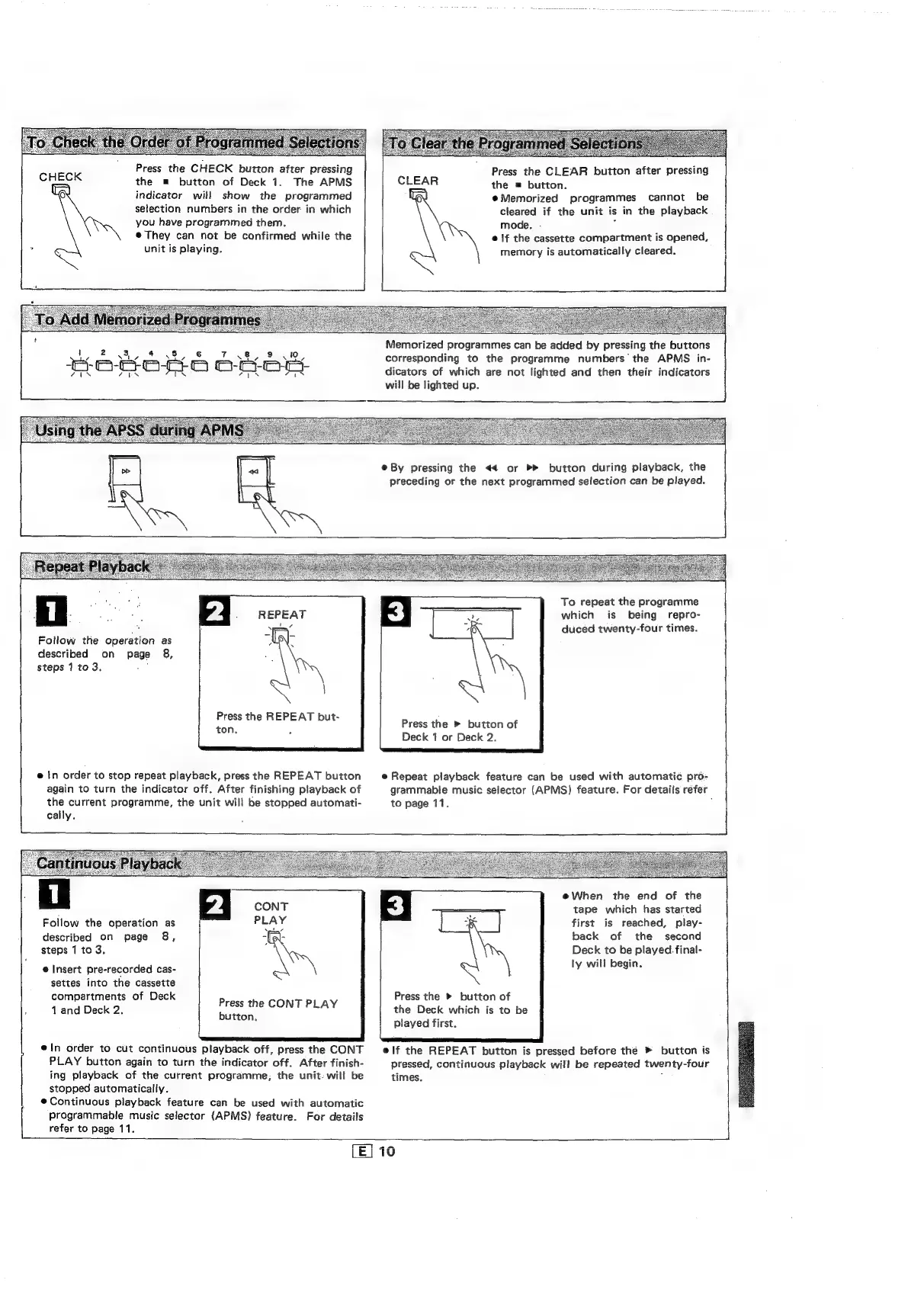
CHECK
button
after
pressing
the
m
button
of
Deck
1.
The
APMS
indicator
will
show
the
programmed
selection
numbers
in
the
order
in
which
you
have
programmed
them.
@
They
can
not
be
confirmed
while
the
*
unit
is
playing.
Press
the
CLEAR
button
after
pressing
the
=
button.
@eMemorized
programmes
cannot
be
cleared
if
the
unit
is
in
the
playback
mode.
-
:
©
if
the
cassette
compartment
is
opened,
memory
is
automatically
cleared.
a
ee
Eee
Se
Ss
Memorized
programmes
can
be
added
by
pressing
the
buttons
corresponding
to
the
programme
numbers
the
APMS
in-
dicators
of
which
are
not
lighted
and
then
their
indicators
will
be
lighted
up.
Follow
the
operation
as
described
on
page
8,
steps
1
to
3.
:
Press
the
REPEAT
but-
ton.
fs
e
In
order
to
stop
repeat
playback,
press
the
REPEAT
button
again
to
turn
the
indicator
off.
After
finishing
playback
of
the
current
programme,
the
unit
will
be
stopped
automati-
cally.
e@
By
pressing
the
<4
or
button
during
playback,
the
preceding
or
the
next
programmed
selection
can
be
played.
To
repeat
the
programme
which
is
being
repro-
duced
twenty-four
times.
Press
the
»
button
of
Deck
1
or
Deck
2.
e
Repeat
playback
feature
can
be
used
with
automatic
pro-
grammable
music
selector
(APMS)
feature.
For
details
refer
to
page
11.
,
Follow
the
operation
as
described
on
page
8,
steps
1
to
3,
e
Insert
pre-recorded
cas-
settes
into
the
cassette
compartments
of
Deck
1
and
Deck
2,
Press
the
CONT
PLAY
button,
ln
order
to
cut
continuous
playback
off,
press
the
CONT
PLAY
button
again
to
turn
the
indicator
off.
After
finish-
ing
playback
of
the
current
programme,
the
unit.
will
be
stopped
automatically.
@Continuous
playback
feature
can
be
used
with
automatic
programmable
music
selector
(APMS)
feature.
For
details
refer
to
page
11.
@When
the
end
of
the
tape
which
has
started
first
is
reached,
play-
back
of
the
second
Deck
to
be
played.
final-
ly
will
begin.
Press
the
»
button
of
the
Deck
which
is
to
be
played
first.
elf
the
REPEAT
button
is
pressed
before
the
»
button
is
pressed,
continuous
playback
will
be
repeated
twenty-four
times.
:
(E]
16

Related product manuals