EasyManua.ls Logo

Sharp SM-207H - Page 10

Sharp SM-207H
27 pages
Print Icon
To Next Page IconTo Next Page
To Previous Page IconTo Previous Page
Loading...
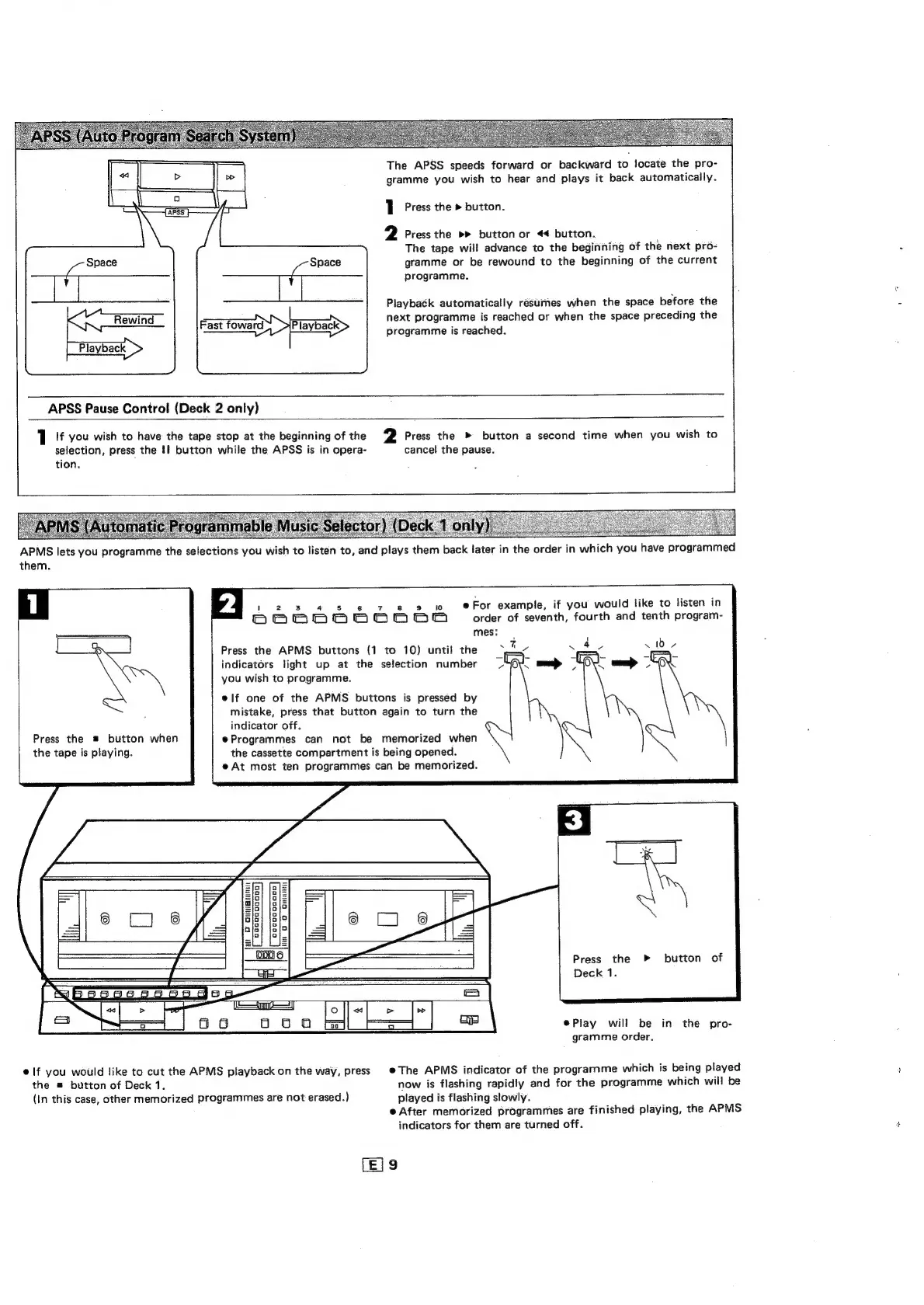
The
APSS
speeds
forward
or
backward
to
locate
the
pro-
gramme
you
wish
to
hear
and
plays
it
back
automatically.
1
Press
the
>
button.
2
Press
the
button
or
<4
button.
:
The
tape
will
advance
to
the
beginning
of
the
next
pro-
gramme
or
be
rewound
to
the
beginning
of
the
current
programme.
Playback
automatically
resumes
when
the
space
before
the
next
programme
is
reached
or
when
the
space
preceding
the
Fast
foward
.
programme
is
reached.
Playback
APSS
Pause
Control
(Deck
2
only)
1
If
you
wish
to
have
the
tape
stop
at
the
beginning
of
the
2
Press
the
»
button
a
second
time
when
you
wish
to
selection,
press
the
tf
button
while
the
APSS
is
in
opera-
cancel
the
pause.
tion.
APMS
lets
you
programme
the
selections
you
wish
to
listen
to,
and
plays
them
back
later
in
the
order
in
which
you
have
programmed
them.
1
2
3
4
5
6
7
8
8
£0
e
For
example,
if
you
would
like
to
listen
in
Deenononvnn
order
of
seventh,
fourth
and
tenth
program-
mes:
Press
the
APMS
buttons
(1
to
10)
until
the
indicators
light
up
at
the
selection
number
you
wish
to
programme.
40
L1b
7
OX
mp
OOK
elf
one
of
the
APMS
buttons
is
pressed
by
mistake,
press
that
button
again
to
turn
the
indicator
off.
Programmes
can
not
be
memorized
when
the
cassette
compartment
is
being
opened.
@
At
most
ten
programmes
can
be
memorized.
Press
the
button
when
the
tape
is
playing.
mdaegooa00
coccoooans
Yh
DO
GINBUE
Press
the
button
of
Deck
1.
@Play
will
be
in
the
pro-
gramme
order.
elf
you
would
like
to
cut
the
APMS
playback
on
the
way,
press
©The
APMS
indicator
of
the
programme
which
is
being
played
the
#
button
of
Deck
1.
now
is
flashing
rapidly
and
for
the
programme
which
will
be
(in
this
case,
other
memorized
programmes
are
not
erased.)
played
is
flashing
slowly.
©
After
memorized
programmes
are
finished
playing,
the
APMS
indicators
for
them
are
turned
off.
(E]9

Related product manuals