EasyManua.ls Logo

Sharp SM-207H - Page 9

Sharp SM-207H
27 pages
Print Icon
To Next Page IconTo Next Page
To Previous Page IconTo Previous Page
Loading...
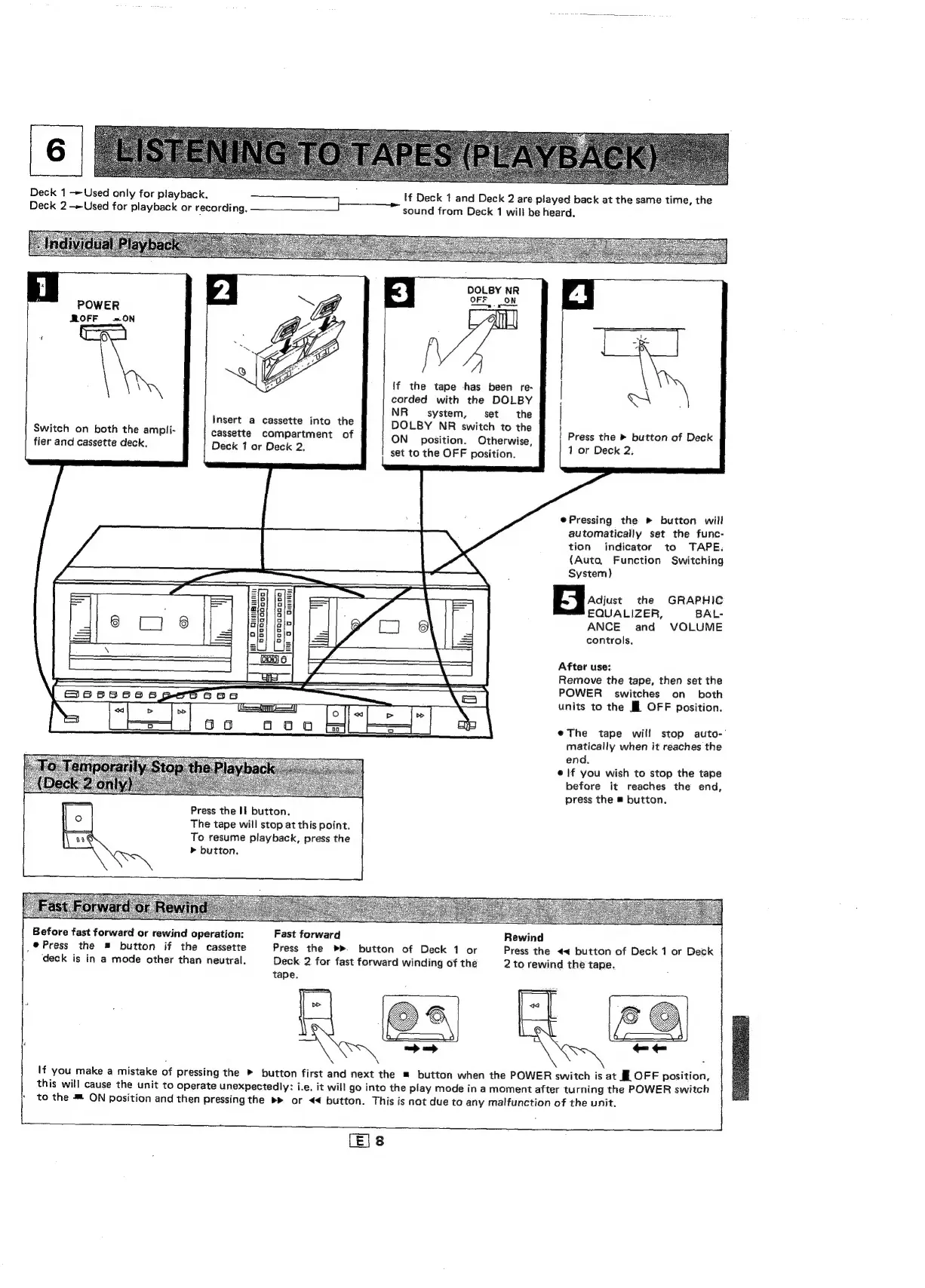
Deck
1
Used
only
for
playback.
oenare
aa
eee
tf
Deck
1
and
Deck
2
are
played
back
at
the
same
time,
the
Deck
2-»Used
for
playback
or
recording,
sound
from
Deck
1
will
be
heard.
3
DOLBY
NR
OFF
ON
POWER
a
ROFF
=ON
g
f
(0
\
Dy
Ze
{f
the
tape
has
been
re-
corded
with
the
DOLBY
|
:
oh
ives
NR
system,
set
the
;
:
nsert
a
cassette
into
the
DOLBY
NR
switch
to
the
}
Switch
on
both
the
ampli-
cassette
compartment
of
ON
position.
Otherwise
!
Press
the
»
button
of
Deck
fier
and
cassette
deck.
Deck
1
or
Deck
2.
set
to
the
OFF
position
1
or
Deck
2,
e@Pressing
the
»
button
will
automatically
set
the
func-
tion
indicator
to
TAPE:
(Auto,
Function
Switching
System)
A
asics
the
GRAPHIC
EQUALIZER,
BAL-
ANCE
and
VOLUME
controls,
After
use:
Remove
the
tape,
then
set
the
a
——
POWER
switches
on
both
|
S005
00s
pees
=e
eee
units
to
the
Ml
OFF
Position.
eThe
tape
will
stop
auto-
matically
when
it
reaches
the
end.
e
if
you
wish
to
stop
the
tape
before
it
reaches
the
end,
press
the
#
button.
Press
the
If
button.
The
tape
will
stop
at
this
point.
To
resume
playback,
press
the
>
button,
Before
fast
forward
or
rewind
operation:
Fast
forward
Rewind
,@
Press
the
button
if
the
cassette
Press
the
>».
button
of
Deck
1
or
Press
the
<<
button
of
Deck
1
or
Deck
‘deck
is
in
a
mode
other
than
neutral.
Deck
2
for
fast
forward
winding
of
the
2
to
rewind
the
tape.
tape.
.
.
>—>
P
\
a
If
you
make
a
mistake
of
pressing
the
»
button
first
and
next
the
=
button
when
the
POWER
switch
is
at
If
OFF
position,
this
will
cause
the
unit
to
operate
unexpectedly:
i.e.
it
will
go
into
the
play
mode
in
a
moment
after
turning
the
POWER
switch
;
to
the
*
ON
position
and
then
pressing
the
»»
or
<
button.
This
is
not
due
to
any
malfunction
of
the
unit.
.
LE|8

Related product manuals