EasyManua.ls Logo

Sharp SM-207H - Page 15

Sharp SM-207H
27 pages
Print Icon
To Next Page IconTo Next Page
To Previous Page IconTo Previous Page
Loading...
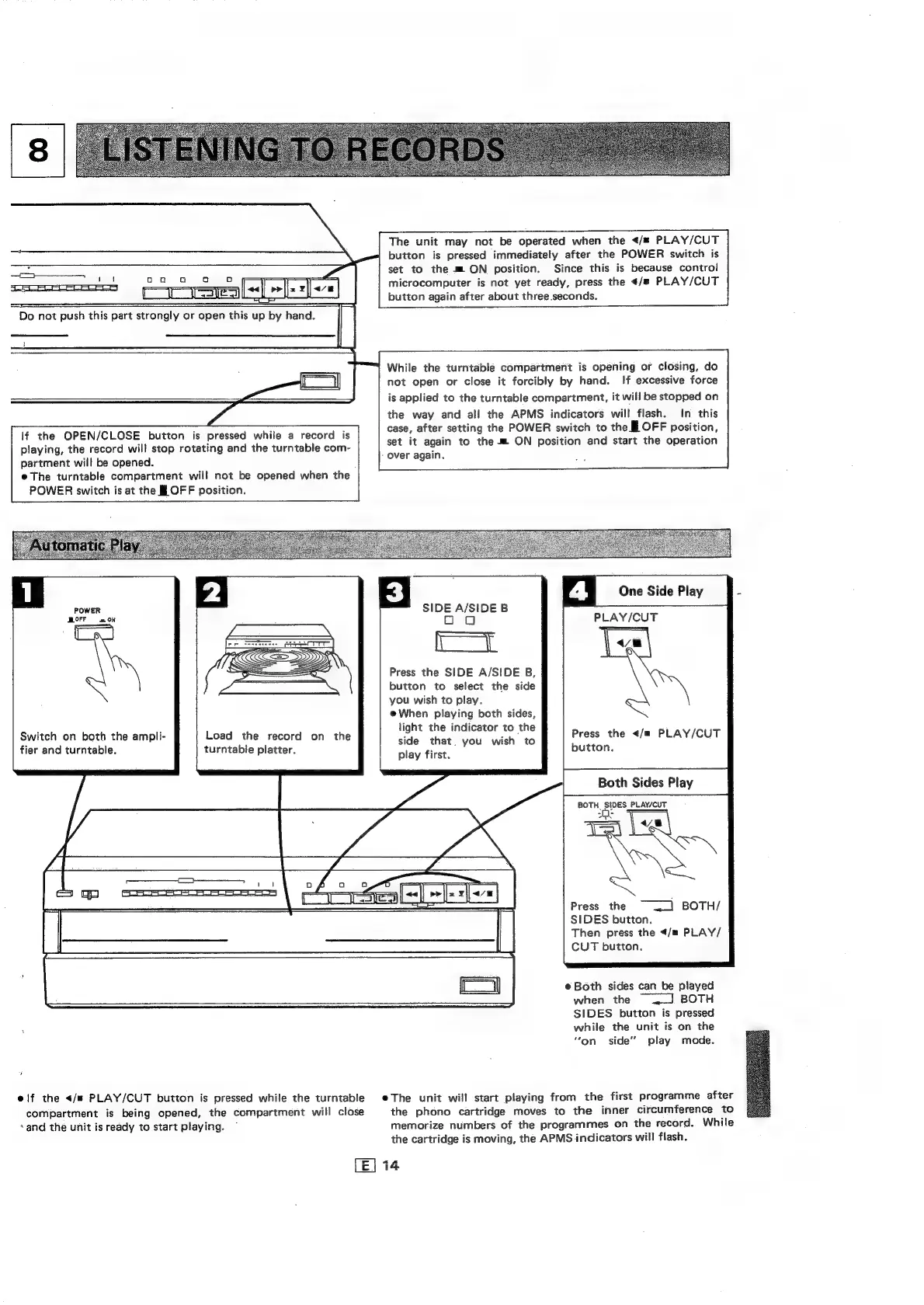
The
unit
may
not
be
operated
when
the
</#
PLAY/CUT
button
is
pressed
immediately
after
the
POWER
switch
is
id
set
to
the
m
ON
position.
Since
this
is
because
control
—+__——
a
microcomputer
is
not
yet
ready,
press
the
«/s
PLAY/CUT
tale
button
again
after
about
three
seconds.
Do
not
push
this
part
strongly
or
open
this
up
by
hand.
While
the
turntable
compartment
is
opening
or
closing,
do
not
open
or
close
it
forcibly
by
hand.
If
excessive
force
is
applied
to
the
turntable
compartment,
it
will
be
stopped
on
the
way
and
all
the
APMS
indicators
will
flash.
In
this
case,
after
setting
the
POWER
switch
to
the
I
OFF
position,
set
it
again
to
the
m=
ON
position
and
start
the
operation
-
over
again.
lf
the
OPEN/CLOSE
button
is
pressed
while
a
record
is
playing,
the
record
will
stop
rotating
and
the
turntable
com-
partment
will
be
opened.
e@
The
turntable
compartment
will
not
be
opened
when
the
POWER
switch
is
at
the
Jf
OFF
position.
SIDE
A/SIDE
B
oa
a
Press
the
SIDE
A/SIDE
B,
button
to
select
the
side
you
wish
to
play.
e
When
playing
both
sides,
light
the
indicator
to
the
side
that.
you
wish
to
play
first.
PLAY/CUT
OFF
an
ON
Press
the
</m
PLAY/CUT
button.
Load
the
record
on
the
turntable
platter.
Switch
on
both
the
ampli-
fier
and
turntable.
Both
Sides
Play
BOTH
SIDES
PLAY/CUT
Press
the
~
~_]
BOTH/
SIDES
button.
Then
press
the
</m
PLAY/
CUT
button,
e
Both
sides
can
be
played
when
the
J]
BOTH
SIDES
button
is
pressed
while
the
unit
is
on
the
“on.
side’’
play
mode.
elf
the
</m
PLAY/CUT
button
is
pressed
while
the
turntable
eThe
unit
will
start
playing
from
the
first
programme
after
compartment
is
being
opened,
the
compartment
will
close
the
phono
cartridge
moves
to
the
inner
circumference
to
sand
the
unit
is
ready
to
start
playing.
~
memorize
numbers
of
the
programmes
on
the
record.
While
the
cartridge
is
moving,
the
APMS
indicators
will
flash.
E|
14

Related product manuals