EasyManua.ls Logo

Sharp SM-207H - Page 20

Sharp SM-207H
27 pages
Print Icon
To Next Page IconTo Next Page
To Previous Page IconTo Previous Page
Loading...
@
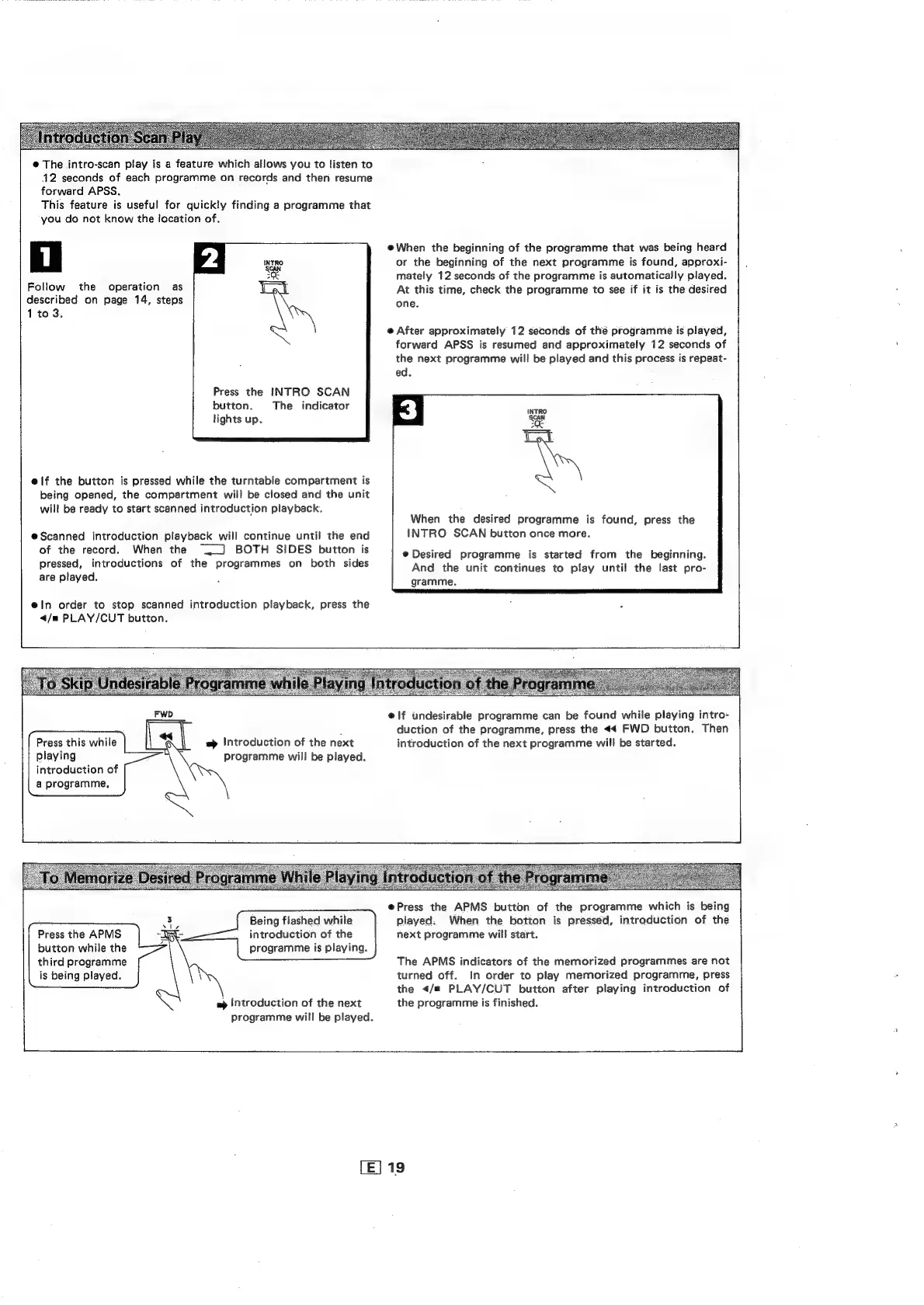
The
intro-scan
play
is
a
feature
which
allows
you
to
listen
to
12
seconds
of
each
programme
on
records
and
then
resume
forward
APSS.
This
feature
is
useful
for
quickly
finding
a
programme
that
you
do
not
know
the
location
of.
Follow
the
operation
as
described
on
page
14,
steps
1
to
3.
Press
the
INTRO
SCAN
button.
The
indicator
lights
up.
e@if
the
button
is
pressed
while
the
turntable
compartment
is
being
opened,
the
compartment
will
be
closed
and
the
unit
will
be
ready
to
start
scanned
introduction
playback.
e@Scanned
introduction
playback
will
continue
until
the
end
of
the
record.
When
the
]
BOTH
SIDES
button
is
pressed,
introductions
of
the
programmes
on
both
sides
are
played.
e@ln
order
to
stop
scanned
introduction
playback,
press
the
</m
PLAY/CUT
button.
=
Introduction
of
the
next
programme
will
be
played.
Press
this
while
playing
introduction
of
a
programme,
@When
the
beginning
of
the
programme
that
was
being
heard
or
the
beginning
of
the
next
programme
is
found,
approxi-
mately
12
seconds
of
the
programme
is
automatically
played.
At
this
time,
check
the
programme
to
see
if
it is
the
desired
one.
@
After
approximately
12
seconds
of
thé
programme
is
played,
forward
APSS
is
resumed
and
approximately
12
seconds
of
the
next
programme
will
be
played
and
this
process
is
repeat-
ed.
When
the
desired
programme
is
found,
press
the
INTRO
SCAN
button once
more.
Desired
programme
is
started
from
the
beginning.
And
the
unit
continues
to
play
until
the
last
pro-
gramme.
e@if
undesirable
programme
can
be
found
while
playing
intro-
duction
of
the
programme,
press
the
«4
FWD
button.
Then
introduction
of
the
next
programme
will
be
started.
Being
flashed
while
introduction
of
the
programme
is
playing.
Press
the
APMS
button
while
the
third
programme
is
being
played.
wp
Introduction
of
the
next
programme
will
be
played.
@Press
the
APMS
button
of
the
programme
which
is
being
played:
When
the
botton
is
pressed,
introduction
of
the
next
programme
will
start.
The
APMS
indicators
of
the
memorized
programmes
are
not
turned
off.
In
order
to
play
memorized
programme,
press
the
</m
PLAY/CUT
button
after
playing
introduction
of
the
programme
is
finished.
[E]
19

Related product manuals