EasyManua.ls Logo

Sharp SM-207H - Page 19

Sharp SM-207H
27 pages
Print Icon
To Next Page IconTo Next Page
To Previous Page IconTo Previous Page
Loading...
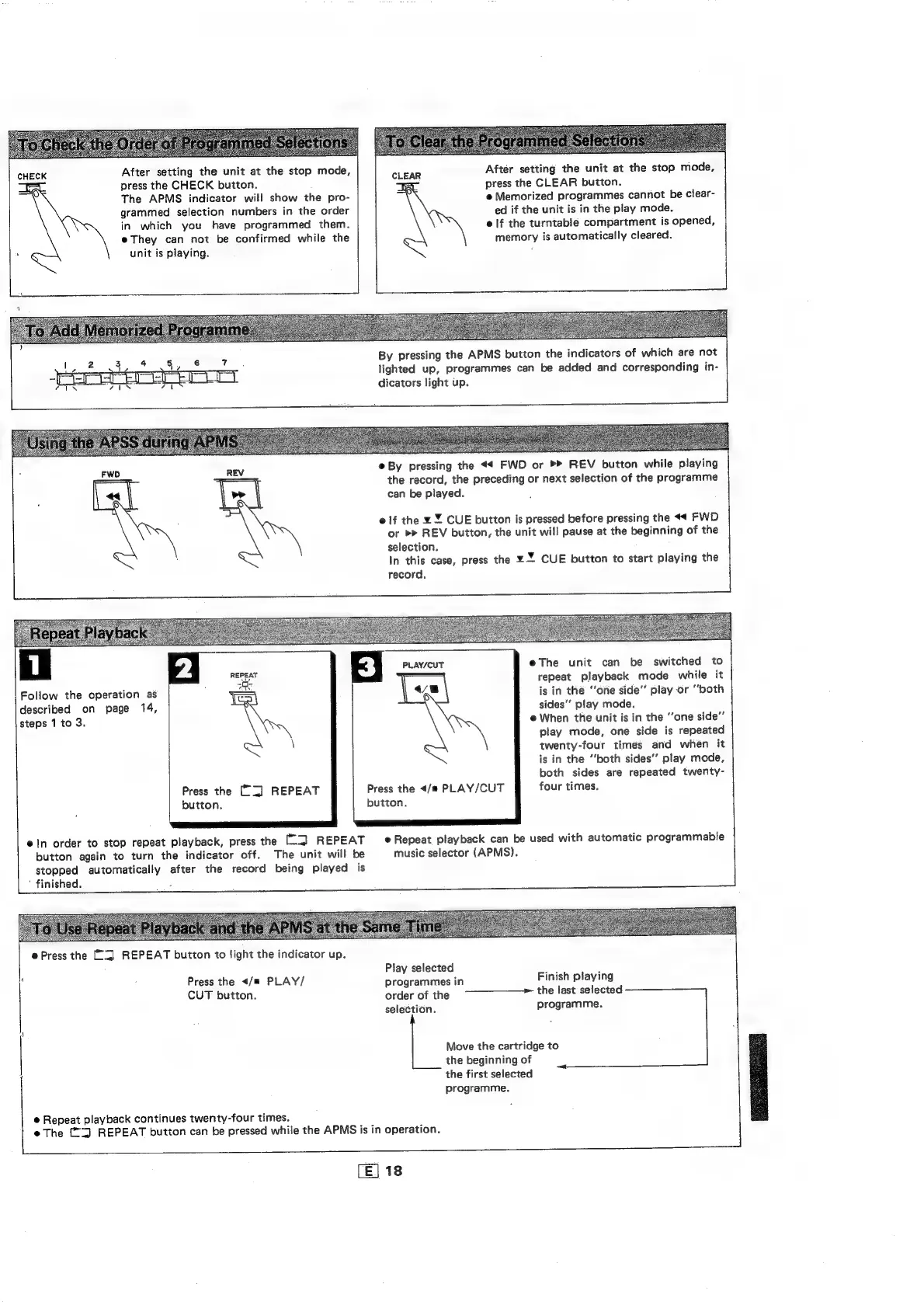
CHECK
After
setting
the
unit
at
the
stop
mode,
After
setting
the
unit
at
the
stop
mode,
eS
press
the
CHECK
button.
press
the
CLEAR
button.
The
APMS
indicator
will
show
the
pro-
@
Memorized
programmes
cannot
be
clear-
grammed
selection
numbers
in
the
order
ed
if
the
unit
is
in
the
play
mode.
\
in
which
you
have
programmed
them.
elf
the
turntable
compartment
is
opened,
e
They
can
not
be
confirmed
while
the
memory
is
automatically
cleared.
.
\
unit
is
playing.
By
pressing
the
APMS
button
the
indicators
of
which
are
not
lighted
up,
programmes
can
be
added
and
corresponding
in-
dicators
light
up.
e
By
pressing
the
<4
FWD
or
REV
button
while
playing
the
record,
the
preceding
or
next
selection
of
the
programme
can
be
played.
FWD
REV
e
if
the
¥
%
CUE
button
is
pressed
before
pressing
the
FWD
or
REV
button,
the
unit
will
pause
at
the
beginning
of
the
selection.
.
In
this
case,
press
the
¥%
CUE
button
to
start
playing
the
record.
eThe
unit
can
be
switched
to
repeat
playback
mode
while
it
is
in
the
“one
side”
play
or
“both
sides’”’
play
mode.
@
When
the
unit
is
in
the
‘‘one
side”
play
mode,
one
side
is
repeated
twenty-four
times
and
when
it
is
in
the
“‘both
sides’’
play
mode,
both
sides
are
repeated
twenty-
four
times.
PLAY/CUT
Follow
the
operation
as
described
on
page
14,
steps
1
to
3.
Press
the
</#
PLAY/CUT
button.
Press
the
[[=]
REPEAT
button.
ein
order
to
stop
repeat
playback,
press
the
([l]
REPEAT
eRepeat
playback
can
be
used
with
automatic
programmable
button
again
to
turn
the
indicator
off.
The
unit
will
be
music
selector
(APMS).
stopped
automatically
after
the
record
being
played
is
hes
finished.
:
@
Press
the
[2]
REPEAT
button
to
light
the
indicator
up.
Play
selected
i
;
Press
the
</m
PLAY/
programmes
in
Finish
playing
CUT
button.
order
of
the
9
>
the
last
selected
selection.
programme.
Move
the
cartridge
to
the
beginning
of
the
first
selected
programme.
@
Repeat
playback
continues
twenty-four
times.
e@
The
("Z)
REPEAT
button
can
be
pressed
while
the
APMS
is
in
operation.
[E]
18

Related product manuals