EasyManua.ls Logo

Sharp SM-207H - Page 18

Sharp SM-207H
27 pages
Print Icon
To Next Page IconTo Next Page
To Previous Page IconTo Previous Page
Loading...
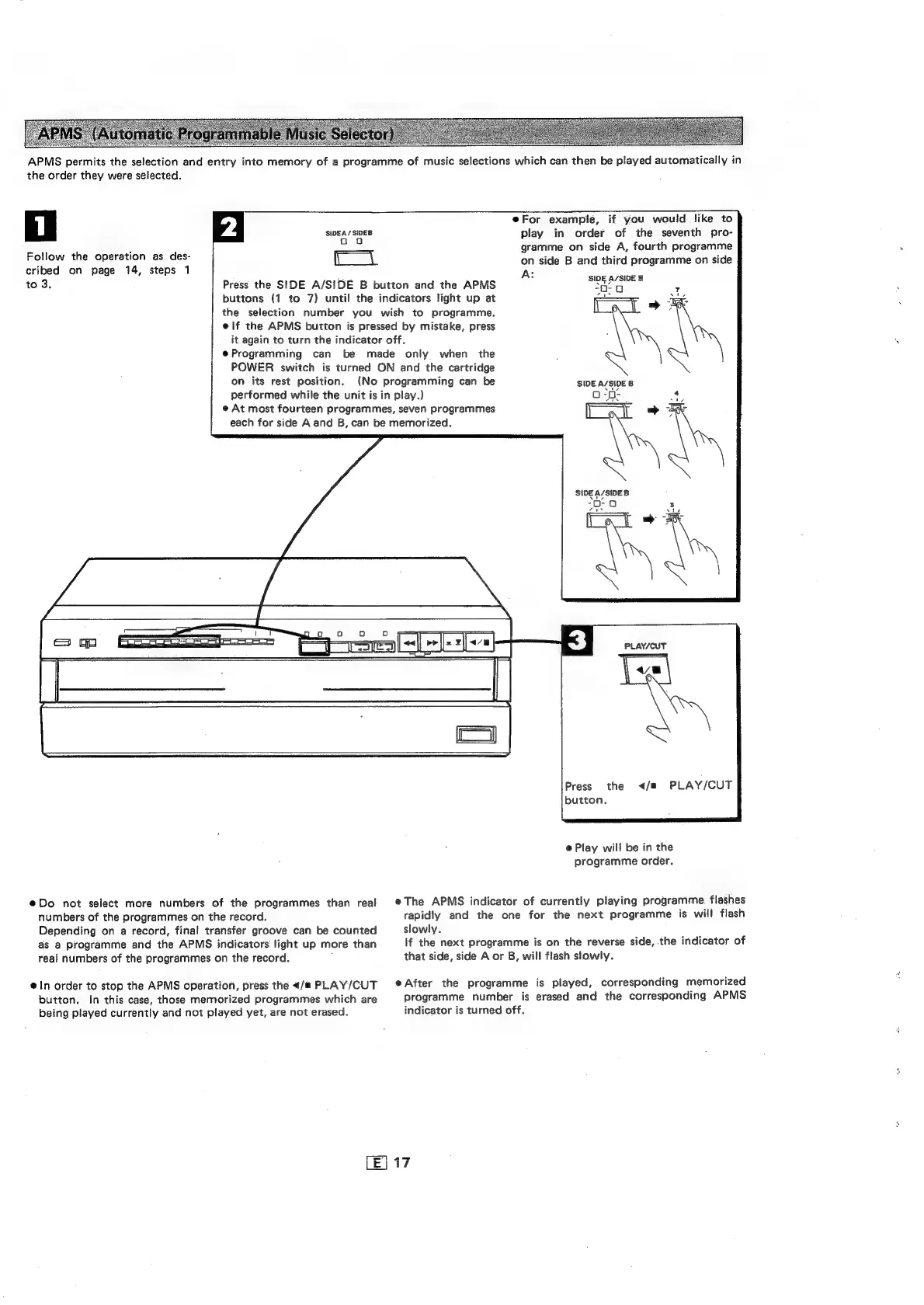
APMS
permits
the
selection
and
entry
into
memory
of
a
programme
of
music
selections
which
can
then
be
played
automatically
in
the
order
they
were
selected.
Follow
the
operation
as.
des-
cribed
on
page
14,
steps
1
to
3.
SIDEA/SIDES
DB
ce
on
its
rest
position.
Press
the
SIDE
A/SIDE
B
button
and
the
APMS
buttons
(1
to
7)
until
the
indicators
light
up
at
the
selection
number
you
wish
to
programme.
e@|lf
the
APMS
button
is
pressed
by
mistake,
press
it
again
to
turn
the
indicator
off.
e@Programming
can
be
made
only
when
the
POWER
switch
is
turned
ON
and
the
cartridge
(No
programming
can
be
performed
while
the
unit
is
in
play.)
e
At
most
fourteen
programmes,
seven
programmes
each
for
side
A
and
B,
can
be
memorized.
@For
example,
if
you
would
like
to
play
in
order
of
the
seventh
pro-
gramme
on
side
A,
fourth
programme
on
side
B
and
third
programme
on
side
A:
SIDE
A/SIDE
B
-0-Qa
4
Aa
aed
pie
\
SIDE
A/SIDE
B
SIDE
A/SIDE
8
Prien
0
eDo
not
select
more
numbers
of
the
programmes
than
real
numbers
of
the
programmes
on
the
record.
Depending
on
a
record,
final
transfer
groove
can
be
counted
as
a
programme
and
the
APMS
indicators
light
up
more
than
real
numbers
of
the
programmes
on
the
record.
.
ein
order
to
stop
the
APMS
operation,
press
the
<«/#
PLAY/CUT
button.
In
this
case,
those
memorized
programmes
which
are
being
played
currently
and
not
played
yet,
are
not
erased.
I
PLAY/CUT
©
\
Press
the
</m
PLAY/CUT
button,
@
Play
will
be
in
the
programme
order.
eThe
APMS
indicator
of
currently
playing
programme
flashes
rapidly
and
the
one
for
the
next
programme
is
will
flash
slowly.
If
the
next
programme
is
on
the
reverse
side,
the
indicator
of
that
side,
side
A
or
B,
will
flash
slowly.
eAfter
the
programme
is
played,
corresponding
memorized
programme
number
is
erased
and
the
corresponding
APMS
indicator
is
turned
off.
my
~l

Related product manuals