EasyManua.ls Logo

Sharp SM-207H - Page 17

Sharp SM-207H
27 pages
Print Icon
To Next Page IconTo Next Page
To Previous Page IconTo Previous Page
Loading...
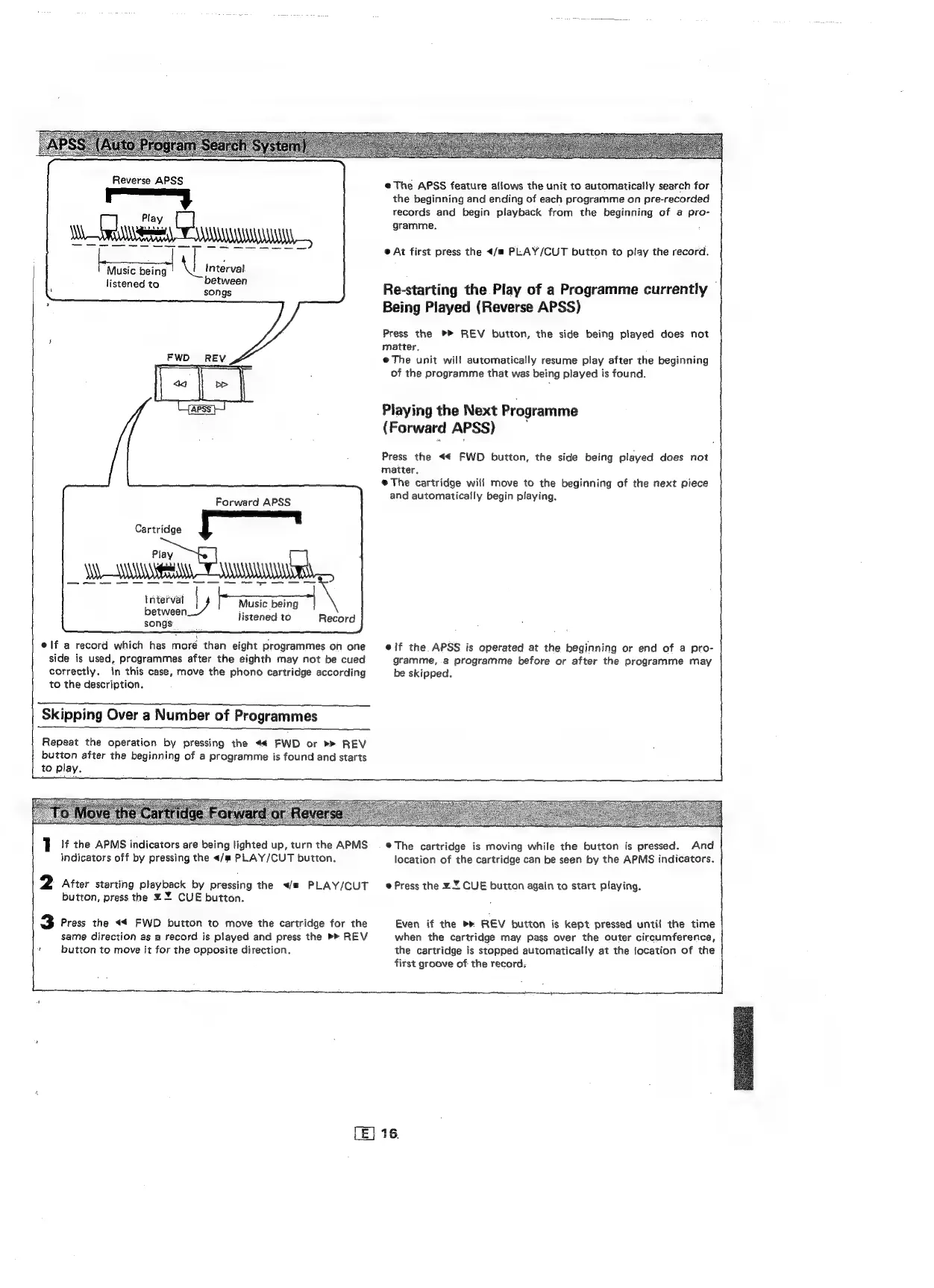
Reverse
APSS
pare
Music
being
Ni
Interval
listened
to
between
songs
Forward
APSS
Cartridge
SS
Sa
ee
cece
ee
|
Music
being
|
eneel
listened
to
Record
songs
elf
a
record
which
has
more
than
eight
programmes
on
one
side
is
used,
programmes
after
the
eighth
may
not
be
cued
correctly.
in
this
case,
move
the
phono
cartridge
according
to
the
description.
Skipping
Over
a
Number
of
Programmes
Repeat
the
operation
by
pressing
the
<«€
FWD
or
REV
button
after
the
beginning
of
a
programme
is
found
and
starts
to
play.
eThe
APSS
feature
allows
the
unit
to
automatically
search
for
the
beginning
and
ending
of
each
programme
on
pre-recorded
records
and
begin
playback
from
the
beginning
of
a
pro-
gramme.
@
At
first
press
the
</m
PLAY/CUT
button
to
play
the
record.
Re-starting
the
Play
of
a
Programme
currently
|
Being
Piayed
(Reverse
APSS)
Press
the
REV
button,
the
side
being
played
does
not
matter.
@
The
unit
will
automatically
resume
play
after
the
beginning
of
the
programme
that
was
being
played
is
found.
Playing
the
Next
Programme
(Forward
APSS)
Press
the
<€
FWD
button,
the
side
being
played
does
not
matter.
e@The
cartridge
will
move
to
the
beginning
of
the
next
piece
and
automatically
begin
playing.
elf
the
APSS
is
operated
at
the
beginning
or
end
of
a
pro-
gramme,
a
programme
before
or
after
the
programme
may
be
skipped.
]
|
the
APMS
indicators
are
being
lighted
up,
turn
the
APMS
indicators
off
by
pressing
the
</m
PLAY/CUT
button.
2
After
starting
playback
by
pressing
the
</#
PLAY/CUT
button,
press
the
%
Y
CUE
button.
3
Press
the
<4
FWD
button
to
move
the
cartridge
for
the
same
direction
as
a
record
is
played
and
press
the
>>
REV
'
button
to
move
it
for
the
opposite
direction.
L
®The
cartridge
is
moving
while
the
button
is
pressed.
And
location
of
the
cartridge
can
be
seen
by
the
APMS
indicators.
@
Press
the
ZY
CUE
button
again
to
start
playing.
Even
if
the
REV
button
is
kept
pressed
until
the
time
when
the
cartridge
may
pass
over
the
outer
circumference,
the
cartridge
is
stopped
automatically
at
the
focation
of
the
first
groove
of
the
record:
iA

Related product manuals