EasyManua.ls Logo

Sharp SM-207H - Page 22

Sharp SM-207H
27 pages
Print Icon
To Next Page IconTo Next Page
To Previous Page IconTo Previous Page
Loading...
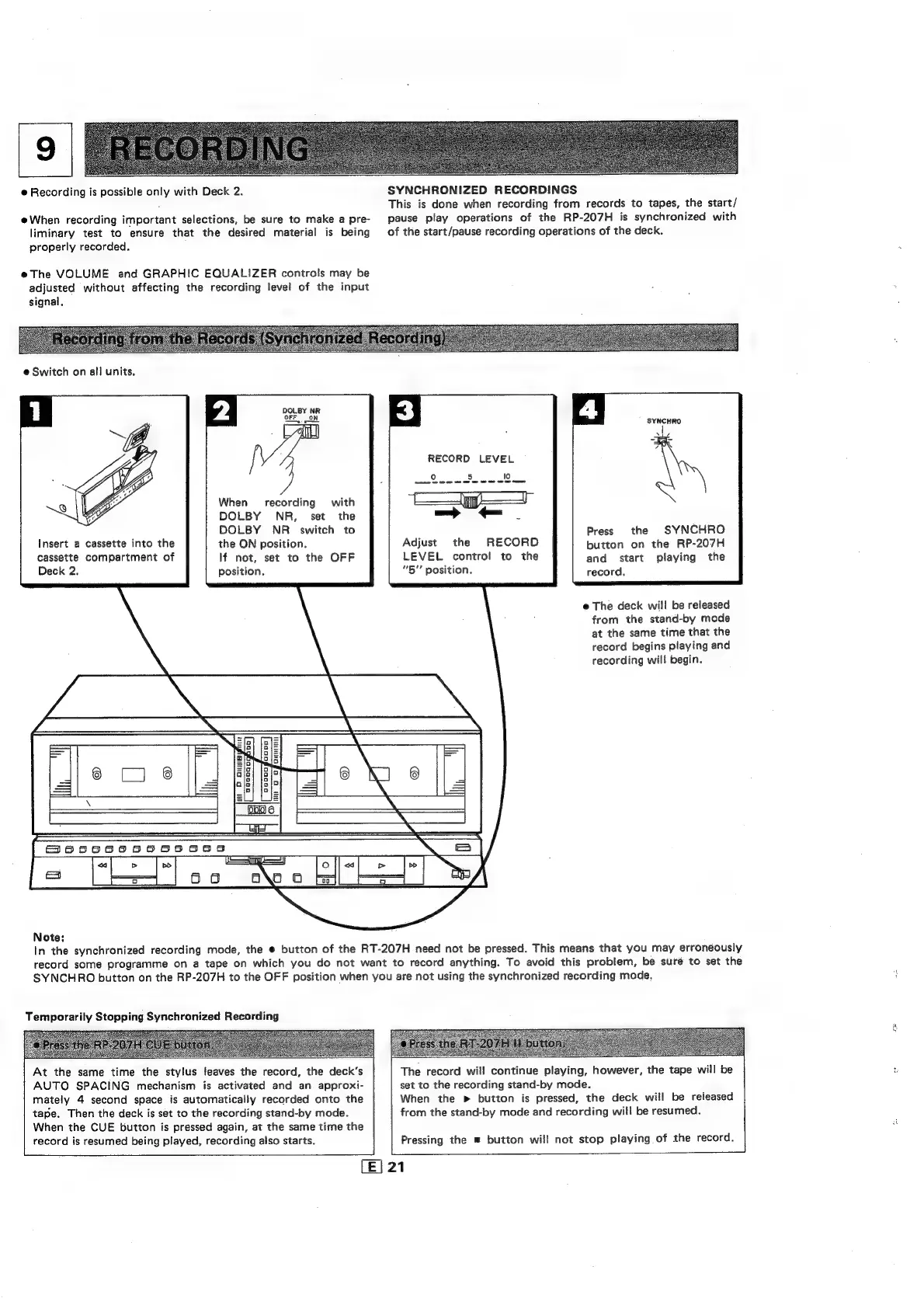
@
Recording
is
possible
only
with
Deck
2.
@When
recording
important
selections,
be
sure
to
make
a
pre-
liminary
test
to
ensure
that
the
desired
material
is
being
properly
recorded.
@The
VOLUME
and
GRAPHIC
EQUALIZER
controls
may
be
adjusted
without
affecting
the
recording
level
of
the
input
signal.
SYNCHRONIZED
RECORDINGS
This
is
done
when
recording
from
records
to
tapes,
the
start/
pause
play
operations
of
the
RP-207H
is
synchronized
with
of
the
start/pause
recording
operations
of
the
deck.
e
Switch
on
all
units.
DOLBY
NR
OFF
ON
When
recording
with
DOLBY
NR,
set
the
DOLBY
NR
_
switch
to
insert
a
cassette
into
the
the
ON
position.
cassette
compartment
of
If
not,
set
to
the
OFF
Deck
2.
position.
SYNCHRO
Si
FPR
RECORD
LEVEL
°
5.
lo
|
—>
-
;
Press
the
SYNCHRO
Adjust
the
RECORD
button
on
the
RP-207H
LEVEL
control
to
the
and
start
playing
the
“5”
position.
record,
e
The
deck
will
be
released
from
the
stand-by
mode
at
the
same
time
that
the
record
begins
playing
and
recording
will
begin.
Note:
In
the
synchronized
recording
mode,
the
®
button
of
the
RT-207H
need
not
be
pressed.
This
means
that
you
may
erroneously
record
some
programme
on
a
tape
on
which
you
do
not
want
to
record
anything.
To
avoid
this
problem,
be
suré
to
set
the
SYNCHRO
button
on
the
RP-207H
to
the
OFF
position
when
you
are
not
using
the
synchronized
recording
mode,
Temporarily
Stopping
Synchronized
Recording
At
the
same
time
the
stylus
feaves
the
record,
the
deck’s
AUTO
SPACING
mechanism
is
activated
and
an
approxi-
mately
4
second
space
is
automatically
recorded
onto
the
tape.
Then
the
deck
is
set
to
the
recording
stand-by
mode.
When
the
CUE
button
is
pressed
again,
at
the
same
time
the
record
is
resumed
being
played,
recording
also
starts.
The
record
wil!
continue
playing,
however,
the
tape
will
be
set
to
the
recording
stand-by
mode.
When
the
>
button
is
pressed,
the
deck
will
be
released
from
the
stand-by
mode
and
recording
will
be
resumed.
Pressing
the
button
will
not
stop
playing
of
the
record.
[E|
21
red

Related product manuals