EasyManua.ls Logo

Sharp SM-207H - Page 6

Sharp SM-207H
27 pages
Print Icon
To Next Page IconTo Next Page
To Previous Page IconTo Previous Page
Loading...
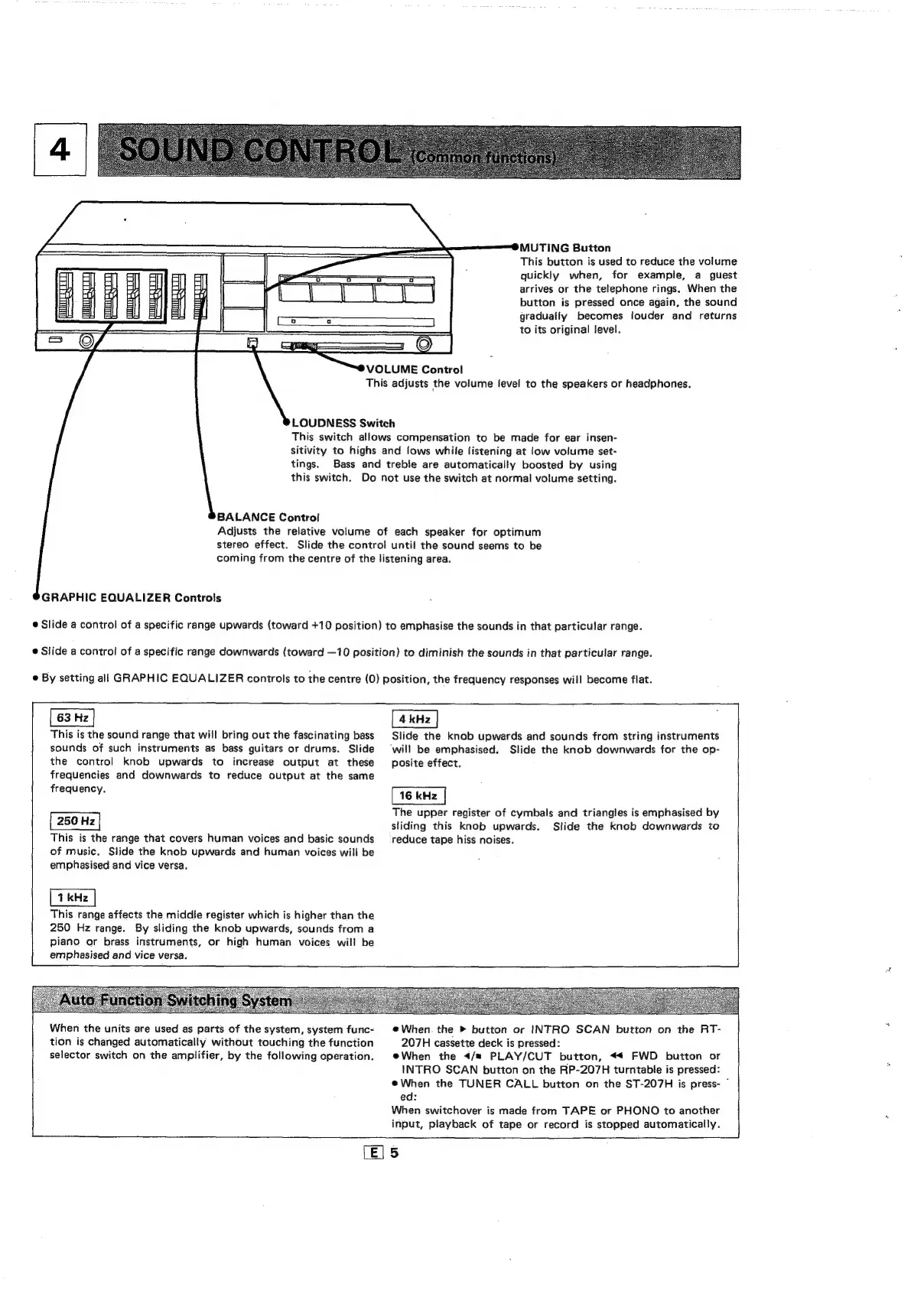
MUTING
Button
This
button
is
used
to
reduce
the
volume
quickly
when,
for
example,
a
guest
arrives
or
the
telephone
rings.
When
the
button
is
pressed
once
again,
the
sound
gradually
becomes
louder
and
returns
to
its
original
level.
=
=—
=
oe
eae
VOLUME
Control
This
adjusts
the
volume
level
to
the
speakers
or
headphones.
LOUDNESS
Switch
This
switch
allows
compensation
to
be
made
for
ear
insen-
sitivity
to
highs
and
lows
while
listening
at
low
volume
set-
tings.
Bass
and
treble
are
automatically
boosted
by
using
this
switch.
Do
not
use
the
switch
at
normal
volume
setting.
BALANCE
Control
Adjusts
the
relative
volume
of
each
speaker
for
optimum
stereo
effect.
Slide
the
contro!
until
the
sound
seems
to
be
coming
from
the
centre
of
the
listening
area.
GRAPHIC
EQUALIZER
Controls
@
Slide
a
control
of
a
specific
range
upwards
(toward
+10
position)
to
emphasise
the
sounds
in
that
particular
range.
@
Slide
a
control
of
a
specific
range
downwards
(toward
—10
position)
to
diminish
the
sounds
in
that
particular
range.
e
By
setting
all
GRAPHIC
EQUALIZER
controls
to
the
centre
(0)
position,
the
frequency
responses
will
become
flat.
a
a
This
is
the
sound
range
that
will
bring
out
the
fascinating
bass
Slide
the
knob
upwards
and
sounds
from
string
instruments
sounds
of
such
instruments
as
bass
guitars
or
drums.
Slide
‘will
be
emphasised.
Slide
the
knob
downwards
for
the
op-
the
control
knob
upwards
to
increase
output
at
these
posite
effect.
frequencies
and
downwards
to
reduce
output
at
the
same
frequency.
The
upper
register
of
cymbals
and
triangles
is
emphasised
by
|
250
Hz
|
sliding
this
knob
upwards.
Slide
the
knob
downwards
to
This
is
the
range
that
covers
human
voices
and
basic
sounds
_
reduce
tape
hiss
noises.
of
music.
Slide
the
knob
upwards
and
human
voices
will
be
emphasised
and
vice
versa.
This
range
affects
the
middle
register
which
is
higher
than
the
250
Hz
range.
By
sliding
the
knob
upwards,
sounds
from
a
piano
or
brass
instruments,
or
high
human
voices
will
be
|
emphasised
and
vice
versa.
Ba
ee
When
the
units
are
used
as
parts
of
the
system,
system
func-
©
When
the
»
button
or
INTRO
SCAN
button
on
the
RT-
tion
is
changed
automatically
without
touching
the
function
207H
cassette
deck
is
pressed:
selector
switch
on
the
amplifier,
by
the
following
operation.
When
the
</m
PLAY/CUT
button,
«4
FWD
button
or
INTRO
SCAN
button
on
the
RP-207H
turntable
is
pressed:
@When
the
TUNER
CALL
button
on
the
ST-207H
is
press-
©
ed:
When
switchover
is
made
from
TAPE
or
PHONO
to
another
L
input,
playback
of
tape
or
record
is
stopped
automatically.
[E|5

Related product manuals