EasyManua.ls Logo

Sharp SM-207H - Page 7

Sharp SM-207H
27 pages
Print Icon
To Next Page IconTo Next Page
To Previous Page IconTo Previous Page
Loading...
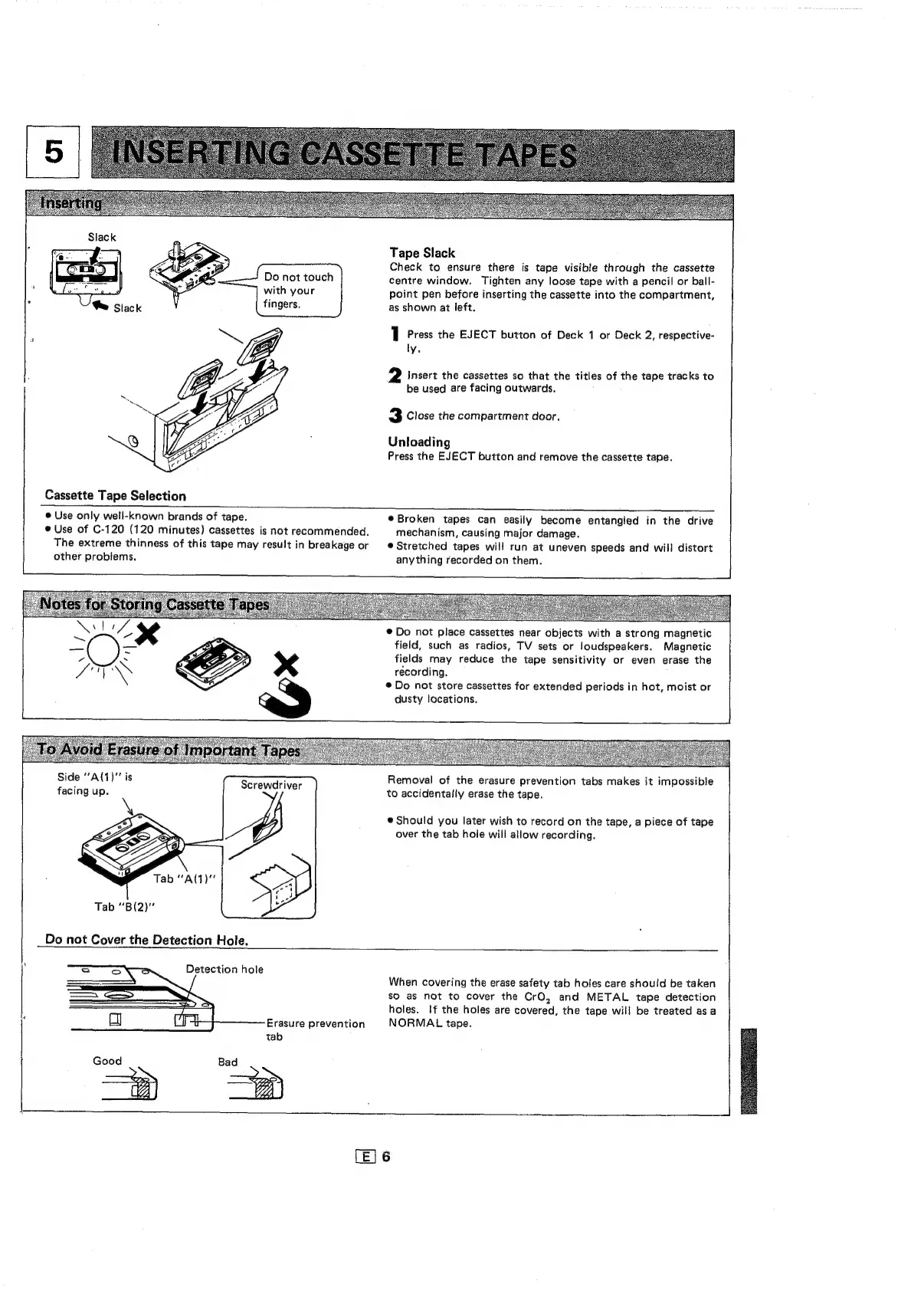
Do
not
touch
with
your
fingers.
Cassette
Tape
Selection
Tape
Slack
Check
to
ensure
there
is
tape
visible
through
the
cassette
centre
window.
Tighten
any
loose
tape
with
a
pencil
or
ball-
point
pen
before
inserting
the
cassette
into
the
compartment,
as
shown
at
left.
1
Press
the
EJECT
button
of
Deck
1
or
Deck
2,
respective-
ly,
2
Insert
the
cassettes
so
that
the
titles
of
the
tape
tracks
to
be
used
are
facing
outwards.
3
Close
the
compartment
door.
Unloading
Press
the
EJECT
button
and
remove
the
cassette
tape.
@
Use
only
well-known
brands
of
tape.
©
Use
of
C-120
(120
minutes)
cassettes
is
not
recommended,
The
extreme
thinness
of
this
tape
may
result
in
breakage
or
other
problems.
Side
‘‘A(1)"'
is
facing
up.
Screwdriver
DB.
Do
not
Cover
the
Detection
Hole.
®
Broken
tapes
can
easily
become
entangled
in
the
drive
mechanism,
causing
major
damage.
®
Stretched
tapes
will
run
at
uneven
speeds
and
will
distort
anything
recorded
on
them.
©
Do
not
place
cassettes
near
objects
with
a
strong
magnetic
field,
such
as
radios,
TV
sets
or
loudspeakers.
Magnetic
fields
may
reduce
the
tape
sensitivity
or
even
erase
the
recording.
®
Do
not
store
cassettes
for
extended
periods
in
hot,
moist
or
dusty
locations.
Removal
of
the
erasure
prevention
tabs
makes
it
impossible
to
accidentally
erase
the
tape.
@
Should
you
later
wish
to
record
on
the
tape,
a
piece
of
tape
over
the
tab
hole
will
allow
recording.
Detection
hole
Erasure
prevention
tab
Good
When
covering
the
erase
safety
tab
holes
care
should
be
taken
sO
as
not
to
cover
the
CrO,
and
METAL
tape
detection
holes.
If
the
holes
are
covered,
the
tape
will
be
treated
as
a
NORMAL
tape.
oy

Related product manuals