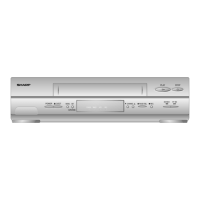
FEATURES
• VHS l-li-Fl stereo sound
•
PAL(B/G,I,D/K)/SECAM
(B/G,
D/K·
K1)
MESECAM(B/G,D/K'K1)NTSC
4.43/NTSC 3.58(M) multi system
• Able to play back NTSC tapes
onto
a PAL system
TV
(see notes on page
19.)
• Equipped with a titanium coated
drum
• Camcorder input terminal
• A.1.(artificial intelligence) auto picture control system
[
• Auto head cleaning system ]
• Auto tracking system
• Auto picture control system
• OSD(On Screen Display)/OSP(On Screen Programme) functions
Choice of four languages (English, Chinese, French, and Spanish)
• VISS signal writing and erasing
• Remote control with shuttle dial
• Full loading
srstem
with instantaneous playback
• DPSS (Digita Programme Search System)
•
Two-way child-lock system
• Full automatic playback function
• 11
0-240V 50/60Hz automatic voltage supply selector
• Timer recording of up to 8 programmes over a
365-day period.
(Every day or every
week
timer recording for a programme is possible.)
•
5-digit linear tape counter
• 48-position automatic voltage synthesized tuner
• Simple Recording Timer only needs setting of the recording start time and
end time.
• Random Repeat playback
Voltage
Supply:
The
voltage supply of this VCR is AC110-240V, 50/60Hz.
Cassette tape:
This
VCR
uses
IVIISI
method
standard
video
signals.
Only
video
cassette
tapes marked with
IV!!.~
and
IVllsl
are usable with this VCR.
ACCESSORIES
CONTENTS
BEFORE
USING YOUR VCR
• IMPORTANTSAFEGUARDSAND PRECAUTIONS.............................................. 2
• BROADCAST SYSTEMSIBEFOREUSING YOURVCR........................................ 3
• MAJOR COMPONENTS OF YOURVCR 5
PREPARATIONS
• CONNECTIONS....................................................................................................... 6
• ADJUSTING THE VIDEO CHANNEL 7
• REMOTECONTROL............................................................................................... 8
• INITIAL SETTINGOF OSD (ON SCREEN DISPLAy) 9
• OSD SETTINGSSCREEN 11
• SETTINGTHE CHANNELS 13
• MODEOSD (ON SCREENDISPLAY) 16
BASIC
OPERATIONS
• PLAYBACK 17
• FULL AUTO PLAY
FUNCTION
19
• HOW TO USE VISS AND VISS ERASE FUNCTIONS 20
• RECORDING A TV PROGRAMME 21
TIMER RECORDING
• TIMER RECORDING (OSP: ON SCREENPROGRAMME) 23
• CONFIRMING TIMER PROGRAMMES 25
• CANCELLING TIMER PROGRAMMES 25
• SIMPLE RECORDING TIMER 26
SPECIAL
FUNCTIONS
• ZERO-BACK
FUNCTION
27
• DPSS(DIGITAL PROGRAMMESEARCH SYSTEM) 27
• RANDOM REPEAT 28
• TWO-WAYCHILD-LOCK SYSTEM 28
• MULTI-FUNCTION DiSPLAy . 29
• USING YOUR VCR WITH A VIDEO CAMERA 30
• EDITING FROM OTHERVIDEO EQUIPMENT 30
HELPFUL
HINTS
• BEFORE CALLING FOR SERVICE 31
• SPECIFICATIONS 32
Makesure the followingaccessories weresuppliedwith your VCR. If any are missing, please contactyour nearestshop.
Coaxialcable (75 ohm)
1Il1
Wireless remotecontrol
with SHUTTLE Dial
~
~
TwoAA batteries
R6
(UM/SUM-3
or AA)
~
~
Audio cable Videocable


 To Next Page
 Loading...