27
<
I NTAKE
>
F
M
:
3
–
20
–
2005
T
O
:
03
–
20
–
2005
0
–
REP
O
RT
–
I
T
E
:
<
ALL
>
M
––
2nd
Use
<
or
>
to select an item to be displayed in the
REPORT. If “INTAKE” is selected, one of the following ten items can
be selected: ALL, CALORIE, TOTAL FAT, SATURATED FAT,
CHOLESTEROL, SODIUM, CARBOHYDRATE, DIETARY FIBER,
SUGARS, or PROTEIN. For “CONSUMPTION”, select one of three
items: ALL, CALORIE, or STEP.
4. Tap
m
, and input values for
START DATE and END DATE,
followed by
ENTER
.
5. A report is displayed.
• INTAKE : Use
k
or
m
to switch
display the selected item report.
• CONSUMPTION : The report of
the selected item is displayed.
Note:
• The displayed calorie value is rounded off to three decimal places.
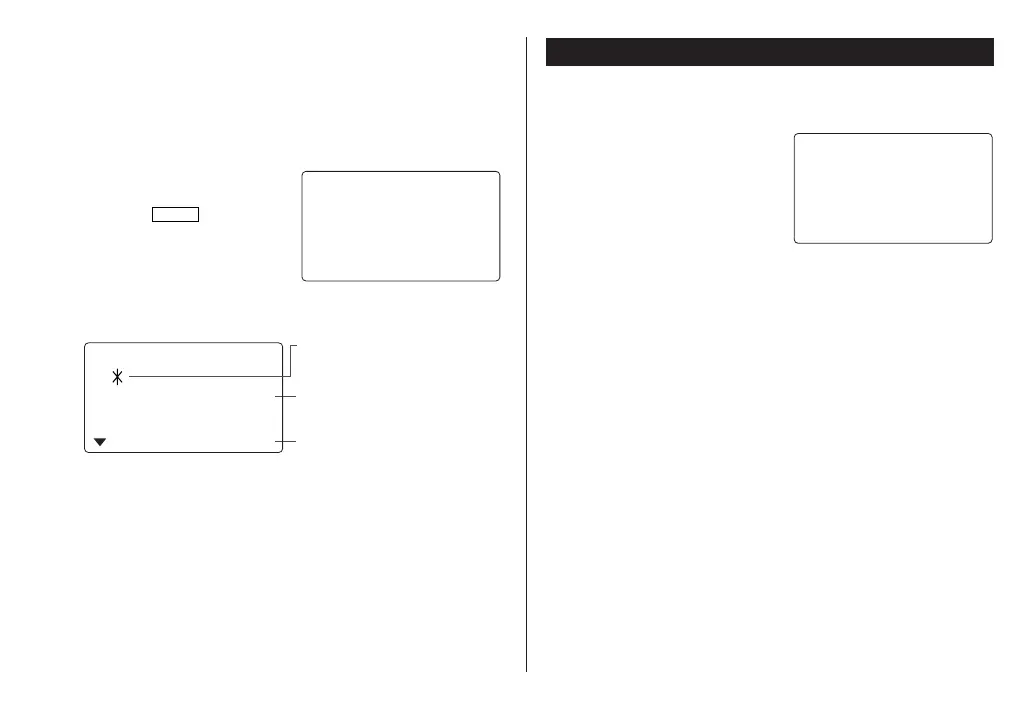
The present calorie
A comparison against the day’s target
(more/less) is indicated.
0.
2000.
IE KcalCAL
O
R
2nd
20
The icon is displayed when a result
exceeds the target value.
Calculator Mode
The Organizer’s built-in calculator can perform arithmetic calcula-
tions in up to 12 digits.
Calculator mode is selected by
tapping
q
the
appropriate number of times.
Each time you press the key, the
display switches as follows:
Calculation mode
➠
Currency Conversion mode
➠
Metric Conversion mode
➠
...
Before performing any calculations, tap
c
twice to clear the
display.
• An error occurs if the integer section of the calculation result
exceeds 12 digits, if the memory exceeds 12 digits, or a number
is divided by zero. (“E” is displayed.)
Tap
c
to clear the error message.
O.
<
C
AL
C
ULAT
O
R
>
OZ-290H(En).pm65 04.3.31, 5:09 PM27



 To Next Page