02/11/22 XL_35W_SCA_3.fm
25
XL-35W
Advanced Features
Timer and sleep operation (continued)
"
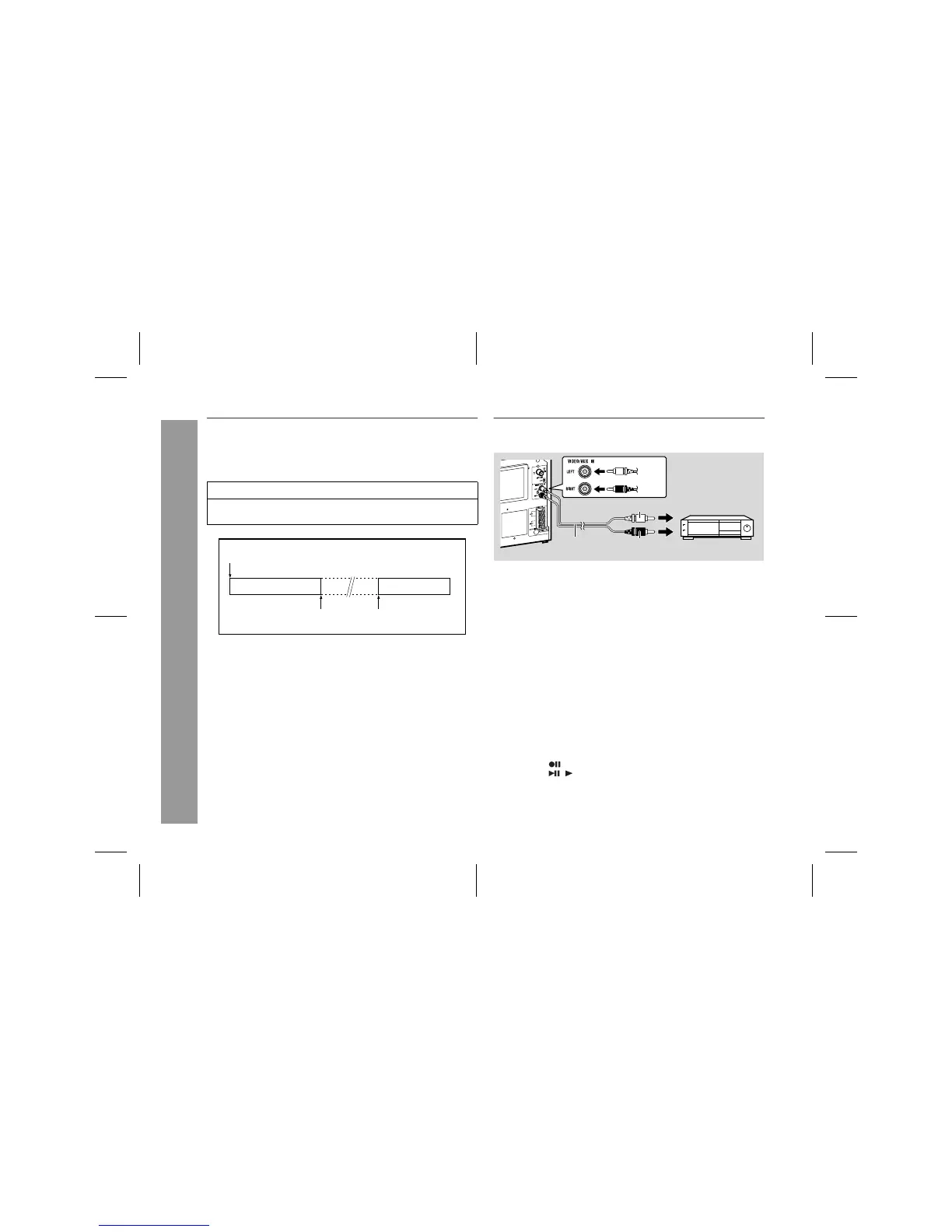
To use timer and sleep operation together
Example: To fall asleep and wake to the same radio station
You can play back the same source only (the function cannot be
switched).
Caution:
When using the cassette deck, be sure the tape length is long
enough to perform both functions. If you want to sleep and wake up
listening to a tape, and the length of the tape is shorter than the
sleep timer setting, timer playback will not be possible.
Enhancing your system
The connection lead is not included. Purchase a commercially avail-
able lead as shown below.
"
Listening to the playback sounds from VCR,
DVD, etc.
Note:
To prevent noise interference, place this unit away from a television.
"
To record on a tape from VCR etc.
1
Set the sleep time (steps 1 - 2, page 24).
2
Whilst the sleep timer is set, set the desired playback time
(steps 4 - 6, pages 23 - 24).
1.
Sleep timer setting
2.
Timer playback setting
Timer playback
start time
5 minutes - 3 hours
Sleep operation will
automatically stop.
1 Use a connection lead to connect the VCR, DVD, etc. to the VID-
EO/AUX IN sockets.
When using video equipment, connect the audio output to this
unit and the video output to a television.
2 Press the ON/STAND-BY button to turn the power on.
3 Press the FUNCTION button until "AUX" appears on the display.
When operating with the remote control, press the VIDEO/AUX
button.
4 Play the VCR, DVD, etc.
1 Load a cassette into the cassette compartment with the side to
be recorded on facing you.
2 Press the VIDEO/AUX button.
3 Press the button.
4 Press the ( ) button.
5 Play back the VCR etc.


 To Next Page