E-6
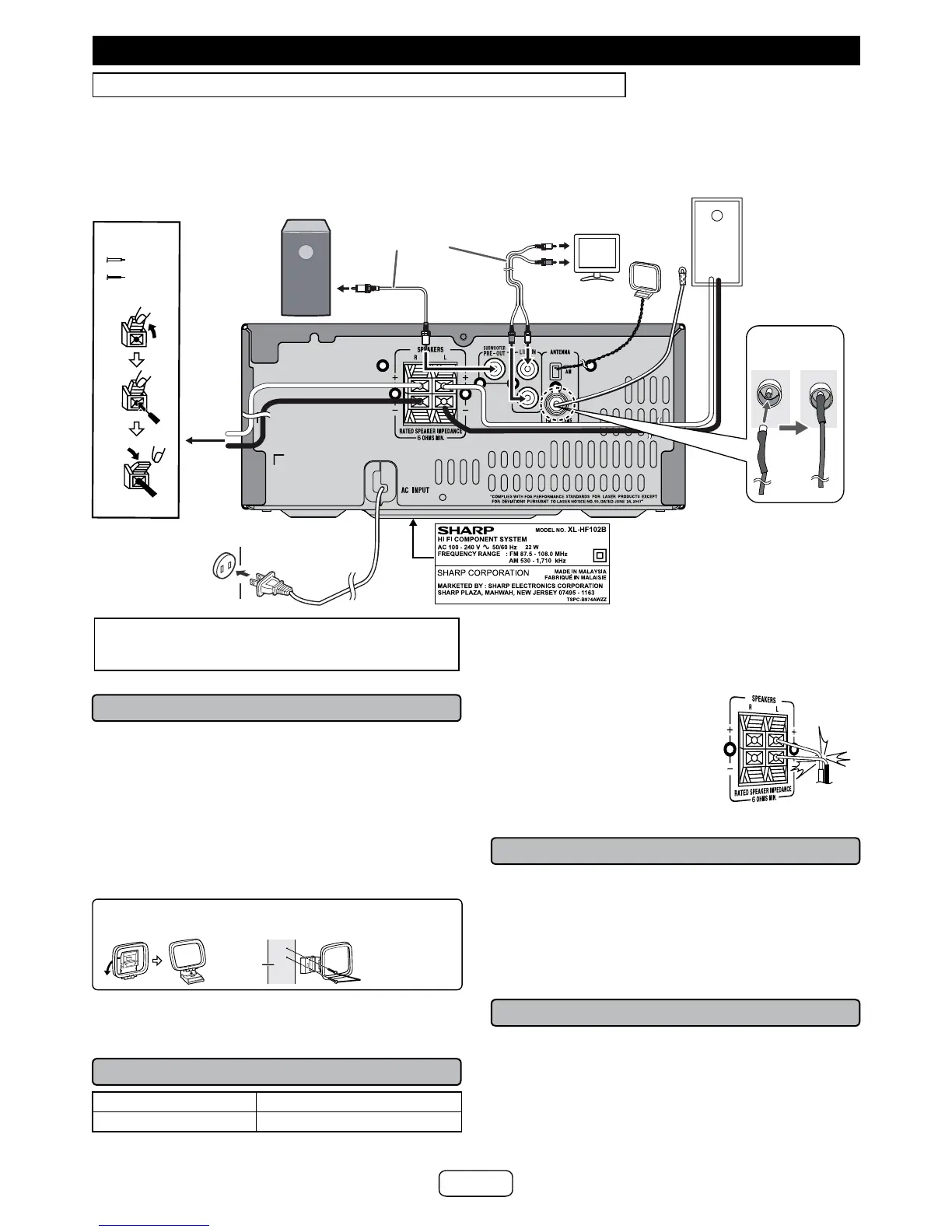
Make sure to unplug the AC power cord before making any connections.
System connections
CAUTION:
TO PREVENT ELECTRIC SHOCK, MATCH WIDE
BLADE OF PLUG TO WIDE SLOT, FULLY INSERT.
■ Antenna connection
Supplied FM antenna:
Connect to the FM 75 ohms jack and position it where
reception is best.
External FM antenna:
Use an external FM antenna (75 ohms coaxial cable) for
better reception. Disconnect the supplied FM antenna wire
before use.
Supplied AM loop antenna:
Connect to the AM terminal and position it where reception
is best. Place it on a shelf, etc., or attach it to a stand or a
wall with screws (not supplied).
Installing the AM loop antenna
< Attaching to the wall >< Assembling >
wall
Screws (not
supplied)
Note:
Keep the antenna away from the unit or AC power cord to
avoid noise pickup.
■ Speaker connection
+ speaker terminal red wire
- speaker terminal black wire
● Use speakers with an impedance of 6 ohms or more,
as lower impedance speakers can damage the unit.
● Do not mistake the right and the left channels. The
right speaker is the one on the right side when you
face the unit.
● Do not let the bare speaker
wires touch each other.
● Do not allow any objects to fall
into or to be placed in the bass
reex ducts.
● Do not stand or sit on the
speakers. You may be injured.
Incorrect
■ Bluetooth standby mode
● The rst time the unit is plugged in, it will enter the
Bluetooth standby mode. “Bluetooth Stby” will be dis-
played.
● To cancel the Bluetooth standby mode, press the ECO
button (remote control) during power standby mode.
The unit will enter the low power consumption mode.
● To return to the Bluetooth standby mode, press the
ECO
button again.
■ AC power connection
After all connections have been made correctly, plug the
AC power cord into the AC outlet.
Note:
Unplug the AC power cord from the AC outlet if the unit will
not be in use for a prolonged period of time.
To select Line In function:
Press FUNCTION button (main unit) or AUDIO/LINE (IN-
PUT) button (remote control) repeatedly until Line in is
displayed.
Notes:
● No sound is heard from the subwoofer without a built-
in amplier.
● Subwoofer Pre-out (audio signal): 200mV / 10k ohms
at 70 Hz.
AC outlet
(AC 100 -240 V ~
50/60 Hz)
To TV audio
output jack.
FM
antenna
Left
speaker
TV
Red
To LINE
input jack
Audio cable
(not supplied)
Commercially
available
Subwoofer
(Amplier
Built-In)
Label is located at the bottom of the
unit.
The specication label illustration or
location may be different for some
destinations.
Installing the
supplied FM
antenna
AM loop
antenna
Black
To right
speaker


 To Next Page